

一、前置知识详解
Spark SQL重要是操作DataFrame,DataFrame本身提供了save和load的操作,
Load:可以创建DataFrame,
Save:把DataFrame中的数据保存到文件或者说与具体的格式来指明我们要读取的文件的类型以及与具体的格式来指出我们要输出的文件是什么类型。
二、Spark SQL读写数据代码实战
import org.apache.spark.SparkConf;
import org.apache.spark.api.java.JavaRDD;
import org.apache.spark.api.java.JavaSparkContext;
import org.apache.spark.api.java.function.Function;
import org.apache.spark.sql.*;
import org.apache.spark.sql.types.DataTypes;
import org.apache.spark.sql.types.StructField;
import org.apache.spark.sql.types.StructType;

import java.util.ArrayList;
import java.util.List;

public class SparkSQLLoadSaveOps {
 public static void main(String[] args) {
  SparkConf conf = new SparkConf().setMaster("local").setAppName("SparkSQLLoadSaveOps");
  JavaSparkContext sc = new JavaSparkContext(conf);
  SQLContext = new SQLContext(sc);
  /**
   * read()是DataFrameReader类型,load可以将数据读取出来
   */
  DataFrame peopleDF = sqlContext.read().format("json").load("E:\\Spark\\Sparkinstanll_package\\Big_Data_Software\\spark-1.6.0-bin-hadoop2.6\\examples\\src\\main\\resources\\people.json");

  /**
   * 直接对DataFrame进行操作
   * Json: 是一种自解释的格式,读取Json的时候怎么判断其是什么格式?
   * 通过扫描整个Json。扫描之后才会知道元数据
   */
  //通过mode来指定输出文件的是append。创建新文件来追加文件
 peopleDF.select("name").write().mode(SaveMode.Append).save("E:\\personNames");
 }
}
读取过程源码分析如下:
1. read方法返回DataFrameReader,用于读取数据。
/**
 * :: Experimental ::
 * Returns a [[DataFrameReader]] that can be used to read data in as a [[DataFrame]].
 * {{{
 *  sqlContext.read.parquet("/path/to/file.parquet")
 *  sqlContext.read.schema(schema).json("/path/to/file.json")
 * }}}
 *
 * @group genericdata
 * @since 1.4.0
 */
@Experimental
//创建DataFrameReader实例,获得了DataFrameReader引用
def read: DataFrameReader = new DataFrameReader(this)
2. 然后再调用DataFrameReader类中的format,指出读取文件的格式。
/**
 * Specifies the input data source format.
 *
 * @since 1.4.0
 */
def format(source: String): DataFrameReader = {
 this.source = source
 this
}
3. 通过DtaFrameReader中load方法通过路径把传入过来的输入变成DataFrame。
/**
 * Loads input in as a [[DataFrame]], for data sources that require a path (e.g. data backed by
 * a local or distributed file system).
 *
 * @since 1.4.0
 */
// TODO: Remove this one in Spark 2.0.
def load(path: String): DataFrame = {
 option("path", path).load()
}
至此,数据的读取工作就完成了,下面就对DataFrame进行操作。
下面就是写操作!!!
1. 调用DataFrame中select函数进行对列筛选
/**
 * Selects a set of columns. This is a variant of `select` that can only select
 * existing columns using column names (i.e. cannot construct expressions).
 *
 * {{{
 *  // The following two are equivalent:
 *  df.select("colA", "colB")
 *  df.select($"colA", $"colB")
 * }}}
 * @group dfops
 * @since 1.3.0
 */
@scala.annotation.varargs
def select(col: String, cols: String*): DataFrame = select((col +: cols).map(Column(_)) : _*)
2. 然后通过write将结果写入到外部存储系统中。
/**
 * :: Experimental ::
 * Interface for saving the content of the [[DataFrame]] out into external storage.
 *
 * @group output
 * @since 1.4.0
 */
@Experimental
def write: DataFrameWriter = new DataFrameWriter(this)
3. 在保持文件的时候mode指定追加文件的方式
/**
 * Specifies the behavior when data or table already exists. Options include:
// Overwrite是覆盖
 *  - `SaveMode.Overwrite`: overwrite the existing data.
//创建新的文件,然后追加
 *  - `SaveMode.Append`: append the data.
 *  - `SaveMode.Ignore`: ignore the operation (i.e. no-op).
 *  - `SaveMode.ErrorIfExists`: default option, throw an exception at runtime.
 *
 * @since 1.4.0
 */
def mode(saveMode: SaveMode): DataFrameWriter = {
 this.mode = saveMode
 this
}
4. 最后,save()方法触发action,将文件输出到指定文件中。
/**
 * Saves the content of the [[DataFrame]] at the specified path.
 *
 * @since 1.4.0
 */
def save(path: String): Unit = {
 this.extraOptions += ("path" -> path)
 save()
}
三、Spark SQL读写整个流程图如下
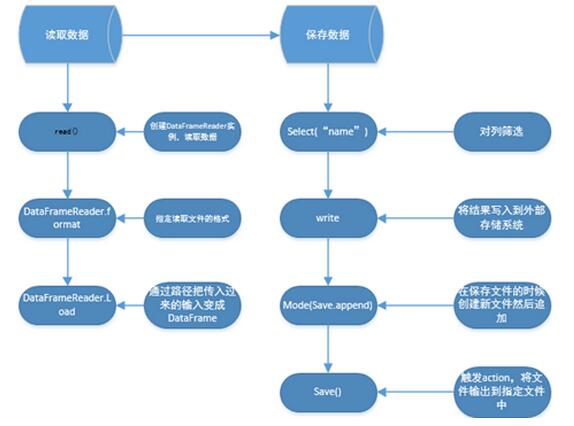
四、对于流程中部分函数源码详解
DataFrameReader.Load()
1. Load()返回DataFrame类型的数据集合,使用的数据是从默认的路径读取。
/**
 * Returns the dataset stored at path as a DataFrame,
 * using the default data source configured by spark.sql.sources.default.
 *
 * @group genericdata
 * @deprecated As of 1.4.0, replaced by `read().load(path)`. This will be removed in Spark 2.0.
 */
@deprecated("Use read.load(path). This will be removed in Spark 2.0.", "1.4.0")
def load(path: String): DataFrame = {
//此时的read就是DataFrameReader
 read.load(path)
}
2. 追踪load源码进去,源码如下:
在DataFrameReader中的方法。Load()通过路径把输入传进来变成一个DataFrame。
/**
 * Loads input in as a [[DataFrame]], for data sources that require a path (e.g. data backed by
 * a local or distributed file system).
 *
 * @since 1.4.0
 */
// TODO: Remove this one in Spark 2.0.
def load(path: String): DataFrame = {
 option("path", path).load()
}
3. 追踪load源码如下:
/**
 * Loads input in as a [[DataFrame]], for data sources that don't require a path (e.g. external
 * key-value stores).
 *
 * @since 1.4.0
 */
def load(): DataFrame = {
//对传入的Source进行解析
 val resolved = ResolvedDataSource(
  sqlContext,
  userSpecifiedSchema = userSpecifiedSchema,
  partitionColumns = Array.empty[String],
  provider = source,
  options = extraOptions.toMap)
 DataFrame(sqlContext, LogicalRelation(resolved.relation))
}
DataFrameReader.format()
1. Format:具体指定文件格式,这就获得一个巨大的启示是:如果是Json文件格式可以保持为Parquet等此类操作。
Spark SQL在读取文件的时候可以指定读取文件的类型。例如,Json,Parquet.
/**
 * Specifies the input data source format.Built-in options include “parquet”,”json”,etc.
 *
 * @since 1.4.0
 */
def format(source: String): DataFrameReader = {
 this.source = source //FileType
 this
}
DataFrame.write()
1. 创建DataFrameWriter实例
/**
 * :: Experimental ::
 * Interface for saving the content of the [[DataFrame]] out into external storage.
 *
 * @group output
 * @since 1.4.0
 */
@Experimental
def write: DataFrameWriter = new DataFrameWriter(this)
1
2. 追踪DataFrameWriter源码如下:
以DataFrame的方式向外部存储系统中写入数据。
/**
 * :: Experimental ::
 * Interface used to write a [[DataFrame]] to external storage systems (e.g. file systems,
 * key-value stores, etc). Use [[DataFrame.write]] to access this.
 *
 * @since 1.4.0
 */
@Experimental
final class DataFrameWriter private[sql](df: DataFrame) {
DataFrameWriter.mode()
1. Overwrite是覆盖,之前写的数据全都被覆盖了。
Append:是追加,对于普通文件是在一个文件中进行追加,但是对于parquet格式的文件则创建新的文件进行追加。
/**
 * Specifies the behavior when data or table already exists. Options include:
 *  - `SaveMode.Overwrite`: overwrite the existing data.
 *  - `SaveMode.Append`: append the data.
 *  - `SaveMode.Ignore`: ignore the operation (i.e. no-op).
//默认操作
 *  - `SaveMode.ErrorIfExists`: default option, throw an exception at runtime.
 *
 * @since 1.4.0
 */
def mode(saveMode: SaveMode): DataFrameWriter = {
 this.mode = saveMode
 this
}
2. 通过模式匹配接收外部参数
/**
 * Specifies the behavior when data or table already exists. Options include:
 *  - `overwrite`: overwrite the existing data.
 *  - `append`: append the data.
 *  - `ignore`: ignore the operation (i.e. no-op).
 *  - `error`: default option, throw an exception at runtime.
 *
 * @since 1.4.0
 */
def mode(saveMode: String): DataFrameWriter = {
 this.mode = saveMode.toLowerCase match {
  case "overwrite" => SaveMode.Overwrite
  case "append" => SaveMode.Append
  case "ignore" => SaveMode.Ignore
  case "error" | "default" => SaveMode.ErrorIfExists
  case _ => throw new IllegalArgumentException(s"Unknown save mode: $saveMode. " +
   "Accepted modes are 'overwrite', 'append', 'ignore', 'error'.")
 }
 this
}
DataFrameWriter.save()
1. save将结果保存传入的路径。
/**
 * Saves the content of the [[DataFrame]] at the specified path.
 *
 * @since 1.4.0
 */
def save(path: String): Unit = {
 this.extraOptions += ("path" -> path)
 save()
}
2. 追踪save方法。
/**
 * Saves the content of the [[DataFrame]] as the specified table.
 *
 * @since 1.4.0
 */
def save(): Unit = {
 ResolvedDataSource(
  df.sqlContext,
  source,
  partitioningColumns.map(_.toArray).getOrElse(Array.empty[String]),
  mode,
  extraOptions.toMap,
  df)
}
3. 其中source是SQLConf的defaultDataSourceName
private var source: String = df.sqlContext.conf.defaultDataSourceName
其中DEFAULT_DATA_SOURCE_NAME默认参数是parquet。
// This is used to set the default data source
val DEFAULT_DATA_SOURCE_NAME = stringConf("spark.sql.sources.default",
 defaultValue = Some("org.apache.spark.sql.parquet"),
 doc = "The default data source to use in input/output.")
DataFrame.scala中部分函数详解:
1. toDF函数是将RDD转换成DataFrame
/**
 * Returns the object itself.
 * @group basic
 * @since 1.3.0
 */
// This is declared with parentheses to prevent the Scala compiler from treating
// `rdd.toDF("1")` as invoking this toDF and then apply on the returned DataFrame.
def toDF(): DataFrame = this
2. show()方法:将结果显示出来
/**
 * Displays the [[DataFrame]] in a tabular form. For example:
 * {{{
 *  year month AVG('Adj Close) MAX('Adj Close)
 *  1980 12  0.503218    0.595103
 *  1981 01  0.523289    0.570307
 *  1982 02  0.436504    0.475256
 *  1983 03  0.410516    0.442194
 *  1984 04  0.450090    0.483521
 * }}}
 * @param numRows Number of rows to show
 * @param truncate Whether truncate long strings. If true, strings more than 20 characters will
 *       be truncated and all cells will be aligned right
 *
 * @group action
 * @since 1.5.0
 */
// scalastyle:off println
def show(numRows: Int, truncate: Boolean): Unit = println(showString(numRows, truncate))
// scalastyle:on println
追踪showString源码如下:showString中触发action收集数据。
/**
 * Compose the string representing rows for output
 * @param _numRows Number of rows to show
 * @param truncate Whether truncate long strings and align cells right
 */
private[sql] def showString(_numRows: Int, truncate: Boolean = true): String = {
 val numRows = _numRows.max(0)
 val sb = new StringBuilder
 val takeResult = take(numRows + 1)
 val hasMoreData = takeResult.length > numRows
 val data = takeResult.take(numRows)
 val numCols = schema.fieldNames.length
以上就是本文的全部内容,希望对大家的学习有所帮助,也希望大家多多支持脚本之家。


