

一 前言
springboot 额外的特色是提供了后台应用监控,可以通过 HTTP 或者 JMX的方式管理监控应用,本文主讲HTTP方式;其主要的功能是监控应用的健康状态,查看环境变量等;
二 pom.xml
springboot 2.1.1,主要引入 actuator 依赖,web依赖用于测试;
		 <dependency>
   <groupId>org.springframework.boot</groupId>
   <artifactId>spring-boot-starter-actuator</artifactId>
  </dependency>
  <dependency>
   <groupId>org.springframework.boot</groupId>
   <artifactId>spring-boot-starter-web</artifactId>
  </dependency>
三 默认开启端点
3.1 默认端点 health
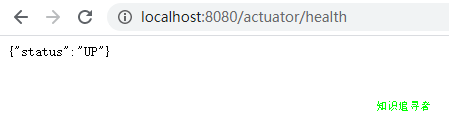
直接编写主程序入口,启动;浏览器输入 http://localhost:8080/actuator/health;结果如下,状态是UP;
翻翻源码heath状态码如下
public OrderedHealthAggregator() {
  this.setStatusOrder(Status.DOWN, Status.OUT_OF_SERVICE, Status.UP, Status.UNKNOWN);
 }
在 application.yml 中配置 healthy 信息 示例如下:
management: endpoint: health: show-details: always
打印详细信息:

基本配置如下:
never :默认,表示不显示详细信息;when-authorized:详细信息显示给 认证过的用户;使用
management.endpoint.health.roles 配置always: 显示详细信息给所有用户3.2 默认端点 info
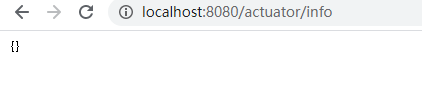
浏览器输入 http://localhost:8080/actuator/info; 展示空信息如下图:
在application.yml 中 配置工程 info 信息 示例如下;
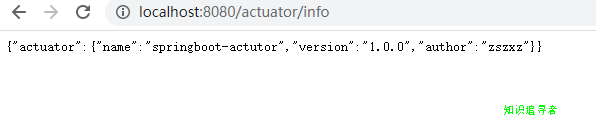
#配置信息info: actuator: name: springboot-actutor version: 1.0.0 author: zszxz
展示结果如下:
四 HTTP端点说明
| 端点 | 端点描述 | 默认值 |
|---|---|---|
| auditevents | 当前应用的审计事件 | Yes |
| beans | 显示spring IOC 容器加载的所有bean | Yes |
| caches | 显示可获得的缓存 | Yes |
| conditions | 显示自动配置通过condition判断匹配或者不匹配的配置信息 | Yes |
| configprops | 显示 通过 @ConfigurationProperties 配置的属性信息 | Yes |
| env | spring环境变量属性信息 | Yes |
| flyway | 显示flyway 配置数据库已经迁移的信息 | Yes |
| health | 显示应用的健康信息 | Yes |
| httptrace | 显示 HTTP 轨迹信息默认最新的100 HTTP request或response | Yes |
| info | 显示自定义的应用信息 | Yes |
| integrationgraph | 显示spring 整合 graph 信息 | Yes |
| loggers | 显示配置文件中日志修改信息 | Yes |
| liquibase | 显示 任意的 Liquibase 数据库已经迁移的信息 | Yes |
| metrics | 显示当前应用的指标 | Yes |
| mappings | 显示 @RequestMapping paths. 配置的路径信息 | Yes |
| scheduledtasks | 显示任务调度信息 | Yes |
| sessions | 删除或者恢复Spring Session会话,不支持web响应式编程 | Yes |
| shutdown | 关闭应用 | No |
| threaddump | 执行一个线程转储 | Yes |
五 配置开启端点
application.yml 中配置需要开启的端点,其中 * 表示开启所有端点,示例如下:
management:
 endpoints:
 web:
  exposure:
  # 使用通配符 * 表示匹配所有端点
  # 排除的端点
  exclude: caches
  # 包括的端点
  include: info,health,beans,env,shutdown,threaddump
5.1 threaddump示例
http://localhost:8080/actuator/threaddump ;用于返回线程快照,分析线程阻塞,死锁等,部分内容如下
{
	"threads": [{
		"threadName": "DestroyJavaVM",
		"threadId": 41,
		"blockedTime": -1,
		"blockedCount": 0,
		"waitedTime": -1,
		"waitedCount": 0,
		"lockName": null,
		"lockOwnerId": -1,
		"lockOwnerName": null,
		"inNative": false,
		"suspended": false,
		"threadState": "RUNNABLE",
		"stackTrace": [],
		"lockedMonitors": [],
		"lockedSynchronizers": [],
		"lockInfo": null
	}
5.2 beans示例
http://localhost:8080/actuator/beans ; 用于返回 spring 容器加载的所有bean,部分内容如下;
{
	"contexts": {
		"application": {
			"beans": {
				"endpointCachingOperationInvokerAdvisor": {
					"aliases": [],
					"scope": "singleton",
					"type": "org.springframework.boot.actuate.endpoint.invoker.cache.CachingOperationInvokerAdvisor",
					"resource": "class path resource [org/springframework/boot/actuate/autoconfigure/endpoint/EndpointAutoConfiguration.class]",
					"dependencies": ["environment"]
				},
				"defaultServletHandlerMapping": {
					"aliases": [],
					"scope": "singleton",
					"type": "org.springframework.web.servlet.HandlerMapping",
					"resource": "class path resource [org/springframework/boot/autoconfigure/web/servlet/WebMvcAutoConfiguration$EnableWebMvcConfiguration.class]",
					"dependencies": []
				}
5.3 关闭应用示例
普通情况下是没有开启这个配置,是比较危险的动作,会导致应用停止;修改application.yml配置如下
management:
 endpoints:
 web:
  exposure:
  # 使用通配符 * 表示匹配所有端点
  # 排除的端点
  exclude: caches
  # 包括的端点
  include: info,health,beans,env,shutdown
 endpoint:
 health:
  show-details: always
 # 开启关闭应用 需要post请求
 shutdown:
  enabled: true
访问地址 http://localhost:8080/actuator/shutdown; 注意仅支持使用POST请求,否则 会 405错误;
六 CORS 支持
application.yml 修改配置如下, allowed-origins 中允许跨域的ip地址; allowed-methods 配置 允许通过的请求,还有支持时间等;
management:
 endpoints:
 web:
  exposure:
  # 使用通配符 * 表示匹配所有端点
  # 排除的端点
  exclude: caches
  # 包括的端点
  include: info,health,beans,env,shutdown
  # 跨域处理
  cors:
  allowed-origins: http://localhost:8080/
  allowed-methods: post,delete,get,put
 endpoint:
 health:
  show-details: always
 # 开启关闭应用 需要post请求
 shutdown:
  enabled: true
七 修改默认路径
在 配置文件中添加 base-path , 会修改掉默认路径 actuator/endpoint;
management:
 endpoints:
 web:
  exposure:
  # 使用通配符 * 表示匹配所有端点
  # 排除的端点
  exclude: caches
  # 包括的端点
  include: info,health,beans,env,shutdown
  # 自定义配置监控路径
  base-path: /zszxz
  # 跨域处理
  cors:
  allowed-origins: http://localhost:8080/
  allowed-methods: post,delete,get,put
 endpoint:
 health:
  show-details: always
 # 开启关闭应用 需要post请求
 shutdown:
  enabled: true
示例url: http://localhost:8080/zszxz/info
结果如下

八 其他配置说明
还可以引入 security 依赖 配置 账号密码,角色信息,达到访问控制,详细的可以参照官网;
还可以使用注解进行配置,自定义端点,详细参照官网;
jmx支持,可以使用open jdk 自带的工具 jconsole 进行监控;
以上就是本文的全部内容,希望对大家的学习有所帮助,也希望大家多多支持脚本之家。


