c#利用webmail邮件系统发送邮件示例分享

所属分类: 软件编程 / C#教程 阅读数: 94
收藏 0 赞 0 分享

在C#中发送邮件的方式有2种,一种是使用webmail方式进行发送,另外一种就是采用netmail发送的方式,在采用这2种方式发送邮件时,如果采用公用的邮件服务器(如126邮件服务器,Sina的邮件服务器)都是需要授权认证才能够发送,如果是采用Gmail的话,还会有每天发送邮件的数量等限制。这2种方式是经过我测试通过了的代码,只需要将邮件的用户名和密码修改成自己的即可,同时也可以修改邮件服务器,改成自己配置的邮件服务器。

复制代码 代码如下:

/// <summary>
    /// 发送Email(带验证,采用微软新推荐的方式)
    /// </summary>
    /// <param name="strTo">收件Email</param>
    /// <param name="strCc">抄送Email</param>
    /// <param name="strSubject">标题</param>
    /// <param name="strBody">内容</param>
    /// <param name="UserName">邮箱验证帐号(与web.config里配置的帐号要一样)</param>
    /// <param name="from">发信人邮箱,要与UserName对应</param>
    /// <param name="strErrorMsg">错误消息</param>
    /// <returns></returns>
    public static bool WebSendEmail(string strTo, string strCc, string strSubject, string strBody, ref string strErrorMsg)
    {
        System.Web.Mail.MailMessage message = new System.Web.Mail.MailMessage();
        System.Text.RegularExpressions.Regex reg = new System.Text.RegularExpressions.Regex(@"\w+([-+.']\w+)*@\w+([-.]\w+)*\.\w+([-.]\w+)*");

        bool bState = false;
        string strSMTPServer = "";

        try
        {
            strSMTPServer = Convert.ToString(System.Configuration.ConfigurationManager.AppSettings["SMTP"]);
            strSMTPServer = strSMTPServer == "" ? "localhost" : strSMTPServer;

            string strFromAddr = Convert.ToString(System.Configuration.ConfigurationManager.AppSettings["FromAddress"]);
            if (reg.IsMatch(strFromAddr))
            {
                message.From = strFromAddr;
            }
            else
            {
                throw new Exception("The Email Address is wrong,Please reset the Email Address in the web.config file !");
            }

            string strTemp = "";
            foreach (string str in strTo.Split(';'))
            {
                if (reg.IsMatch(str))
                    if (!strTemp.Contains(str))
                        strTemp += str + ";";
            }

            message.Cc = "";
            foreach (string str in strCc.Split(';'))
            {
                if (reg.IsMatch(str))
                    if (!message.Cc.Contains(str))
                        message.Cc += str + ";";
            }

            message.Subject = strSubject;
            message.BodyFormat = System.Web.Mail.MailFormat.Html;

            message.Body ="<html><body>UtilMailMessage001"+ strBody+"- success</body></html>" ;
            //下面这块是加载附件的方法
            MailAttachment attachment1 =new MailAttachment(@"d:\My Documents\test1.doc");
            MailAttachment attachment2 =new MailAttachment("d:\\Documents\\test2.doc");
            message.Attachments.Add(attachment1);
            message.Attachments.Add(attachment2);

            message.Fields.Add("http://schemas.microsoft.com/cdo/configuration/smtpusessl", "true");
            message.Fields.Add("http://schemas.microsoft.com/cdo/configuration/smtpauthenticate", "1");
            //这里的邮箱帐号和密码一定要和下面配置文件中设置的邮箱的帐号和密码一致
            message.Fields.Add("http://schemas.microsoft.com/cdo/configuration/sendusername", "xxxxxxxxx");//邮箱帐号,比如Test11@126.com帐号为:Test11
            message.Fields.Add("http://schemas.microsoft.com/cdo/configuration/sendpassword", "xxxxxxxx");//邮箱密码
            //这个是指明邮件服务器的端口,可以不指定
            //message.Fields.Add("http://schemas.microsoft.com/cdo/configuration/smtpserverport", "25");
    

            foreach (string str in strTemp.Split(';'))
            {
                if (reg.IsMatch(str))
                {
                    message.To = str;
                    message.BodyEncoding = System.Text.Encoding.UTF8;
                    System.Web.Mail.SmtpMail.SmtpServer = strSMTPServer;

                    System.Web.Mail.SmtpMail.Send(message);
                }
            }

            bState = true;
        }
        catch (Exception ex)
        {
            System.IO.File.AppendAllText("C:\\Mail_Log.ini", string.Format("{0:yyyy/MM/dd HH:mm:ss}\r\n{1}\r\n\r\n", DateTime.Now, ex.Message));
            bState = false;
            strErrorMsg = ex.Message;
        }

        return bState;
    }
//测试发送邮件
protected void btnSend_Click(object sender, EventArgs e)
    {
        try
        {

            Email.SendEmail("xxxxxx@163.com", "", "Test Email", "Test Send Email");

        }
        catch (Exception ex)
        {
            Response.Write(ex.Message);
        }
    }

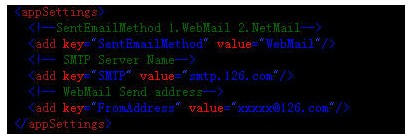
邮件在webconfig文件中配置如下:
更多精彩内容其他人还在看

C#抽象类与抽象方法详解

这篇文章主要为大家详细介绍了C#抽象类与抽象方法的相关资料,具有一定的参考价值,感兴趣的小伙伴们可以参考一下
收藏 0 赞 0 分享

C#代码实现扑克牌排序的几种方式

今天小编就为大家分享一篇关于C#代码实现扑克牌排序,小编觉得内容挺不错的,现在分享给大家,具有很好的参考价值,需要的朋友一起跟随小编来看看吧
收藏 0 赞 0 分享

C#泛型概念的简介与泛型的使用

今天小编就为大家分享一篇关于C#泛型概念的简介与泛型的使用,小编觉得内容挺不错的,现在分享给大家,具有很好的参考价值,需要的朋友一起跟随小编来看看吧
收藏 0 赞 0 分享

C# 7.0 使用下划线忽略使用的变量的原因分析

这篇文章主要介绍了C# 7.0 使用下划线忽略使用的变量的原因浅析,本文通过实例代码给大家介绍的非常详细,具有一定的参考借鉴价值,需要的朋友可以参考下
收藏 0 赞 0 分享

C# 中使用正则表达式匹配字符的含义

正则表达式的作用用来描述字符串的特征。本文重点给大家介绍C# 中使用正则表达式匹配字符的含义,非常不错,具有一定的参考借鉴价值,需要的朋友参考下吧
收藏 0 赞 0 分享

C# Dictionary和SortedDictionary的简介

今天小编就为大家分享一篇关于C# Dictionary和SortedDictionary的简介,小编觉得内容挺不错的,现在分享给大家,具有很好的参考价值,需要的朋友一起跟随小编来看看吧
收藏 0 赞 0 分享

C#中SQL Command的基本用法

今天小编就为大家分享一篇关于C#中SQL Command的基本用法,小编觉得内容挺不错的,现在分享给大家,具有很好的参考价值,需要的朋友一起跟随小编来看看吧
收藏 0 赞 0 分享

C#使用SQL DataReader访问数据的优点和实例

今天小编就为大家分享一篇关于C#使用SQL DataReader访问数据的优点和实例,小编觉得内容挺不错的,现在分享给大家,具有很好的参考价值,需要的朋友一起跟随小编来看看吧
收藏 0 赞 0 分享

C#使用SQL Dataset数据集代码实例

今天小编就为大家分享一篇关于的文章,小编觉得内容挺不错的,现在分享给大家,具有很好的参考价值,需要的朋友一起跟随小编来看看吧
收藏 0 赞 0 分享

C#使用SQL DataAdapter数据适配代码实例

今天小编就为大家分享一篇关于C#使用SQL DataAdapter数据适配代码实例,小编觉得内容挺不错的,现在分享给大家,具有很好的参考价值,需要的朋友一起跟随小编来看看吧
收藏 0 赞 0 分享
查看更多