

一个精简可自定义的倒计时控件,使用 Canvas.drawArc() 绘制。实现了应用开屏页的圆环扫过的进度条效果。
代码见https://github.com/hanjx-dut/CountDownView
使用
allprojects {
 repositories {
  ...
  maven { url 'https://jitpack.io' }
 }
}

dependencies {
 implementation 'com.github.hanjx-dut:CountDownView:1.1'
}
实现的效果
效果图
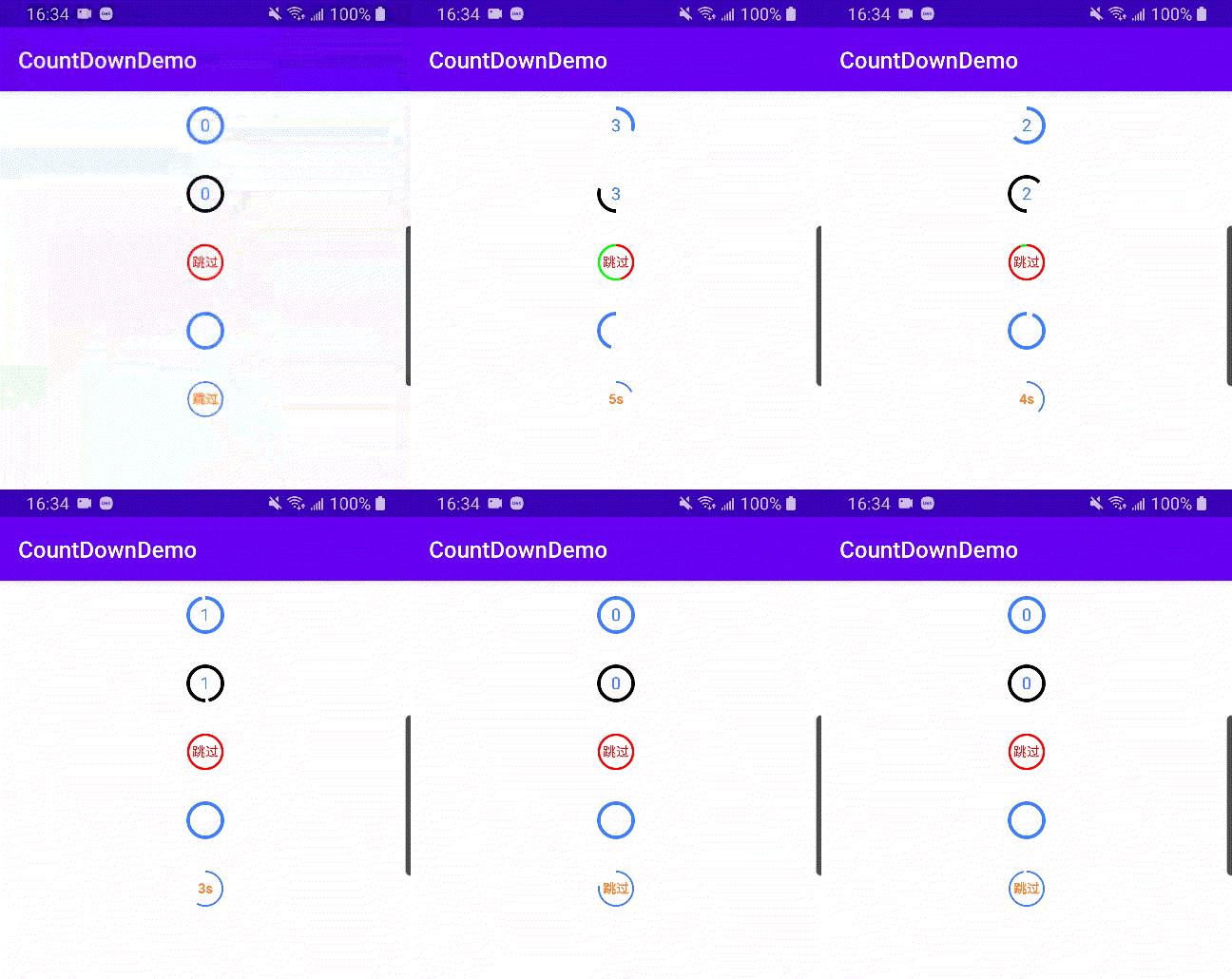
对应的view:
 <com.hanjx.ui.CountDownView
  android:id="@+id/count_down_1"
  android:layout_width="wrap_content"
  android:layout_height="wrap_content"
  android:layout_gravity="center_horizontal"
  app:auto_start="true"
  app:text_mode="time_variant"
  app:duration="3000"
  app:paint_stroke="3dp"/>

 <com.hanjx.ui.CountDownView
  android:id="@+id/count_down_2"
  android:layout_width="wrap_content"
  android:layout_height="wrap_content"
  android:layout_gravity="center_horizontal"
  app:finished_color="#000000"
  app:auto_start="true"
  app:start_angle="90"
  app:text_mode="time_variant"
  app:duration="3000"
  app:paint_stroke="3dp"/>

 <com.hanjx.ui.CountDownView
  android:id="@+id/count_down_3"
  android:layout_width="wrap_content"
  android:layout_height="wrap_content"
  android:layout_gravity="center_horizontal"
  app:finished_color="#FF0000"
  app:unfinished_color="#00FF00"
  app:auto_start="true"
  app:duration="2000"
  app:refresh_interval="quick"
  app:text="跳过"
  app:text_size="12sp"
  app:text_color="#FF0000"
  app:text_mode="fixed"
  app:paint_stroke="2dp"/>

 <com.hanjx.ui.CountDownView
  android:id="@+id/count_down_4"
  android:layout_width="wrap_content"
  android:layout_height="wrap_content"
  android:layout_gravity="center_horizontal"
  app:auto_start="true"
  app:text_mode="fixed"
  app:clockwise="false"
  app:text=""
  app:duration="2000"
  app:paint_stroke="3dp"/>

 <com.hanjx.ui.CountDownView
  android:id="@+id/count_down_5"
  android:layout_width="wrap_content"
  android:layout_height="wrap_content"
  android:layout_gravity="center_horizontal"
  app:text_mode="time_variant"
  app:duration="5000"
  app:paint_stroke="1.5dp"/>
全部属性:
<declare-styleable name="CountDownView">
  <attr name="duration" format="integer"/> <!-- 总时间 -->
  <attr name="refresh_interval"> <!-- 刷新间隔 ms -->
   <enum name="normal" value="16"/>
   <enum name="quick" value="11"/>
   <enum name="slow" value="20"/>
  </attr>
  <attr name="paint_stroke" format="dimension"/> <!-- 圆环宽度 -->
  <attr name="finished_color" format="color"/> <!-- 扫过完成的颜色 -->
  <attr name="unfinished_color" format="color"/> <!-- 未完成的颜色 -->
  <attr name="start_angle" format="float"/> <!-- 起始角度 默认 -90 即顶部 -->
  <attr name="clockwise" format="boolean"/> <!-- 顺时针 默认 true -->
  <attr name="auto_start" format="boolean"/> <!-- 自动开始 默认 false -->

  <!-- 文字 -->
  <attr name="text" format="string"/> <!-- 设置文字 -->
  <attr name="text_mode"> <!-- 文字模式 固定 / 随时间倒数(默认)-->
   <enum name="fixed" value="0"/>
   <enum name="time_variant" value="1"/>
  </attr>
  <attr name="text_size" format="dimension"/> <!-- 文字尺寸 -->
  <attr name="text_color" format="color"/> <!-- 文字颜色 -->
 </declare-styleable>
文字部分没有提供更多的自定义属性,可以通过 setTextDrawer()对画笔和文字进行自定义,如 demo 中的第五个:
CountDownView countDownView = findViewById(R.id.count_down_5);
countDownView.setTextDrawer(new CountDownView.TextDrawer() {
 @Override
 public void setTextPaint(Paint paint, long leftTime, int textMode) {
  if (leftTime < 2000) {
   paint.setTextSize(SizeUtils.sp2px(12));
  }
  paint.setTypeface(Typeface.DEFAULT_BOLD);
  paint.setColor(0xFFFF802E);
 }

 @Override
 public String getText(long leftTime, int mode, String originText) {
  if (leftTime < 2000) {
   return "跳过";
  }
  return String.format("%ss", leftTime == 0 ? leftTime : leftTime / 1000 + 1);
 }
});
监听
countDownView.setCountDownListener(new CountDownView.CountDownListener() {
 @Override
 public void onTick(long leftTime, float finishedAngle) {
  // leftTime: 剩余时间, finishedAngle: 扫过的角度
 }

 @Override
 public void onStop(boolean reset) {
  // 主动调用 countDownView.stop() 时会触发此回调
 }

 @Override
 public void onFinished() {

 }
});
ps:接口都有默认实现,可以选择实现任意方法


