

android实现旋转、平移、缩放和透明度渐变的补间动画,具体实现如下:
1.在新建项目的res目录中,创建一个名为anim的目录,并在该目录中创建实现旋转、平移、缩放和透明度渐变的动画资源文件。
透明度渐变的动画资源文件anim_alpha.xml(完全不透明->完全透明->完全不透明)
<?xml version="1.0" encoding="utf-8"?>
<set xmlns:android="http://schemas.android.com/apk/res/android">
 <alpha android:fromAlpha="1"
 android:toAlpha="0"
 android:fillAfter="true"
 android:repeatMode="reverse"
 android:repeatCount="1"
 android:duration="2000"/>
</set>
旋转的动画资源文件anim_rotate.xml(0度->720度->360度->0度)
<?xml version="1.0" encoding="utf-8"?>
<set xmlns:android="http://schemas.android.com/apk/res/android">
 <rotate
 android:interpolator="@android:anim/accelerate_interpolator"
 android:fromDegrees="0"
 android:toDegrees="720"
 android:pivotX="50%"
 android:pivotY="50%"
 android:duration="2000"/>
 <rotate
 android:interpolator="@android:anim/accelerate_interpolator"
 android:startOffset="2000"
 android:fromDegrees="360"
 android:toDegrees="0"
 android:pivotX="50%"
 android:pivotY="50%"
 android:duration="2000"/>
</set>
缩放动画资源文件anim_scale.xml(放大2倍->收缩回来)
<?xml version="1.0" encoding="utf-8"?>
<set xmlns:android="http://schemas.android.com/apk/res/android">
 <scale android:fromXScale="1"
 android:interpolator="@android:anim/decelerate_interpolator"
 android:fromYScale="1"
 android:toXScale="2.0"
 android:toYScale="2.0"
 android:pivotX="50%"
 android:pivotY="50%"
 android:fillAfter="true"
 android:repeatCount="1"
 android:repeatMode="reverse"
 android:duration="2000"/>
 </set>
平移动画资源文件anim_translate.xml(屏幕左侧->屏幕右侧->屏幕左侧)
<?xml version="1.0" encoding="utf-8"?>
<set xmlns:android="http://schemas.android.com/apk/res/android">
 <translate
 android:fromXDelta="0"
 android:toXDelta="860"
 android:fromYDelta="0"
 android:toYDelta="0"
 android:fillAfter="true"
 android:repeatMode="reverse"
 android:repeatCount="1"
 android:duration="2000"/>
</set>
主界面资源文件:
res/layout/main.xml:
[html] view plain copy
<?xml version="1.0" encoding="utf-8"?>
<LinearLayout xmlns:android="http://schemas.android.com/apk/res/android"
 xmlns:tools="http://schemas.android.com/tools"
 android:layout_width="fill_parent"
 android:layout_height="fill_parent"
 android:id="@+id/linearLayout1"
 android:orientation="vertical"
 >
 <LinearLayout
 android:layout_width="fill_parent"
 android:layout_height="wrap_content"
 android:id="@+id/linearLayout2"
 android:orientation="horizontal">
 <Button android:layout_width="wrap_content"
 android:layout_height="wrap_content"
 android:id="@+id/button1"
 android:text="旋转"/>
 <Button android:layout_width="wrap_content"
 android:layout_height="wrap_content"
 android:id="@+id/button2"
 android:text="平移"/>
 <Button android:layout_width="wrap_content"
 android:layout_height="wrap_content"
 android:id="@+id/button3"
 android:text="缩放"/>
 <Button android:layout_width="wrap_content"
 android:layout_height="wrap_content"
 android:id="@+id/button4"
 android:text="透明度变化"/>
 </LinearLayout>
 <ImageView android:layout_width="wrap_content"
 android:layout_height="wrap_content"
 android:id="@+id/imageView1"
 android:src="@drawable/img1"/>
</LinearLayout>
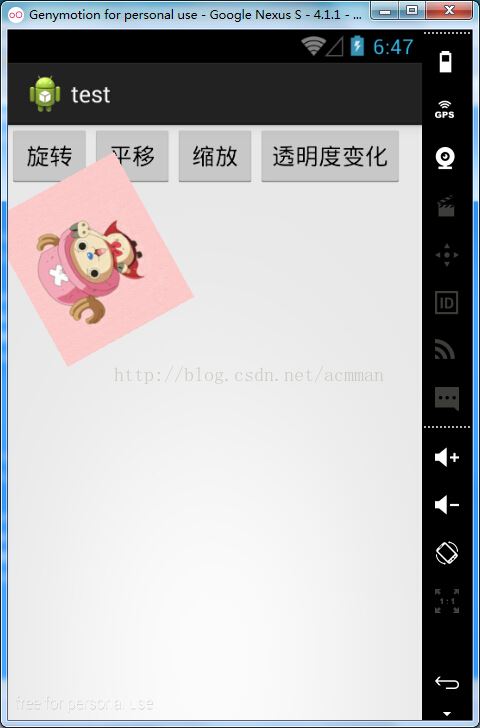
效果如图

2.MainActivity:
在onCreat()方法中,首先获取动画资源文件中创建的动画资源,然后获取要应用动画效果的ImageView,再获取“旋转”按钮,并为该按钮添加单击事件监听器,在重写onClik()方法中,播放动画。具体代码如下:
[java] view plain copy
package com.example.test;

import android.app.Activity;
import android.os.Bundle;
import android.view.View;
import android.view.View.OnClickListener;
import android.view.animation.Animation;
import android.view.animation.AnimationUtils;
import android.widget.Button;
import android.widget.ImageView;

public class MainActivity extends Activity {

 @Override
 public void onCreate(Bundle savedInstanceState) {
 super.onCreate(savedInstanceState);
 setContentView(R.layout.main);

 final Animation rotate=AnimationUtils.loadAnimation(this, R.anim.anim_rotate);//获取旋转动画资源
 final Animation translate=AnimationUtils.loadAnimation(this, R.anim.anim_translate);//获取平移动画资源
 final Animation scale=AnimationUtils.loadAnimation(this, R.anim.anim_scale);//获取缩放动画资源
 final Animation alpha=AnimationUtils.loadAnimation(this, R.anim.anim_alpha);//获取透明度变化动画资源
 //获取要应用动画效果的ImageView
 final ImageView iv=(ImageView)findViewById(R.id.imageView1);
 Button button1=(Button)findViewById(R.id.button1);//获取"旋转"按钮
 button1.setOnClickListener(new OnClickListener() {

 @Override
 public void onClick(View arg0) {
 //播放旋转动画
 iv.startAnimation(rotate);

 }
 });

 Button button2=(Button)findViewById(R.id.button2);//获取"平移"按钮
 button2.setOnClickListener(new OnClickListener() {

 @Override
 public void onClick(View arg0) {
 //播放平移动画
 iv.startAnimation(translate);

 }
 });

 Button button3=(Button)findViewById(R.id.button3);//获取"缩放"按钮
 button3.setOnClickListener(new OnClickListener() {

 @Override
 public void onClick(View arg0) {
 //播放缩放动画
 iv.startAnimation(scale);

 }
 });

 Button button4=(Button)findViewById(R.id.button4);//获取"透明度渐变"按钮
 button4.setOnClickListener(new OnClickListener() {

 @Override
 public void onClick(View arg0) {
 //播放透明度渐变动画
 iv.startAnimation(alpha);
 }
 });
 }
}
效果如图1、图2、图3、图4:


以上就是这篇文章的全部内容了,希望本文的内容对大家的学习或者工作具有一定的参考学习价值,如果有疑问大家可以留言交流,谢谢大家对脚本之家的支持。


