

android在网络上下载文件,供大家参考,具体内容如下
步骤:
1.使用HTTP协议下载文件
- 创建一个HttpURLConnection对象 : HttpURLConnection urlConn = (HttpURLConnection) url.openConnection();
- 获取一个InputStream对象 : urlConn.getInputStream()
- 访问网络的权限 : android.permission.INTERNET
2.将下载的文件写入SDCARD
- 得到当前设备SD卡的目录 : Environment.getExternalStrageDirectory()
- 访问SD卡的权限 : android.permission.WRITE_EXTERNAL_STORAGE
代码:
activity_main.xml
<RelativeLayout xmlns:android="http://schemas.android.com/apk/res/android"
  xmlns:tools="http://schemas.android.com/tools"
  android:layout_width="match_parent"
  android:layout_height="match_parent"
  android:paddingBottom="@dimen/activity_vertical_margin"
  android:paddingLeft="@dimen/activity_horizontal_margin"
  android:paddingRight="@dimen/activity_horizontal_margin"
  android:paddingTop="@dimen/activity_vertical_margin"
  tools:context=".MainActivity" >

  <Button
    android:id="@+id/btn_txt"
    android:layout_width="match_parent"
    android:layout_height="wrap_content"
    android:text="download lrc" />

  <Button
    android:id="@+id/btn_mp3"
    android:layout_width="match_parent"
    android:layout_height="wrap_content"
    android:layout_below="@id/btn_txt"
    android:text="download mp3" />

</RelativeLayout>
MainActivity.java
package com.chay.download;

import com.chay.utils.HttpDownloader;

import android.app.Activity;
import android.os.Bundle;
import android.view.View;
import android.view.View.OnClickListener;
import android.widget.Button;

public class MainActivity extends Activity {

  String urlStr_txt = "http://192.168.56.1:8080/mp3/wan.lrc";
  String urlStr_mp3 = "http://192.168.56.1:8080/mp3/wan.mp3";
  String path = "mp3/";
  String fileName = "wan.mp3";
  private Button downloadTxtButton;
  private Button downloadMp3Button;

  @Override
  protected void onCreate(Bundle savedInstanceState) {
    super.onCreate(savedInstanceState);
    setContentView(R.layout.activity_main);
    downloadTxtButton = (Button) findViewById(R.id.btn_txt);
    downloadTxtButton.setOnClickListener(new DownloadTxtListener());
    downloadMp3Button = (Button) findViewById(R.id.btn_mp3);
    downloadMp3Button.setOnClickListener(new DownloadMp3Listener());
  }

  //下载歌词文件按钮监听器
  class DownloadTxtListener implements OnClickListener {
    @Override
    public void onClick(View v) {
      Thread t = new DownloadTxtThread();
      t.start();
      System.out.println("txt--->");
    }
  }
  //下载歌词文件线程
  class DownloadTxtThread extends Thread{
    @Override
    public void run() {
      HttpDownloader httpDownloader = new HttpDownloader();
      String lrc = httpDownloader.download(urlStr_txt);
      System.out.println(lrc);
    }
  }
  //下载MP3文件按钮监听器
  class DownloadMp3Listener implements OnClickListener {
    @Override
    public void onClick(View v) {
      Thread h = new DownMp3Thread();
      h.start();
      System.out.println("mp3--->");
    }
  }
  //下载MP3文件线程
  class DownMp3Thread extends Thread{
    @Override
    public void run() {
      HttpDownloader httpDownloader = new HttpDownloader();
      int result = httpDownloader.downFile(urlStr_mp3, path, fileName);
      System.out.println(result);
    }
  }
}
工具类:
HttpDownloader.java
package com.chay.utils;

import java.io.BufferedReader;
import java.io.File;
import java.io.IOException;
import java.io.InputStream;
import java.io.InputStreamReader;
import java.net.HttpURLConnection;
import java.net.MalformedURLException;
import java.net.URL;

public class HttpDownloader {
  private URL url = null;

  /**
   * 根据URL下载文件,前提是这个文件当中的内容是文本,函数的返回值就是文件当中的内容
   * 1.创建一个URL对象
   * 2.通过URL对象,创建一个HttpURLConnection对象
   * 3.得到InputStram
   * 4.从InputStream当中读取数据
   * @param urlStr
   * @return
   */
  public String download(String urlStr) {
    StringBuffer sb = new StringBuffer();
    String line = null;
    BufferedReader buffer = null;
    try {
      // 创建一个URL对象
      url = new URL(urlStr);
      // 创建一个Http连接
      HttpURLConnection urlConn = (HttpURLConnection) url.openConnection();
      // 使用IO流读取数据
      buffer = new BufferedReader(new InputStreamReader(urlConn.getInputStream()));
      while ((line = buffer.readLine()) != null) {
        sb.append(line);
      }
    } catch (Exception e) {
      e.printStackTrace();
    } finally {
      try {
        buffer.close();
      } catch (Exception e) {
        e.printStackTrace();
      }
    }
    return sb.toString();
  }

  /**
   * 该函数返回整形 -1:代表下载文件出错   0:代表下载文件成功   1:代表文件已经存在
   */
  public int downFile(String urlStr, String path, String fileName) {
    InputStream inputStream = null;
    try {
      FileUtils fileUtils = new FileUtils();

      if (fileUtils.isFileExist(path + fileName)) {
        return 1;
      } else {
        inputStream = getInputStreamFromUrl(urlStr);
        File resultFile = fileUtils.write2SDFromInput(path,fileName, inputStream);
        if (resultFile == null) {
          return -1;
        }
      }
    } catch (Exception e) {
      e.printStackTrace();
      return -1;
    } finally {
      try {
        inputStream.close();
      } catch (Exception e) {
        e.printStackTrace();
      }
    }
    return 0;
  }

  /**
   * 根据URL得到输入流
   *
   * @param urlStr
   * @return
   * @throws MalformedURLException
   * @throws IOException
   */
  public InputStream getInputStreamFromUrl(String urlStr)
      throws MalformedURLException, IOException {
    url = new URL(urlStr);
    HttpURLConnection urlConn = (HttpURLConnection) url.openConnection();
    InputStream inputStream = urlConn.getInputStream();
    return inputStream;
  }
}
FileUtils.java
package com.chay.utils;

import java.io.File;
import java.io.FileOutputStream;
import java.io.IOException;
import java.io.InputStream;
import java.io.OutputStream;

import android.os.Environment;

public class FileUtils {
  private String SDPATH;

  public String getSDPATH() {
    return SDPATH;
  }
  public FileUtils() {
    //得到当前外部存储设备的目录
    // /SDCARD
    SDPATH = Environment.getExternalStorageDirectory() + "/";
  }
  /**
   * 在SD卡上创建文件
   *
   * @throws IOException
   */
  public File creatSDFile(String fileName) throws IOException {
    File file = new File(SDPATH + fileName);
    file.createNewFile();
    return file;
  }

  /**
   * 在SD卡上创建目录
   *
   * @param dirName
   */
  public File creatSDDir(String dirName) {
    File dir = new File(SDPATH + dirName);
    dir.mkdirs();
    return dir;
  }

  /**
   * 判断SD卡上的文件夹是否存在
   */
  public boolean isFileExist(String fileName){
    File file = new File(SDPATH + fileName);
    return file.exists();
  }

  /**
   * 将一个InputStream里面的数据写入到SD卡中
   */
  public File write2SDFromInput(String path,String fileName,InputStream input){
    File file = null;
    OutputStream output = null;
    try{
      creatSDDir(path);
      file = creatSDFile(path + fileName);
      output = new FileOutputStream(file);
      byte buffer [] = new byte[4 * 1024];
      while((input.read(buffer)) != -1){
        output.write(buffer);
      }
      output.flush();
    }
    catch(Exception e){
      e.printStackTrace();
    }
    finally{
      try{
        output.close();
      }
      catch(Exception e){
        e.printStackTrace();
      }
    }
    return file;
  }
}
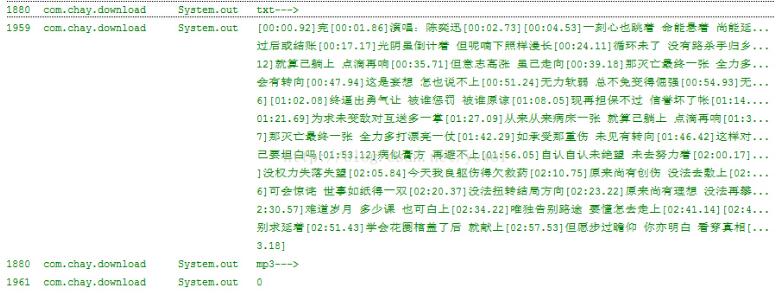
如果不能下载,请先将windows防火墙关闭。


