

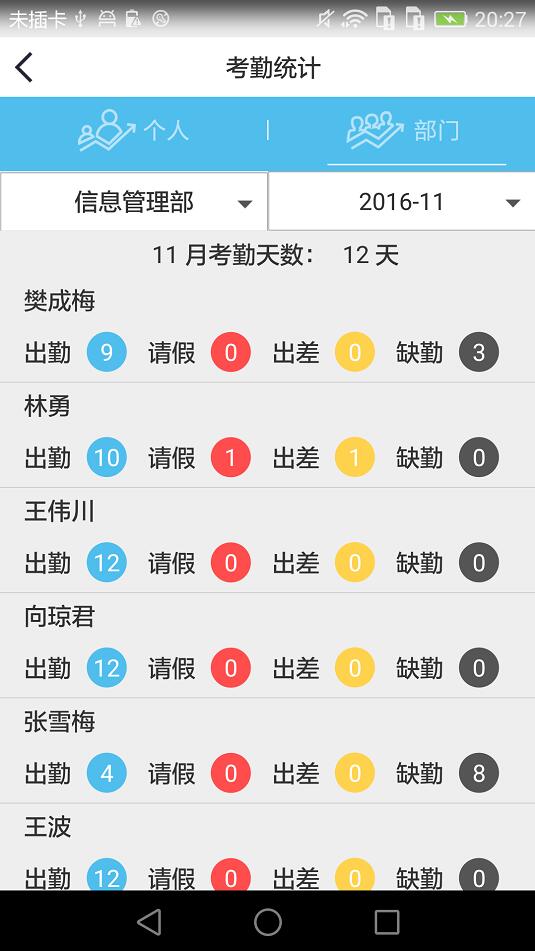
要实现点击上面listview中每一行中的请假就会获得该行的人名来调用相应的webservice接口,
departmenttongji_item:
<LinearLayout xmlns:android="http://schemas.android.com/apk/res/android"
  android:layout_width="match_parent"
  android:layout_height="match_parent"
  android:orientation="vertical"
  >
    <LinearLayout
      android:layout_width="match_parent"
      android:layout_height="30dp"
      android:orientation="horizontal"
      android:gravity="center_vertical"
      >
      <TextView
        android:id="@+id/name"
        android:layout_marginLeft="@dimen/activity_vertical_margin"
        android:layout_width="wrap_content"
        android:layout_height="wrap_content"
        android:text="张三"
        style="@style/home_word_style"
        />
      <TextView
        android:visibility="gone"
        android:id="@+id/dayofkq"
        android:layout_marginLeft="30dp"
        android:layout_width="wrap_content"
        android:layout_height="wrap_content"
        style="@style/home_word_style"
        />
    </LinearLayout>
    <LinearLayout
      android:layout_width="match_parent"
      android:layout_height="40dp"
      android:orientation="horizontal"
      android:gravity="center_vertical"
      >
      <TextView
        android:text="出勤"
        android:layout_marginLeft="16dp"
        android:layout_width="wrap_content"
        android:layout_height="wrap_content"
        style="@style/home_word_style"
        />
      <TextView
        android:gravity="center"
        android:text="1"
        android:id="@+id/work"
        android:layout_marginLeft="10dp"
        android:layout_width="wrap_content"
        android:layout_height="wrap_content"
        style="@style/home_word_style"
        android:textColor="@color/colorTran"
        android:background="@drawable/sekuai_chuqin"
        />
      <TextView
        android:text="请假"
        android:layout_marginLeft="14dp"
        android:layout_width="wrap_content"
        android:layout_height="wrap_content"
        style="@style/home_word_style"
        />
      <TextView
        android:gravity="center"
        android:text="1"
        android:id="@+id/holiday"
        android:layout_marginLeft="10dp"
        android:layout_width="wrap_content"
        android:layout_height="wrap_content"
        style="@style/home_word_style"
        android:textColor="@color/colorTran"
        android:background="@drawable/sekuai_chidao"
        />
      <TextView
        android:text="出差"
        android:layout_marginLeft="14dp"
        android:layout_width="wrap_content"
        android:layout_height="wrap_content"
        style="@style/home_word_style"
        />
      <TextView
        android:gravity="center"
        android:text="1"
        android:id="@+id/outwork"
        android:layout_marginLeft="10dp"
        android:layout_width="wrap_content"
        android:layout_height="wrap_content"
        style="@style/home_word_style"
        android:textColor="@color/colorTran"
        android:background="@drawable/sekuai_chuchai"
        />
      <TextView
        android:text="缺勤"
        android:layout_marginLeft="14dp"
        android:layout_width="wrap_content"
        android:layout_height="wrap_content"
        style="@style/home_word_style"
        />
      <TextView
        android:gravity="center"
        android:text="1"
        android:id="@+id/nowork"
        android:layout_marginLeft="10dp"
        android:layout_width="wrap_content"
        android:layout_height="wrap_content"
        style="@style/home_word_style"
        android:textColor="@color/colorTran"
        android:background="@drawable/sekuai_queqin"
        />
    </LinearLayout>
</LinearLayout>
Listview中的adapter:
public class KqtjAdapter extends BaseAdapter{
  ArrayList<PersonKqStatisInfo> list;
Context mcontext;
  public KqtjAdapter(ArrayList<PersonKqStatisInfo> list, Context mcontext) {
    this.list = list;
    this.mcontext = mcontext;
  }
  @Override
  public int getCount() {
    return list.size();
  }

  @Override
  public Object getItem(int position) {
    return list.get(position);
  }

  @Override
  public long getItemId(int position) {
    return position;
  }
  @Override
  public View getView( int position, View convertView, ViewGroup parent) {
    ViewHolder viewHolder;
    if (convertView==null) {
      convertView = LayoutInflater.from(mcontext).inflate(R.layout.departmenttongji_item, null);
      viewHolder=new ViewHolder();
      viewHolder.holiday=(TextView)convertView.findViewById(R.id.holiday);
      viewHolder.name=(TextView)convertView.findViewById(R.id.name);
      viewHolder.work=(TextView)convertView.findViewById(R.id.work);
      viewHolder.nowork=(TextView)convertView.findViewById(R.id.nowork);
      viewHolder.outwork=(TextView)convertView.findViewById(R.id.outwork);
      viewHolder.dayofkq=(TextView)convertView.findViewById(R.id.dayofkq);
      convertView.setTag(viewHolder);
    }
    else {
      viewHolder=(ViewHolder)convertView.getTag();
    }
    viewHolder.name.setText(list.get(position).getName());
    viewHolder.work.setText(list.get(position).getWork()+"");
    viewHolder.nowork.setText(list.get(position).getNowork()+"");
    viewHolder.outwork.setText(list.get(position).getOutwrok()+"");
    viewHolder.holiday.setText(list.get(position).getHoliday()+"");
    viewHolder.holiday.setOnClickListener(new View.OnClickListener() {
      @Override
      public void onClick(View v) {
        Log.i("tag","position:"+ position+"");
      }
    });
    return convertView;
  }
  class ViewHolder{
    TextView name,
         work,
         nowork,
         outwork,
         dayofkq,
         holiday;
  }
}
上面是该listview的adapter,如果直接在adapter中调用点击事件时发现Log.i(“tag”,”position:”+ position+”“)输出的position的值并不是所得到的点击的当前行的值,所以并不能通过这种方法来获取点击请假的时候获取当前行的人名。
这时候就这时候就要理解
public void onItemClick(AdapterView parent, View view, int position,long id) {
}
中的参数的意思,其中view是当前点击行所在的view,position是当前行的位置其值和id相同。
因此就可以在该方法中实现获取当前点击请假所在的行的人名:
listView.setOnItemClickListener(new AdapterView.OnItemClickListener() {
          @Override
          public void onItemClick(AdapterView<?> parent, View view, int position,long id) {
            final TextView name=(TextView)view.findViewById(R.id.name);
            view.findViewById(R.id.work).setOnClickListener(new View.OnClickListener() {
              @Override
              public void onClick(View v) {
                Log.i("tag"," P: "+name.getText().toString());

              }
            });
          }
        });
上面的view也就是当前所点击的行的view,可以通过该view来找到里面的每个元素。
以上这篇老生常谈Listview中onItemClick中的各个参数(推荐)就是小编分享给大家的全部内容了,希望能给大家一个参考,也希望大家多多支持脚本之家。


