

本文实例为大家分享了Tensorflow之MNIST CNN实现并保存、加载模型的具体代码,供大家参考,具体内容如下
废话不说,直接上代码
# TensorFlow and tf.keras
import tensorflow as tf
from tensorflow import keras

# Helper libraries
import numpy as np
import matplotlib.pyplot as plt
import os

#download the data
mnist = keras.datasets.mnist

(train_images, train_labels), (test_images, test_labels) = mnist.load_data()

class_names = ['0', '1', '2', '3', '4', '5', '6', '7', '8', '9']

train_images = train_images / 255.0
test_images = test_images / 255.0

def create_model():
 # It's necessary to give the input_shape,or it will fail when you load the model
 # The error will be like : You are trying to load the 4 layer models to the 0 layer
 model = keras.Sequential([
   keras.layers.Conv2D(32,[5,5], activation=tf.nn.relu,input_shape = (28,28,1)),
   keras.layers.MaxPool2D(),
   keras.layers.Conv2D(64,[7,7], activation=tf.nn.relu),
   keras.layers.MaxPool2D(),
   keras.layers.Flatten(),
   keras.layers.Dense(576, activation=tf.nn.relu),
   keras.layers.Dense(10, activation=tf.nn.softmax)
 ])

 model.compile(optimizer=tf.train.AdamOptimizer(),
        loss='sparse_categorical_crossentropy',
        metrics=['accuracy'])

 return model

#reshape the shape before using it, for that the input of cnn is 4 dimensions
train_images = np.reshape(train_images,[-1,28,28,1])
test_images = np.reshape(test_images,[-1,28,28,1])


#train
model = create_model()
model.fit(train_images, train_labels, epochs=4)

#save the model
model.save('my_model.h5')

#Evaluate
test_loss, test_acc = model.evaluate(test_images, test_labels,verbose = 0)
print('Test accuracy:', test_acc)
模型保存后,自己手写了几张图片,放在文件夹C:\pythonp\testdir2下,开始测试
#Load the model

new_model = keras.models.load_model('my_model.h5')
new_model.compile(optimizer=tf.train.AdamOptimizer(),
        loss='sparse_categorical_crossentropy',
        metrics=['accuracy'])
new_model.summary()

#Evaluate

# test_loss, test_acc = new_model.evaluate(test_images, test_labels)
# print('Test accuracy:', test_acc)

#Predicte

mypath = 'C:\\pythonp\\testdir2'

def getimg(mypath):
  listdir = os.listdir(mypath)
  imgs = []
  for p in listdir:
    img = plt.imread(mypath+'\\'+p)
    # I save the picture that I draw myself under Windows, but the saved picture's
    # encode style is just opposite with the experiment data, so I transfer it with
    # this line.
    img = np.abs(img/255-1)
    imgs.append(img[:,:,0])
  return np.array(imgs),len(imgs)

imgs = getimg(mypath)

test_images = np.reshape(imgs[0],[-1,28,28,1])

predictions = new_model.predict(test_images)

plt.figure()

for i in range(imgs[1]):
 c = np.argmax(predictions[i])
 plt.subplot(3,3,i+1)
 plt.xticks([])
 plt.yticks([])
 plt.imshow(test_images[i,:,:,0])
 plt.title(class_names[c])
plt.show()
测试结果
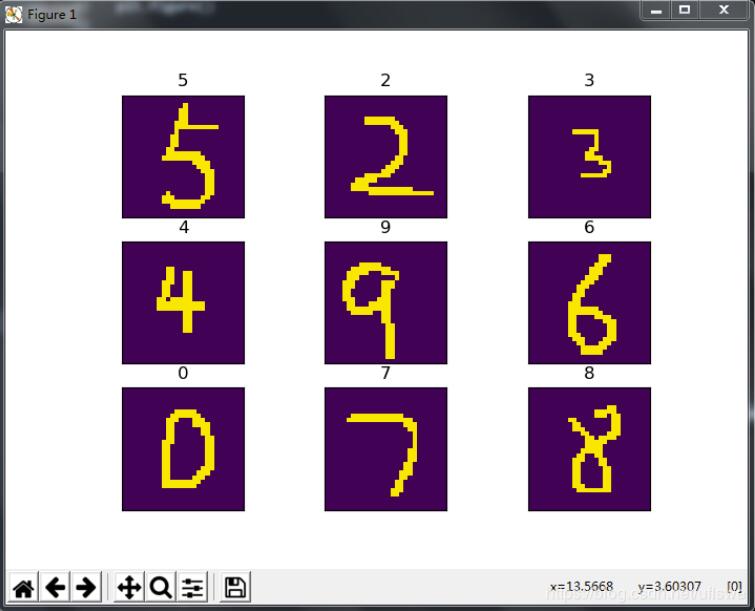
自己手写的图片截的时候要注意,空白部分尽量不要太大,否则测试结果就呵呵了
以上就是本文的全部内容,希望对大家的学习有所帮助,也希望大家多多支持脚本之家。


