

实时画图
import matplotlib.pyplot as plt

ax = []   # 定义一个 x 轴的空列表用来接收动态的数据
ay = []   # 定义一个 y 轴的空列表用来接收动态的数据
plt.ion()   # 开启一个画图的窗口
for i in range(100): # 遍历0-99的值
 ax.append(i)  # 添加 i 到 x 轴的数据中
 ay.append(i**2) # 添加 i 的平方到 y 轴的数据中
 plt.clf()  # 清除之前画的图
 plt.plot(ax,ay) # 画出当前 ax 列表和 ay 列表中的值的图形
 plt.pause(0.1)  # 暂停一秒
 plt.ioff()  # 关闭画图的窗口
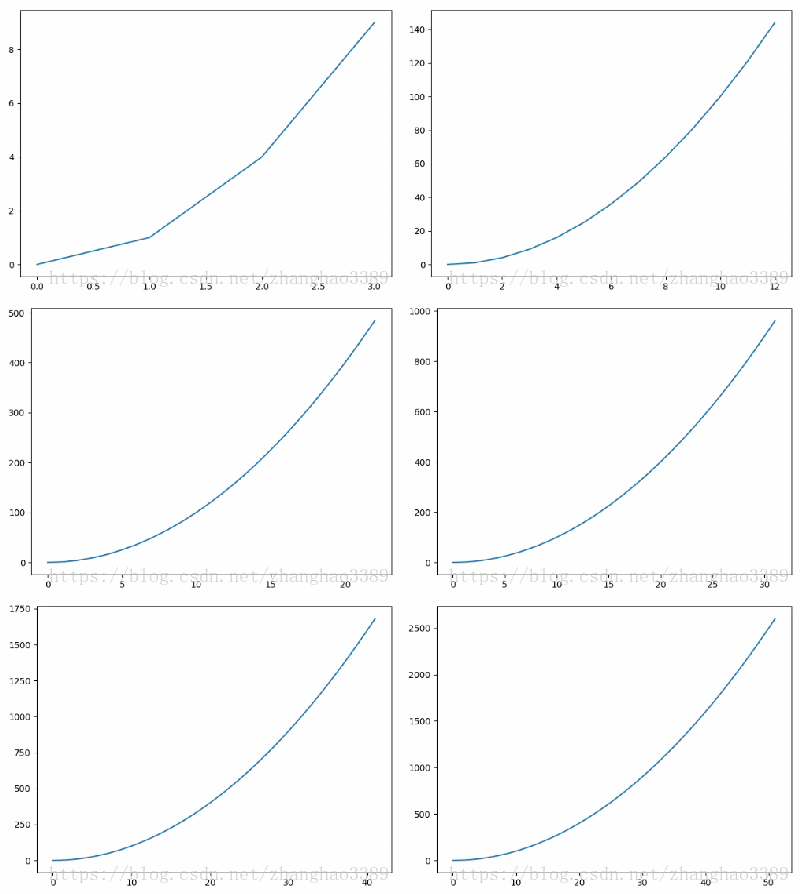
实时画图 效果图
补充知识:Python 绘图与可视化 matplotlib 动态条形图 bar
第一种办法
一种方法是每次都重新画,包括清除figure
def animate(fi):
 bars=[]
 if len(frames)>fi:
  # axs.text(0.1,0.90,time_template%(time.time()-start_time),transform=axs.transAxes)#所以这样
  time_text.set_text(time_template%(0.1*fi))#这个必须没有axs.cla()才行
  # axs.cla()
  axs.set_title('bubble_sort_visualization')
  axs.set_xticks([])
  axs.set_yticks([])
  bars=axs.bar(list(range(Data.data_count)),#个数
    [d.value for d in frames[fi]],#数据
    1,    #宽度
    color=[d.color for d in frames[fi]]#颜色
    ).get_children()
 return bars
 anim=animation.FuncAnimation(fig,animate,frames=len(frames), interval=frame_interval,repeat=False)
这样效率很低,而且也有一些不可取的弊端,比如每次都需要重新设置xticks、假如figure上添加的有其他东西,这些东西也一并被clear了,还需要重新添加,比如text,或者labale。
第二种办法
可以像平时画线更新data那样来更新bar的高
'''
遇到问题没人解答?小编创建了一个Python学习交流QQ群:857662006
寻找有志同道合的小伙伴,互帮互助,群里还有不错的视频学习教程和PDF电子书!
'''
import matplotlib.pyplot as plt
import numpy as np
from matplotlib import animation


fig=plt.figure(1,figsize=(4,3))
ax=fig.add_subplot(111)
ax.set_title('bar_animate_test')
#ax.set_xticks([])注释了这个是能看到变化,要不看不到变化,不对,能看到变化,去了注释吧
#ax.set_yticks([])
ax.set_xlabel('xlable')
N=5
frames=50
x=np.arange(1,N+1)

collection=[]
collection.append([i for i in x])
for i in range(frames):
 collection.append([ci+1 for ci in collection[i]])
print(collection)
xstd=[0,1,2,3,4]
bars=ax.bar(x,collection[0],0.30)
def animate(fi):
 # collection=[i+1 for i in x]
   ax.set_ylim(0,max(collection[fi])+3)#对于问题3,添加了这个
 for rect ,yi in zip(bars,collection[fi]):
 rect.set_height(yi)
 # bars.set_height(collection)
 return bars
anim=animation.FuncAnimation(fig,animate,frames=frames,interval=10,repeat=False)
plt.show()
问题
*)TypeError: ‘numpy.int32' object is not iterable
x=np.arange(1,N+1)<br>collection=[i for i in x]
#collection=[i for i in list(x)]#错误的认为是dtype的原因,将这里改成了list(x)
for i in range(frames):
 collection.append([ci+1 for ci in collection[i]])#问题的原因是因为此时的collection还是一个一位数组,所以这个collection[i]是一个x里的一个数,并不是一个列表,我竟然还以为的dtype的原因,又改了
xstd=[0,1,2,3,4]
应该是
'''
遇到问题没人解答?小编创建了一个Python学习交流QQ群:857662006
寻找有志同道合的小伙伴,互帮互助,群里还有不错的视频学习教程和PDF电子书!
'''
collection=[]
collection.append([i for i in x])#成为二维数组
for i in range(frames):
 collection.append([ci+1 for ci in collection[i]])
然后又出现了下面的问题:
*)TypeError: only size-1 arrays can be converted to Python scalars
Traceback (most recent call last):
 File "forTest.py", line 22, in <module>
 bars=ax.bar(x,collection,0.30)
 File "C:\Users\Administrator.SC-201605202132\Envs\sort\lib\site-packages\matplotlib\__init__.py", line 1589, in inner
 return func(ax, *map(sanitize_sequence, args), **kwargs)
 File "C:\Users\Administrator.SC-201605202132\Envs\sort\lib\site-packages\matplotlib\axes\_axes.py", line 2430, in bar
 label='_nolegend_',
 File "C:\Users\Administrator.SC-201605202132\Envs\sort\lib\site-packages\matplotlib\patches.py", line 707, in __init__
 Patch.__init__(self, **kwargs)
 File "C:\Users\Administrator.SC-201605202132\Envs\sort\lib\site-packages\matplotlib\patches.py", line 89, in __init__
 self.set_linewidth(linewidth)
 File "C:\Users\Administrator.SC-201605202132\Envs\sort\lib\site-packages\matplotlib\patches.py", line 368, in set_linewidth
 self._linewidth = float(w)
TypeError: only size-1 arrays can be converted to Python scalars
应该是传递的参数错误,仔细想了一下,在报错的代码行中,collection原来是没错的,因为原来是一维数组,现在变成二维了,改为
bars=ax.bar(x,collection[0],0.30)
好了
*)出现的问题,在上面的代码中,运行的时候不会画布的大小不会变,会又条形图溢出的情况,在animate()中添加了
'''
遇到问题没人解答?小编创建了一个Python学习交流QQ群:857662006
寻找有志同道合的小伙伴,互帮互助,群里还有不错的视频学习教程和PDF电子书!
'''
def animate(fi):
 # collection=[i+1 for i in x]
 ax.set_ylim(0,max(collection[fi])+3)#添加了这个
 for rect ,yi in zip(bars,collection[fi]):
 rect.set_height(yi)

 # bars.set_height(collection)
 return bars
别的属性
*)条形图是怎样控制间隔的:
是通过控制宽度
width=1,#没有间隔,每个条形图会紧挨着
*)errorbar:
是加一个横线,能通过xerr和yerr来调整方向
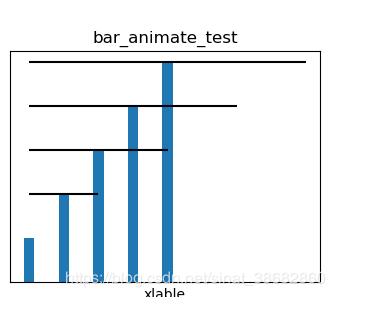
xstd=[0,1,2,3,4]
bars=ax.bar(x,collection,0.30,xerr=xstd)
以上这篇Python matplotlib实时画图案例就是小编分享给大家的全部内容了,希望能给大家一个参考,也希望大家多多支持脚本之家。


