

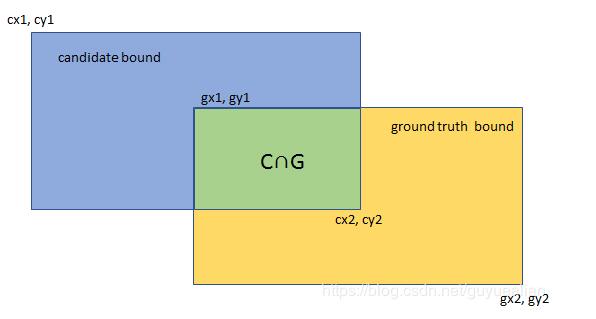
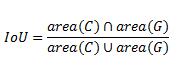
交并比(Intersection-over-Union,IoU),目标检测中使用的一个概念,是产生的候选框(candidate bound)与原标记框(ground truth bound)的交叠率,即它们的交集与并集的比值。最理想情况是完全重叠,即比值为1。
计算公式:
Python实现代码:
def cal_iou(box1, box2):
 """
 :param box1: = [xmin1, ymin1, xmax1, ymax1]
 :param box2: = [xmin2, ymin2, xmax2, ymax2]
 :return:
 """
 xmin1, ymin1, xmax1, ymax1 = box1
 xmin2, ymin2, xmax2, ymax2 = box2
 # 计算每个矩形的面积
 s1 = (xmax1 - xmin1) * (ymax1 - ymin1) # C的面积
 s2 = (xmax2 - xmin2) * (ymax2 - ymin2) # G的面积

 # 计算相交矩形
 xmin = max(xmin1, xmin2)
 ymin = max(ymin1, ymin2)
 xmax = min(xmax1, xmax2)
 ymax = min(ymax1, ymax2)

 w = max(0, xmax - xmin)
 h = max(0, ymax - ymin)
 area = w * h # C∩G的面积
 iou = area / (s1 + s2 - area)
 return iou
# -*-coding: utf-8 -*-
"""
 @Project: IOU
 @File : IOU.py
 @Author : panjq
 @E-mail : pan_jinquan@163.com
 @Date : 2018-10-14 10:44:06
"""
def calIOU_V1(rec1, rec2):
 """
 computing IoU
 :param rec1: (y0, x0, y1, x1), which reflects
   (top, left, bottom, right)
 :param rec2: (y0, x0, y1, x1)
 :return: scala value of IoU
 """
 # 计算每个矩形的面积
 S_rec1 = (rec1[2] - rec1[0]) * (rec1[3] - rec1[1])
 S_rec2 = (rec2[2] - rec2[0]) * (rec2[3] - rec2[1])

 # computing the sum_area
 sum_area = S_rec1 + S_rec2

 # find the each edge of intersect rectangle
 left_line = max(rec1[1], rec2[1])
 right_line = min(rec1[3], rec2[3])
 top_line = max(rec1[0], rec2[0])
 bottom_line = min(rec1[2], rec2[2])

 # judge if there is an intersect
 if left_line >= right_line or top_line >= bottom_line:
  return 0
 else:
  intersect = (right_line - left_line) * (bottom_line - top_line)
  return intersect/(sum_area - intersect)

def calIOU_V2(rec1, rec2):
 """
 computing IoU
 :param rec1: (y0, x0, y1, x1), which reflects
   (top, left, bottom, right)
 :param rec2: (y0, x0, y1, x1)
 :return: scala value of IoU
 """
 # cx1 = rec1[0]
 # cy1 = rec1[1]
 # cx2 = rec1[2]
 # cy2 = rec1[3]
 # gx1 = rec2[0]
 # gy1 = rec2[1]
 # gx2 = rec2[2]
 # gy2 = rec2[3]
 cx1,cy1,cx2,cy2=rec1
 gx1,gy1,gx2,gy2=rec2
 # 计算每个矩形的面积
 S_rec1 = (cx2 - cx1) * (cy2 - cy1) # C的面积
 S_rec2 = (gx2 - gx1) * (gy2 - gy1) # G的面积

 # 计算相交矩形
 x1 = max(cx1, gx1)
 y1 = max(cy1, gy1)
 x2 = min(cx2, gx2)
 y2 = min(cy2, gy2)

 w = max(0, x2 - x1)
 h = max(0, y2 - y1)
 area = w * h # C∩G的面积

 iou = area / (S_rec1 + S_rec2 - area)
 return iou

if __name__=='__main__':
 rect1 = (661, 27, 679, 47)
 # (top, left, bottom, right)
 rect2 = (662, 27, 682, 47)
 iou1 = calIOU_V1(rect1, rect2)
 iou2 = calIOU_V2(rect1, rect2)
 print(iou1)
 print(iou2)
参考:https://www.jb51.net/article/184542.htm
补充知识:Python计算多分类的混淆矩阵,Precision、Recall、f1-score、mIOU等指标
直接上代码,一看很清楚
import os
import numpy as np
from glob import glob
from collections import Counter

def cal_confu_matrix(label, predict, class_num):
 confu_list = []
 for i in range(class_num):
  c = Counter(predict[np.where(label == i)])
  single_row = []
  for j in range(class_num):
   single_row.append(c[j])
  confu_list.append(single_row)
 return np.array(confu_list).astype(np.int32)


def metrics(confu_mat_total, save_path=None):
 '''
 :param confu_mat: 总的混淆矩阵
 backgound:是否干掉背景
 :return: txt写出混淆矩阵, precision,recall,IOU,f-score
 '''
 class_num = confu_mat_total.shape[0]
 confu_mat = confu_mat_total.astype(np.float32) + 0.0001
 col_sum = np.sum(confu_mat, axis=1) # 按行求和
 raw_sum = np.sum(confu_mat, axis=0) # 每一列的数量

 '''计算各类面积比,以求OA值'''
 oa = 0
 for i in range(class_num):
  oa = oa + confu_mat[i, i]
 oa = oa / confu_mat.sum()

 '''Kappa'''
 pe_fz = 0
 for i in range(class_num):
  pe_fz += col_sum[i] * raw_sum[i]
 pe = pe_fz / (np.sum(confu_mat) * np.sum(confu_mat))
 kappa = (oa - pe) / (1 - pe)

 # 将混淆矩阵写入excel中
 TP = [] # 识别中每类分类正确的个数

 for i in range(class_num):
  TP.append(confu_mat[i, i])

 # 计算f1-score
 TP = np.array(TP)
 FN = col_sum - TP
 FP = raw_sum - TP

 # 计算并写出precision,recall, f1-score,f1-m以及mIOU

 f1_m = []
 iou_m = []
 for i in range(class_num):
  # 写出f1-score
  f1 = TP[i] * 2 / (TP[i] * 2 + FP[i] + FN[i])
  f1_m.append(f1)
  iou = TP[i] / (TP[i] + FP[i] + FN[i])
  iou_m.append(iou)

 f1_m = np.array(f1_m)
 iou_m = np.array(iou_m)
 if save_path is not None:
  with open(save_path + 'accuracy.txt', 'w') as f:
   f.write('OA:\t%.4f\n' % (oa*100))
   f.write('kappa:\t%.4f\n' % (kappa*100))
   f.write('mf1-score:\t%.4f\n' % (np.mean(f1_m)*100))
   f.write('mIou:\t%.4f\n' % (np.mean(iou_m)*100))

   # 写出precision
   f.write('precision:\n')
   for i in range(class_num):
    f.write('%.4f\t' % (float(TP[i]/raw_sum[i])*100))
   f.write('\n')

   # 写出recall
   f.write('recall:\n')
   for i in range(class_num):
    f.write('%.4f\t' % (float(TP[i] / col_sum[i])*100))
   f.write('\n')

   # 写出f1-score
   f.write('f1-score:\n')
   for i in range(class_num):
    f.write('%.4f\t' % (float(f1_m[i])*100))
   f.write('\n')

   # 写出 IOU
   f.write('Iou:\n')
   for i in range(class_num):
    f.write('%.4f\t' % (float(iou_m[i])*100))
   f.write('\n')
以上这篇python实现交并比IOU教程就是小编分享给大家的全部内容了,希望能给大家一个参考,也希望大家多多支持脚本之家。


