

使用了python中的pexpect模块,在测试代码之前,可输入python进入交互界面,输入help('pexpect'),查询是否本地含有pexpect模块。
如果没有,linux系统输入 easy_install pexpect便可自动安装。
测试代码,连接127.0.0.1
下面是我手动连接127.0.0.1, 发现只有在首次使用ssh连接127.0.0.1时,需要输入yes or no ,而后再次使用ssh ,则不需要再次输入yes
直接输入密码即可。
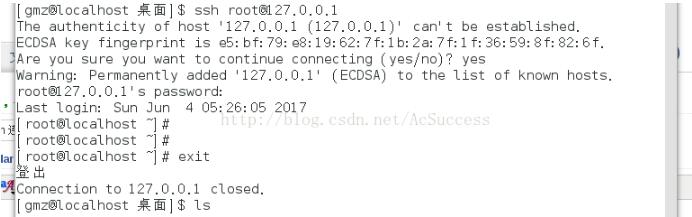
后续测试代码是二次链接,无需查询是否需要输入yes or no
import pexpect
def send_command(child, cmd):
  child.sendline(cmd)
  child.expect(PROMT)
  print child.before
def connect(user, host, password):
  ssh_newkey = 'Ary you sure you want to continue connecting'
  connStr = 'ssh ' + user + '@' + host
  child = pexpect.spawn(connStr)
  '''
  ret = child.expect([pexpect.TIMEOUT, ssh_newkey])
  if ret == 0:
    print "[-] Error 1"
    return
  elif ret == 1:
    child.sendline('yes')
  '''
  res = child.expect([pexpect.TIMEOUT, '[P|p]assword:'])
  if res == 0:
    print "[-] Error 2"
    return
  elif res == 1:
    child.sendline(password)
  child.expect(PROMT)
  return child
def main():
  host = '127.0.0.1'#测试主机ip或者主机名
  user = 'root'#测试账号
  password = 'root'#测试密码
  child = connect(user, host, password)
  send_command(child, 'w')
if __name__ == '__main__':
  main()
可以用pxssh模块更简单来完成ssh的连接
from pexpect import pxssh
def send_command(s, cmd):
  s.sendline(cmd)
  s.prompt()
  print s.before
def connect(host, user, password):
  try:
    s = pxssh.pxssh()
    s.login(host, user, password)
    return s
  except:
    print "error"
    exit(0)
def main():
  s = connect('127.0.0.1', 'root', '15110506010')
  send_command(s, 'whoami')
if __name__ == '__main__':
  main()
批量连接肉鸡。
from pexpect import pxssh
botnet = []
class client:
	def __init__(self, user, host, password):
		self.user=user
		self.host=host
		self.password=password
		self.child=self.connect()
	def connect(self):
		try:
			s = pxssh.pxssh()
			s.login(self.host, self.user, self.password)
			return s
		except Exception, e:
			print "Error *" + str(e)
	def send_command(self, cmd):
		self.child.sendline(cmd)
		self.child.prompt()
		return self.child.before
def addclient(user, host, password):
	c = client(user, host, password)
	botnet.append(c)
def botnetcommand(command):
	for c in botnet:
		output = c.send_command(command)
		print "ip: " + str(c.host)
		print output
def main():
	addclient('root', '127.0.0.1', 'toor')
	addclient('root', '****', '*****')
	botnetcommand('pwd')
if __name__=='__main__':
	main()
以上这篇python pexpect ssh 远程登录服务器的方法就是小编分享给大家的全部内容了,希望能给大家一个参考,也希望大家多多支持脚本之家。


