

定时将源文件或目录使用WinRAR压缩并自动备份到本地或网络上的主机
1.确保WinRAR安装在默认路径或者把WinRAR.exe添加到环境变量中
2.在代码里的sources填写备份的文件或目录,target_dir填写备份目的目录
3.delete_source_file为备份完后是否删除源文件(不删除子文件夹)
4.备份成功/失败后生成备份日志
按照格式,填写源目的:
sources = [r'E:\目录1', r'E:\目录2\b.txt'] #例:= [ r'E:\test\1234.txt', r'E:\test1']
target_dir = r'\\10.1.5.227\共享\备份'   #例:= r'D:\备份' 或 = r'\\10.1.5.227\共享目录'
delete_source_file = False        #False/True
手动运行三次,已经有两个备份zip了

打开log查看为什么少了一个
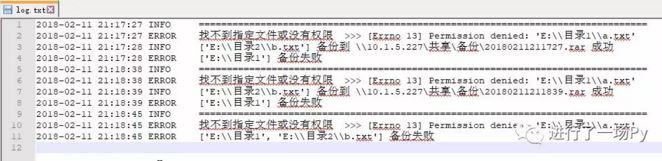
可以看到目录1备份失败了,细看发现,目录1下的a.txt没有权限(读取),是因为用户对该文件没有权限。
如果该目录或者子目录下有一个没有权限,会导致整个目录都不能备份, 日志看到a.txt没有权限.
第二次备份的时候将源文件删除后,第三次备份就没有文件备份了
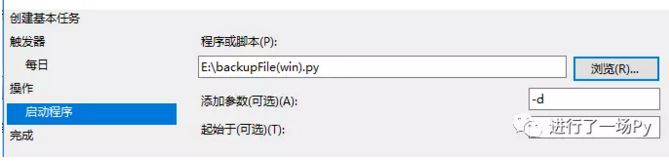
接下来将脚本程序添加到win的计划任务里,就能实现定时自动备份辣<( ̄︶ ̄)>

把代码文件添加进来,同时也可以在这里添加参数-d, 指明备份完后删除源文件
完整代码
python3.0
# -*- coding=utf-8 -*-
#进行了一场py/etherchannel
import os, sys
import time
import logging
sources = [r'E:\视频笔记', r'E:\目录\b.txt'] #例:= [ r'E:\test\1234.txt', r'E:\test1']
target_dir = r'\\10.1.5.227\共享\备份'    #例:= r'D:\备份' 或 = r'\\10.1.5.227\共享目录'
delete_source_file = False         #False/True
def Init_Logging(path):
  logging.basicConfig(level=logging.INFO,
    format='%(asctime)s %(levelname)-8s %(message)s',
    filename=path + '\\' + 'log.txt',
    filemode='a',
    datefmt='%Y-%m-%d %X')
def Ctypes(message, title):
  import ctypes
  ctypes.windll.user32.MessageBoxA(0,message.encode('gb2312'), \
  title.encode('gb2312'),0)
  sys.exit()
def Check_Dir_Permit(dirs, dirc_permit=True, root=''):
  for dirc in dirs:
    dirc = os.path.join(root,dirc)
    try:
      os.chdir(dirc)
    except IOError as e:
      logging.error("找不到指定文件或没有权限 >>> " + str(e))
      dirc_permit = False
  return dirc_permit
def Create_Directory(dir):
  if not os.path.exists(dir):
    try:
      os.mkdir(dir)
      print('Successfully created directory',dir)
    except IOError as e:
      Ctypes(u"target_dir 目录路径不存在 ", u' 错误')
  assert Check_Dir_Permit([dir]), Ctypes(u"target_dir 没有权限 ", u' 错误')
  return dir
def Check_File_Permit(files, file_permit=True, root=''):
  for filename in files:
    file = os.path.join(root,filename)
    try:
      f = open(file)
      f.close()
    except IOError as e:
      logging.error("找不到指定文件或没有权限 >>> " + str(e))
      file_permit = False
  return file_permit
def Permit_Source(sources):
  allow_sources = []
  disallow_sources = []
  for source in sources:
    file_permit = True
    dirc_permit = True
    for (root, dirs, files) in os.walk(source):
      file_permit = Check_File_Permit(files, file_permit,root=root)
      dirc_permit = Check_Dir_Permit(dirs, dirc_permit,root=root)
    if os.path.isdir(source) and file_permit and dirc_permit or \
      os.path.isfile(source) and Check_File_Permit([source], file_permit):
      allow_sources.append(source)
    else:
      disallow_sources.append(source)
  return (allow_sources,disallow_sources)
def Delete_Files(allow_sources):
  for source in allow_sources:
    if os.path.isdir(source):
      command = 'del /a/s/f/q ' + source  #/s:也把子文件夹的文件一并删除
      if os.system(command) == 0:
        logging.info('del: ' + str(source))
      else:
        logging.error(str(source) + ' 删除失败')
    else:
      command = 'del /a/f/q ' + source
      if os.system(command) == 0:
        logging.info('del: ' + str(source))
      else:
        logging.error(str(source) + ' 删除失败')
def Compress_Backup(target, source):
  target = target + '\\' + time.strftime('%Y%m%d%H%M%S') + '.rar'
  if os.path.exists(r"C:\Program Files (x86)\WinRAR\WinRAR.exe"):
    rar_command = r'"C:\Program Files (x86)\WinRAR\WinRAR.exe" A %s %s' % (target,' '.join(source)) #WinRAR.exe" A %s %s -r'加上-r是作用到子文件夹中同名的文件
  else:
    rar_command = 'WinRAR' + ' A %s %s' % (target,' '.join(source))
  if os.system(rar_command) == 0:
    print('Successful backup to', target)
    logging.info(str(source) + ' 备份到 ' + str(target) + ' 成功')
    try:
      if delete_source_file or sys.argv[1] == '-d':
        Delete_Files(source)
    except IndexError:
      pass
  else:
    logging.error("备份失败:WinRAR出错,确认路径 或 压缩被中断")
    Ctypes(u"备份失败:WinRAR出错,确认路径 或 压缩被中断", u' 错误')
if __name__ == '__main__':
  target_dir = Create_Directory(target_dir)
  Init_Logging(target_dir)
  logging.info('=' * 80)
  allow_sources, disallow_sources = Permit_Source(sources)
  if allow_sources:
    Compress_Backup(target_dir, allow_sources)
  if disallow_sources:
    print(disallow_sources, ' 备份失败')
    logging.error(str(disallow_sources) + ' 备份失败')
以上所述是小编给大家介绍的python实现定时自动备份文件到其他主机的实例代码,希望对大家有所帮助,如果大家有任何疑问请给我留言,小编会及时回复大家的。在此也非常感谢大家对脚本之家网站的支持!


