

前言
最近在项目中需要输出彩色的文字来提醒用户,以前写过,但是只能在win上面运行。
今天搜了下看有没有在win和Linux上通用的输出彩色文字的模块,结果发现没有,,于是就自己弄了一个,分享下,以后用的时候翻翻博客,方便别人也方便自己。
win下输出彩色文字,网上有两种方法一种是用system执行命令来设置颜色,感觉还是不太好,用ctypes模块实现更好点。
linux下设置颜色,网上只找到了一种方法,下面不废话了,直接贴下代码:
示例代码
import platform
if 'Windows' in platform.system():
 import sys
 import ctypes
 __stdInputHandle = -10
 __stdOutputHandle = -11
 __stdErrorHandle = -12
 __foreGroundBLUE = 0x09
 __foreGroundGREEN = 0x0a
 __foreGroundRED = 0x0c
 __foreGroundYELLOW = 0x0e
 stdOutHandle=ctypes.windll.kernel32.GetStdHandle(__stdOutputHandle)
 def setCmdColor(color,handle=stdOutHandle):
 return ctypes.windll.kernel32.SetConsoleTextAttribute(handle, color)
 def resetCmdColor():
 setCmdColor(__foreGroundRED | __foreGroundGREEN | __foreGroundBLUE)
 def printBlue(msg):
 setCmdColor(__foreGroundBLUE)
 sys.stdout.write(msg + '\n')
 resetCmdColor()
 def printGreen(msg):
 setCmdColor(__foreGroundGREEN)
 sys.stdout.write(msg + '\n')
 resetCmdColor()
 def printRed(msg):
 setCmdColor(__foreGroundRED)
 sys.stdout.write(msg + '\n')
 resetCmdColor()
 def printYellow(msg):
 setCmdColor(__foreGroundYELLOW)
 sys.stdout.write(msg + '\n')
 resetCmdColor()
else:
 STYLE = {
 'fore':{
 'red': 31,
 'green': 32,
 'yellow': 33,
 'blue': 34,
 }
 }
 def UseStyle(msg, mode = '', fore = '', back = '40'):
 fore = '%s' % STYLE['fore'][fore] if STYLE['fore'].has_key(fore) else ''
 style = ';'.join([s for s in [mode, fore, back] if s])
 style = '\033[%sm' % style if style else ''
 end = '\033[%sm' % 0 if style else ''
 return '%s%s%s' % (style, msg, end)
 def printRed(msg):
 print UseStyle(msg,fore='red')
 def printGreen(msg):
 print UseStyle(msg,fore='green')
 def printYellow(msg):
 print UseStyle(msg,fore='yellow')
 def printBlue(msg):
 print UseStyle(msg,fore='blue')
效果图:
Windows:
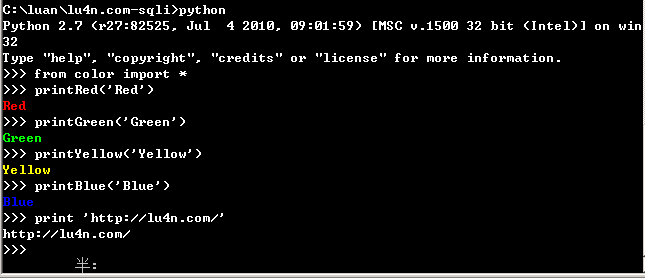
C:\luan\lu4n.com-sqli>python
Python 2.7 (r27:82525, Jul 4 2010, 09:01:59) [MSC v.1500 32 bit (Intel)] on win
32
Type "help", "copyright", "credits" or "license" for more information.
>>> from color import *
>>> printRed('Red')
Red
>>> printGreen('Green')
Green
>>> printYellow('Yellow')
Yellow
>>> printBlue('Blue')
Blue
>>> print 'http://lu4n.com/'
http://lu4n.com/
>>>
Linux:
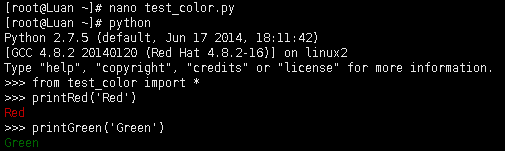
[root@Luan ~]# nano test_color.py
[root@Luan ~]# python
Python 2.7.5 (default, Jun 17 2014, 18:11:42)
[GCC 4.8.2 20140120 (Red Hat 4.8.2-16)] on linux2
Type "help", "copyright", "credits" or "license" for more information.
>>> from test_color import *
>>> printRed('Red')
Red
>>> printGreen('Green')
Green
>>>
用起来很容易,直接from color import *就可以用了,有4种常用颜色可以使用,分别写了4个函数:
提示信息 printBlue
成功信息 printGreen
失败信息 printRed
警告信息 printYellow
和bootstrap的几种颜色差不多,应该够用了。
以上就是这篇文章的全部内容了,希望本文的内容对大家的学习或者工作能带来一定的帮助,如果有疑问大家可以留言交流,谢谢大家对脚本之家的支持。


