

筛选分页每页的条数:
<select class="form-control" id="perPage" name="perPage">
 @foreach ( [10,20,30,50] as $e)
  <option value="{{$e}}" {{ $e==request('perPage') ? 'selected' : '' }} >{{$e}}</option>
 @endforeach
</select>
路由:
Route::get('customer/index/{customer_type?}', 'CustomerController@index');
后端接口:
public function index($customer_type = null) {
  $search = request('search');
  $perPage = request('perPage') ? request('perPage') : 10;
  $customer_type = $customer_type ? $customer_type : request('customer_type');
  $data = Customer::select(['id', 'email', 'user_name', 'nick_name', 'phone', 'create_time'])
   ->where('customer_type', '=', $customer_type)
   ->where(function ($query) use ($search) {
    if ($search) {
     $query->where('user_name', 'like', '%' . $search . '%')
      ->orWhere('nick_name', 'like', '%' . $search . '%')
      ->orWhere('phone', 'like', '%' . $search . '%')
      ->orWhere('email', 'like', '%' . $search . '%');
    }
   })
   ->orderBy('create_time', 'desc')
   ->paginate($perPage);
  //追加额外参数,例如搜索条件
  $appendData = $data->appends(array(
   'search' => $search,
   'customer_type' => $customer_type,
   'perPage' => $perPage,
  ));
  return view('admin/customerList', compact('data'));
 }
##效果图:
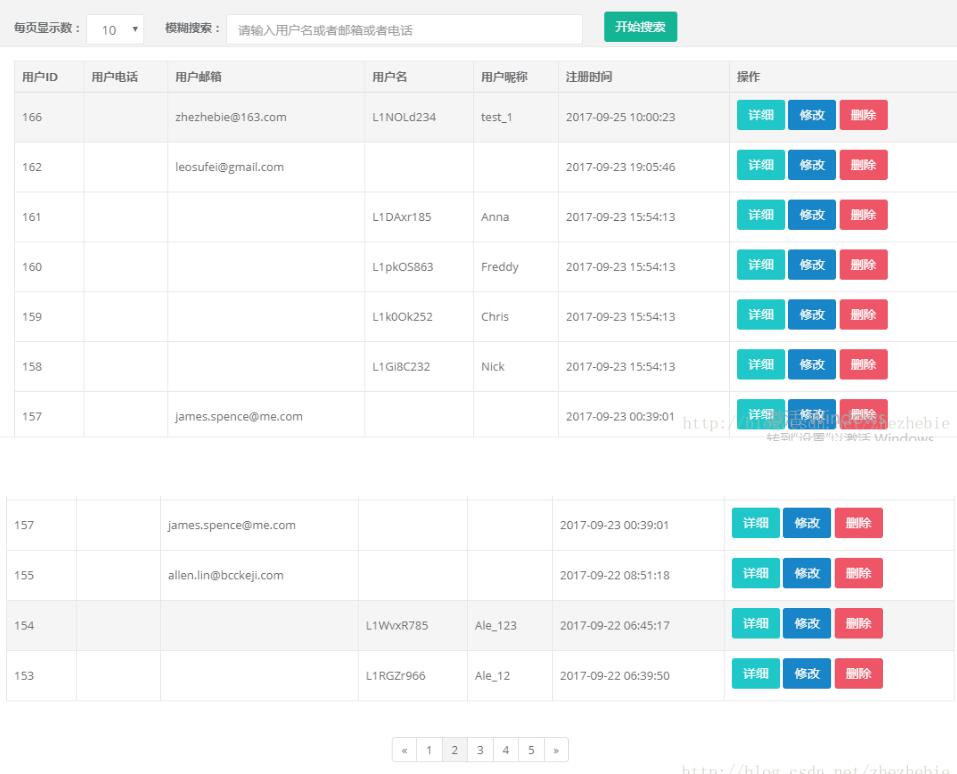
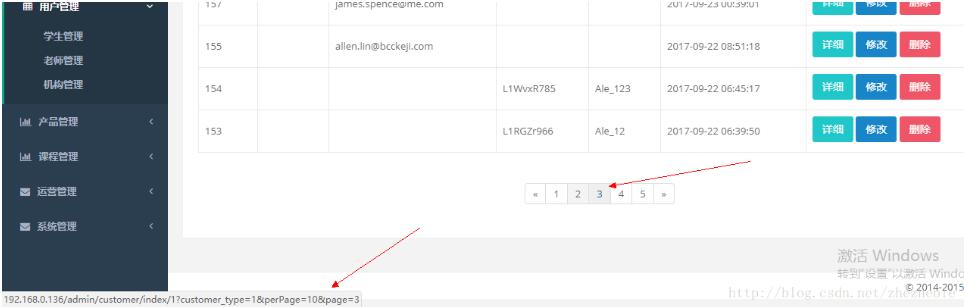
前端完整代码:
@extends('admin.master')
@section('content')
<div class="wrapper wrapper-content animated fadeInRight">
 <div class="row">
  <div class="col-sm-12">
   <div class="ibox float-e-margins">
    <form class="form-inline" method="get" action="{{ url('/admin/customer/index',[request()->route('customer_type')])}}">
     <div class="form-group" style="margin-left: 20px">
     <label for="perPage">每页显示数:</label>
     <select class="form-control" id="perPage" name="perPage">
      @foreach ( [10,20,30,50] as $e)
      <option value="{{$e}}" {{ $e==request('perPage') ? 'selected' : '' }} >{{$e}}</option>
      @endforeach
     </select>
    </div>
    <div class="form-group" style="margin-left: 20px">
     <label for="search">模糊搜索:</label>
     <input type="text" name="search" style="width: 400px" class="form-control" id="search" placeholder="请输入机构名或者邮箱或者电话" value="{{request('search')}}">
    </div>
    <button type="submit" class="btn btn-primary" style="margin-left: 20px">开始搜索</button>
   </form>
   {{-- 表格内容 --}}
   <div class="ibox-content">
    <table class="table table-hover table-bordered table-condensed">
     <thead>
      <tr class="success">
       <th class="text-center">用户ID</th>
       <th class="text-center">用户电话</th>
       <th class="text-center">用户邮箱</th>
       <th class="text-center">用户名</th>
       <th class="text-center">用户昵称</th>
       <th class="text-center">注册时间</th>
       <th class="text-center">操作</th>
      </tr>
     </thead>
     @if ($data->total()>0)

     <tbody>
      @foreach ($data as $element)
      {{-- {{dd($element)}} --}}
      <tr class="gradeU {{ ($element['status']==4)?'bg-danger':'' }}">
       <td>{{$element->id}}</td>
       <td class="center">{{$element->phone}}</td>
       <td>{{$element->email}}</td>
       <td>{{$element->user_name}}</td>
       <td>{{$element->nick_name}}</td>
       <td>{{$element->create_time}}</td>
       <td>
        <a class="btn btn-info" href="{{ url('admin/customer/getInfo',[$element->id] )}}" rel="external nofollow" >详细</a>
        <a class="btn btn-success" href="{{ url('admin/customer/readCustomer',[$element->id] )}}" rel="external nofollow" >修改</a>
        <a class="btn btn-danger" href="{{ url('admin/customer/softDeleteCustomer',[$element->id] )}}" rel="external nofollow" >删除</a>
       </td>
      </tr>
      @endforeach
     </tbody>
    </table>
    <div class="text-center">{!! $data->render() !!}</div>
    @else
    <tbody>
     <tr ><td colspan="7"><div class="text-center"><h3>没有查到相关数据!</h3></div></td></tr>
    </tbody>
   </table>
   @endif
  </div>
 </div>
</div>
</div>
</div>
@endsection
带筛选的:
<form class="form-inline" method="get" action="{{ url('dataInfo/channel_form_data',request('id'))}}">
 <div class="form-group" style="margin-left: 20px">
  <label for="search">状态筛选:</label>
  <select name="user_status" class="form-control">
   <option>所有状态</option>
   @foreach ($user_status as $key=>$element)
   <option value="{{$key}}" {{request('user_status')==$key?'selected':''}}>{{$element}}</option>
   @endforeach
  </select>
  <label for="search">模糊搜索:</label>
  <input type="text" name="search" style="width: 400px" class="form-control" id="search" placeholder="用户名或者邮箱" value="{{request('search')}}">
 </div>
 <button type="submit" class="btn btn-primary" style="margin-left: 20px">开始搜索</button>
 <a href="{{url('dataInfo/create_channel_user_data',request('id'))}}" rel="external nofollow" class="btn btn-primary" style="float:right;">新增渠道用户</a>
</form>
以上这篇Laravel实现搜索的时候分页并携带参数就是小编分享给大家的全部内容了,希望能给大家一个参考,也希望大家多多支持脚本之家。


