

Oracle数据泵(Data Dump)使用过程当中经常会遇到一些奇奇怪怪的错误案例,下面总结一些自己使用数据泵(Data Dump)过程当中遇到的问题以及解决方法。都是在使用过程中遇到的问题,以后陆续遇到数据泵(Data Dump)的错误案例,都会补充在此篇。
错误案例1:
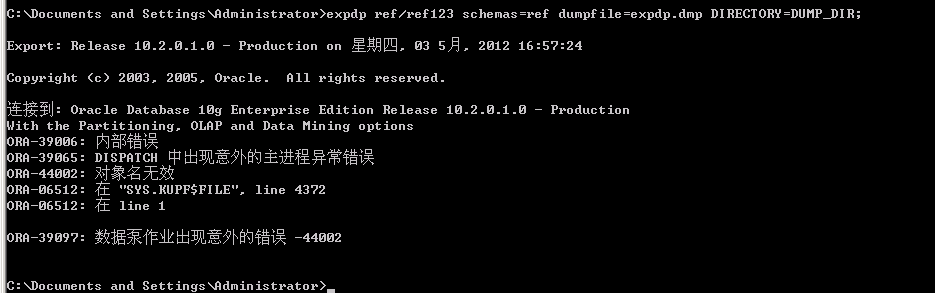
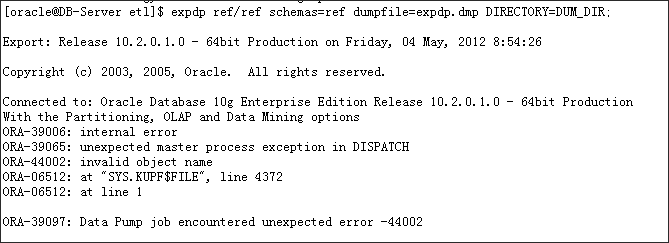
ORA-39065: DISPATCH 中出现意外的主进程异常错误;ORA-44002: 对象名无效
Windows 平台错误提示:
Linux平台错误提示
解决方法:
[oracle@DB-Server admin]$ oerr ora 39065
39065, 00000, "unexpected master process exception in %s"
// *Cause: An unhandled exception was detected internally within the master
// control process for the Data Pump job. This is an internal error.
// messages will detail the problems.
// *Action: If problem persists, contact Oracle Customer Support.
[oracle@DB-Server admin]$ oerr ora 39097
39097, 00000, "Data Pump job encountered unexpected error %s"
// *Cause: An unexpected, potentially non-fatal error occurred while
// processing a Data Pump job.
// *Action: Contact Oracle Customer Support.
执行$ORACLE_HOME/rdbms/admin目录下面的catmet2.sql,utlrp.sql 两个SQL文件即可解决这个问题。
[oracle@DB-Server ~]$ cd $ORACLE_HOME/rdbms/admin

[oracle@DB-Server admin]$ sqlplus / as sysdba

SQL*Plus: Release 10.2.0.1.0 - Production on Sun Sep 7 08:24:23 2014

Copyright (c) 1982, 2005, Oracle. All rights reserved.

Connected to an idle instance.

SQL> @catmet2.sql

SQL> @utlrp.sql
错误案例2:
使用expdp/impdp时遭遇ORA-39006: internal error;ORA-39213: Metadata processing is notavailable错误
[oracle@DB-Server backup]$ impdp frnt/frnt directory=dum_dir dumpfile=20120420.FRNT_02.dmp tablespaces=TBS_TR_DATA;

Import: Release 10.2.0.1.0 - 64bit Production on Wednesday, 25 April, 2012 14:41:48

Copyright (c) 2003, 2005, Oracle. All rights reserved.

Connected to: Oracle Database 10g Enterprise Edition Release 10.2.0.1.0 - 64bit Production
With the Partitioning, OLAP and Data Mining options
ORA-39006: internal error
ORA-39213: Metadata processing is not available
解决方法:
错误原因如下所示,因为Data Pump不能使用Metadata API, 这个是因为XSL stylesheets 没有正确设置缘故。需要以SYSDBA执行dbms_metadata_util.load_stylesheets
[oracle@DB-Server admin]$ oerr ora 39213

39213, 00000, "Metadata processing is not available"

// *Cause: The Data Pump could not use the Metadata API. Typically,

// this is caused by the XSL stylesheets not being set up properly.

// *Action: Connect AS SYSDBA and execute dbms_metadata_util.load_stylesheets

// to reload the stylesheets.
SQL>exec dbms_metadata_util.load_stylesheets
错误案例3:
错误如下所示:
etl@NMS_ODS_NDB1[/jkfile/klbtmp]#expdp userid=username/password@tnsname dumpfile=ref.dmp directory=DUMP_TEST schemas=ref content=all logfile=ref.log

Export: Release 10.2.0.3.0 - 64bit Production on Saturday, 02 March, 2013 10:28:25

Copyright (c) 2003, 2005, Oracle. All rights reserved.

Connected to: Oracle Database 10g Enterprise Edition Release 10.2.0.3.0 - 64bit Production

With the Partitioning, Real Application Clusters, OLAP and Data Mining options

ORA-39002: invalid operation

ORA-39070: Unable to open the log file.

ORA-29283: invalid file operation

ORA-06512: at "SYS.UTL_FILE", line 475

ORA-29283: invalid file operation
解决方法:
出现这个错误,需要检查DIRECTORY目录,创建DIRECTORY时,ORACLE并不检查操作系统目录是否已经存在
首先检查DIRECTORY目录DUMP_TEST对应的DIRECTORY_PATH,然后检查操作系统下,验证该目录是否存在。
SQL> SELECT * FROM DBA_DIRECTORIES WHERE DIRECTORY_NAME='DUMP_TEST';

OWNER              DIRECTORY_NAME      DIRECTORY_PATH

------------------------ ------------------------------ -----------------

SYS                DUMP_TEST       /jkfile/klbtmp/

SQL>
结果检查发现该目录被删除了,创建该目录即可解决问题。
另外一种情况,如果创建DIRECTORY目录时,出现了换行,也会出现上面错误信息,这种错误玩玩很难发现,非常折腾人。所以需要非常细心。
SQL> create directory DUMP_TEST as '/jkfile/klbtmp/
';
错误案例4:
如下所示:
etl@NMS_ODS_NDB1[/jkfile/work/klb]#expdp userid=etl/sunrise@wgods1 dumpfile=ref.dmp directory=DUMP_DIR schemas=ref content=all logfile=ref.log

Export: Release 10.2.0.3.0 - 64bit Production on Saturday, 02 March, 2013 10:50:25

Copyright (c) 2003, 2005, Oracle. All rights reserved.

Connected to: Oracle Database 10g Enterprise Edition Release 10.2.0.3.0 - 64bit Production

With the Partitioning, Real Application Clusters, OLAP and Data Mining options

ORA-31631: privileges are required

ORA-39109: Unprivileged users may not operate upon other users' schemas
解决方法:
主要是etl账号缺少exp_full_database 权限,给etl账号授予exp_full_database 权限后,上述问题解决。
# su - oracle

$ sqlplus / as sysdba

SQL*Plus: Release 10.2.0.3.0 - Production on Sat Mar 2 10:58:37 2013

Copyright (c) 1982, 2006, Oracle. All Rights Reserved.

Connected to:

Oracle Database 10g Enterprise Edition Release 10.2.0.3.0 - 64bit Production

With the Partitioning, Real Application Clusters, OLAP and Data Mining options

SQL> grant exp_full_database to etl;

Grant succeeded.
错误案例5:
etl@NMS_ODS_NDB1[/etl1_cx/etl]expdp etl/sunrise@wgods1 dumpfile=DM.TM_ALARM_LOG.dmp directory=DUMP_DIR tables=DM.TM_ALARM_LOG query='DATE_CD >=20121201 AND DATE_CD <=20130131';

LRM-00101: unknown parameter name '>'
解决方法:
etl@NMS_ODS_NDB1[/etl1_cx/etl]expdp etl/sunrise@wgods1 dumpfile=DM.TM_ALARM_LOG.dmp directory=DUMP_DIR tables=DM.TM_ALARM_LOG query="DATE_CD \>\=20121201 AND DATE_CD \<\=20130131";
错误案例6:
LRM-00121: 'DATA_ONLY' is not an allowable value for 'compression'。如下所示:
etl@NMS_ODS_NDB1[/etl1_cx/etl]#expdp etl/sunrise@wgods1 dumpfile=ref.dmp directory=DUMP_DIR dumpfile=DM.TM_ALARM_LOG201212.dmp tables=DM.TM_ALARM_LOG COMPRESSION=DATA_ONLY query='DATE_CD >=20121201 AND DATE_CD <=20130131';

LRM-00121: 'DATA_ONLY' is not an allowable value for 'compression'
解决方法:
首先查看EXPDP工具的版本,如下所示:
etl@NMS_ODS_NDB1[/etl1_cx/etl]#expdp version

Export: Release 10.2.0.3.0 - 64bit Production on Monday, 04 March, 2013 14:46:47

Copyright (c) 2003, 2005, Oracle. All rights reserved.

Password:
请注意,在ORACLE 10g下 COMPRESSION只有METADATA_ONLY和NONE两个选项,ORACLE 11g下才有DATA_ONLY选项。所以报如上错误。所以在使用前,请注意一下EXPDP工具的版本。
错误案例7:
[oracle@DB-Server]$ expdp system/***** TABLES=INVENRTY.INV_STK_HD dumpfile=INV_STK_HD.dmp logfile=1.log DIRECTORY=CUR_DUMP_DIR

Export: Release 10.2.0.4.0 - Production on Sunday, 14 July, 2013 8:27:16

Copyright (c) 2003, 2007, Oracle. All rights reserved.

Connected to: Oracle Database 10g Release 10.2.0.4.0 - Production

ORA-31626: job does not exist

ORA-31637: cannot create job SYS_EXPORT_TABLE_01 for user SYSTEM

ORA-06512: at "SYS.DBMS_SYS_ERROR", line 95

ORA-06512: at "SYS.KUPV$FT_INT", line 600

ORA-39080: failed to create queues "KUPC$C_1_20130714082716" and "KUPC$S_1_20130714082716" for Data Pump job

ORA-06512: at "SYS.DBMS_SYS_ERROR", line 95

ORA-06512: at "SYS.KUPC$QUE_INT", line 1606

ORA-00832: no streams pool created and cannot automatically create one
解决方法:
这个案例我以前已经介绍过,具体参考我的博客 Expdp 导数错误 ORA-00832
错误案例8:
[oracle@testlnx01 u03]$ cd tmp/

[oracle@testlnx01 tmp]$ expdp system/***** directory=DUMPDIR dumpfile=ESCMUSER.dmp schemas=ESCMUSER logfile=ESCMUSER.log

Export: Release 10.2.0.4.0 - 64bit Production on Wednesday, 27 August, 2014 16:30:46

Copyright (c) 2003, 2007, Oracle. All rights reserved.

Connected to: Oracle Database 10g Release 10.2.0.4.0 - 64bit Production

ORA-31626: job does not exist

ORA-31633: unable to create master table "SYSTEM.SYS_EXPORT_SCHEMA_05"

ORA-06512: at "SYS.DBMS_SYS_ERROR", line 95

ORA-06512: at "SYS.KUPV$FT", line 871

ORA-00959: tablespace 'TOOLS' does not exist
解决方法:
这个案例有点特别,刚遇到的时候,确实有点莫名其妙,经过苦苦求索、求证后才发现,本来有一个TOOLS的表空间,不知道是哪位头脑发热的人,居然指定SYSTEM用户的默认表空间为TOOLS,但是这个表空间又被人删除了。于是便有了这样一个案例。
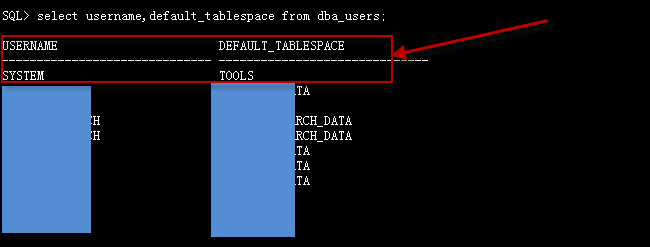
SQL> ALTER USER SYSTEM DEFAULT TABLESPACE SYSTEM;

User altered.
修改用户SYSTEM的默认表空间后,问题解决。


