

MySQL 的官网下载地址:http://www.mysql.com/downloads/
在这个下载界面会有几个版本的选择。
1. MySQL Community Server 社区版本,开源免费,但不提供官方技术支持。
2. MySQL Enterprise Edition 企业版本,需付费,可以试用30天。
3. MySQL Cluster 集群版,开源免费。可将几个MySQL Server封装成一个Server。
4. MySQL Cluster CGE 高级集群版,需付费。
5. MySQL Workbench(GUI TOOL)一款专为MySQL设计的ER/数据库建模工具。它是著名的数据库设计工具DBDesigner4的继任者。MySQL Workbench又分为两个版本,分别是社区版(MySQL Workbench OSS)、商用版(MySQL Workbench SE)。
MySQL Community Server 是开源免费的,这也是我们通常用的MySQL的版本。根据不同的操作系统平台细分为多个版本,下面我们以windows平台为例来说明。
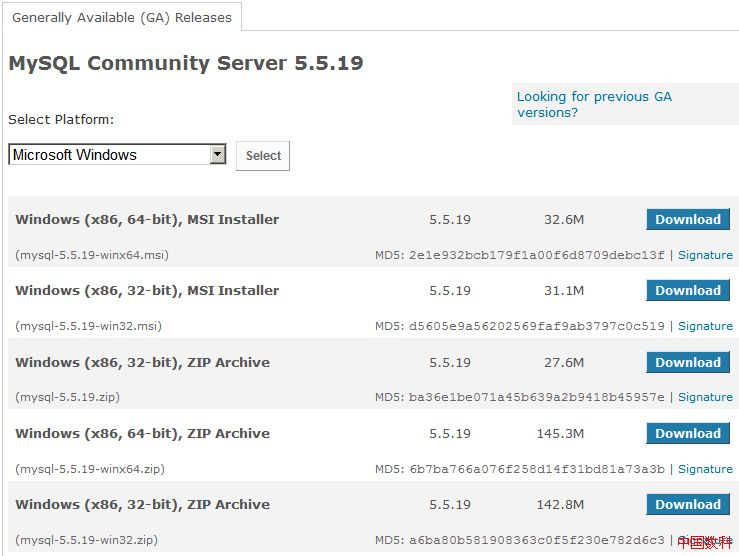
例如下载mysql 5.5.19的界面如下:
说明:
我们选择Generally Available(GA)Release 去下载。GA 是指软件的通用版本,一般指正式发布的版本。
mysql-5.5.19-win32.msi,windows安装包,msi安装包是用msiexec安装完成的。windows下双击根据向导安装即可,简单方便。
mysql-5.5.19.zip,这个是windows源文件,需要编译。
mysql-5.5.19-win32.zip,这个文件解包后即可使用,是编译好的windows32位MySQL。需要手工配置。
带 "winx64" 的则是对应的64位版本,在64位操作系统下使用。
一般做后台开发,我们就下载mysql-5.5.19-win32.msi。
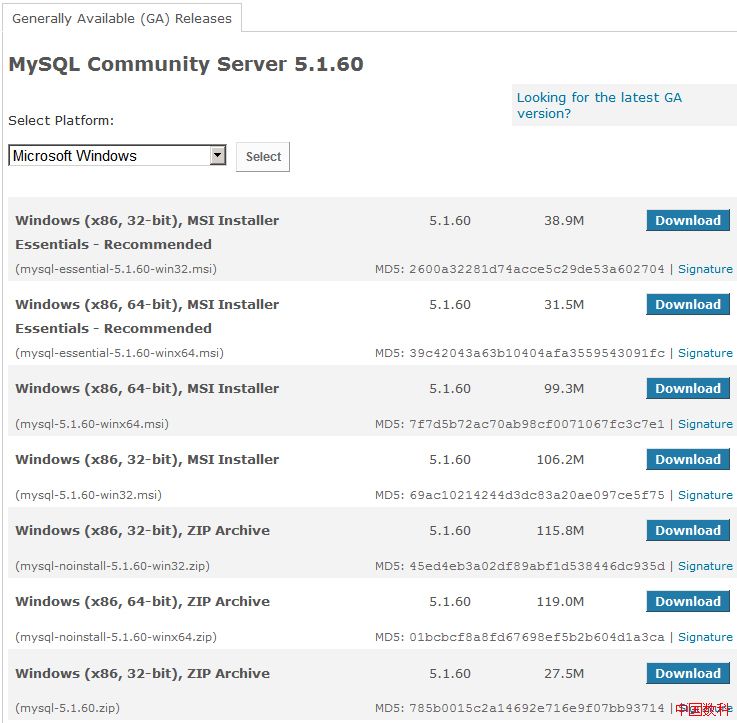
例如下载mysql 5.1.60的界面如下:
说明:
选择Generally Available(GA)Release 去下载。GA 是指软件的通用版本,一般指正式发布的版本。
“essentials” 是指精简版,不包含 embedded server and benchmark suite,有自动安装程序和配置向导,没有MySQL文档。
“noinstall” 是指非安装的压缩包的。包含 embedded server and benchmark suite,没有自动安装程序和配置向导,需手动安装配置,有MySQL文档。
mysql-essential-5.1.60-win32.msi 是精简版,如果只需要mysql服务,就选择此版本。
mysql-5.1.60-win32.msi 是完整版,包含安装程序和配置向导,有MySQL文档。
mysql-noinstall-5.1.60-win32.zip 是非安装的zip压缩包,没有自动安装程序和配置向导,需手动安装配置,有MySQL文档。
mysql-5.1.60.zip 是用于windows的Mysql源码压缩包
带 "winx64" 的则是对应的64位版本,在64位操作系统下使用。
一般做后台开发,我们就下载mysql-essential-5.1.60-win32.msi 即可。
The Essentials Package:
不包含 embedded server and benchmark suite,有自动安装程序和配置向导,没有MySQL Documentation。
The Complete Package:
包含 embedded server and benchmark suite,有自动安装程序和配置向导,有MySQL Documentation。
The Noinstall Archive:
包含 embedded server and benchmark suite,没有自动安装程序和配置向导,有MySQL Documentation。
一般情况下我们会使用带有有自动安装程序和配置向导的安装版本,方便配置mysql,当然高手也可以不用,手工配置即可。
参考:
For MySQL 5.0, there are three installation packages to choose from when installing MySQL on Windows:
The Essentials Package: This package has a filename similar to mysql-essential-5.0.40-win32.msi and contains the minimum set of files needed to install MySQL on Windows, including the Configuration Wizard. This package does not include optional components such as the embedded server and benchmark suite.
The Complete Package: This package has a filename similar to mysql-5.0.40-win32.zip and contains all files needed for a complete Windows installation, including the Configuration Wizard. This package includes optional components such as the embedded server and benchmark suite.
The Noinstall Archive: This package has a filename similar to mysql-noinstall-5.0.40-win32.zip and contains all the files found in the Complete install package, with the exception of the Configuration Wizard. This package does not include an automated installer, and must be manually installed and configured.
The Essentials package is recommended for most users. It is provided as an .msi file for use with the Windows Installer. The Complete and Noinstall distributions are packaged as Zip archives. To use them, you must have a tool that can unpack .zip files.
Your choice of install package affects the installation process you must follow. If you choose to install either the Essentials or Complete install packages, see Section 2.4.8.2, “Installing MySQL with the Automated Installer”. If you choose to install MySQL from the Noinstall archive, see Section 2.4.8.5, “Installing MySQL from a Noinstall Zip Archive”.


