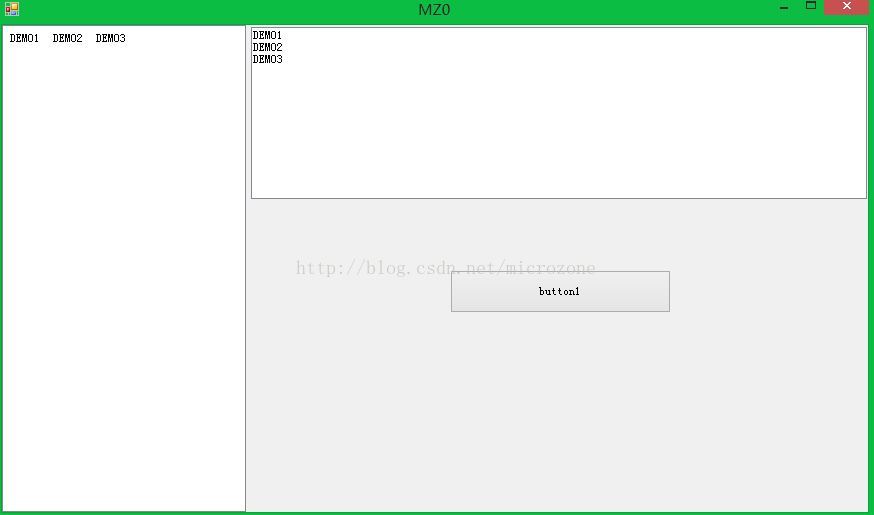
C#实现窗体中的各个控件同比自动放缩大小

所属分类: 数据库 / MongoDB 阅读数: 192
收藏 0 赞 0 分享

实现方式主要是利用panel控件为主题,对于每个控件的大小位置和字体这几个属性进行记录,然后根据窗体改变的大小同时放缩。

简要步骤如下:

1、创建C#窗体程序项目。
2、Panel放置到窗体。
3、设置属性dock为fill。
4、注意MinnumSize不能设置为0, 改成大于0都行。

复制代码 代码如下:

public partial class FrmDemo : Form 
    { 
        double dFrmWidth; 
        double dFrmHeight; 
        double dZoomHorizon; 
        double dZoomVerticality; 
        Dictionary<string, string> dicControlsAttribute = new Dictionary<string, string>(); 
 
        protected void GetAllInitiateContrlInfo(Control CrlContainer) 
        { 
            if (CrlContainer.Parent == this) 
            { 
                dFrmWidth = Convert.ToDouble(CrlContainer.Width); 
                dFrmHeight = Convert.ToDouble(CrlContainer.Height); 
            } 
            foreach (Control item in CrlContainer.Controls) 
            { 
                if (item.Name.Trim() != "") 
                    dicControlsAttribute.Add(item.Name, (item.Left + item.Width / 2) + "," + (item.Top + item.Height / 2)  
                                             + "," + item.Width + "," + item.Height + "," + item.Font.Size); 
                if ((item as UserControl) == null && item.Controls.Count > 0) 
                    GetAllInitiateContrlInfo(item); 
            } 
        } 
 
        private void ChangeControlsInitiate(Control CrlContainer) 
        { 
            dZoomHorizon = (Convert.ToDouble(CrlContainer.Width) / dFrmWidth); 
            dZoomVerticality = (Convert.ToDouble(CrlContainer.Height) / dFrmHeight); 
        } 
         
        private void ChangeCurrentControlAttr(Control CrlContainer) 
        { 
            double[] dPosition = new double[5]; 
            foreach (Control item in CrlContainer.Controls) 
            { 
                if (item.Name.Trim() != "") 
                { 
                    if ((item as UserControl) == null && item.Controls.Count > 0) 
                        ChangeCurrentControlAttr(item); 
                    string[] strs = dicControlsAttribute[item.Name].Split(','); 
                    for (int j = 0; j < 5; j++) 
                    { 
                        dPosition[j] = Convert.ToDouble(strs[j]); 
                    } 
                    double itemWidth = dPosition[2] * dZoomHorizon; 
                    double itemHeight = dPosition[3] * dZoomVerticality; 
                    item.Left = Convert.ToInt32(dPosition[0] * dZoomHorizon - itemWidth / 2); 
                    item.Top = Convert.ToInt32(dPosition[1] * dZoomVerticality - itemHeight / 2); 
                    item.Width = Convert.ToInt32(itemWidth); 
                    item.Height = Convert.ToInt32(itemHeight); 
                    //item.Font = new Font(item.Font.Name, float.Parse 
                    //((dPosition[4] * Math.Min(dZoomHorizon, dZoomVerticality)).ToString())); 
                    //字体也可以实现同比放缩。 
                     } 
            } 
        } 
        protected override void OnSizeChanged(EventArgs e) 
        { 
            base.OnSizeChanged(e); 
            if (dicControlsAttribute.Count > 0) 
            { 
                ChangeControlsInitiate(this.Controls[0]); 
                ChangeCurrentControlAttr(this.Controls[0]); 
            } 
        }  
 
        public FrmDemo() 
        { 
            InitializeComponent(); 
            GetAllInitiateContrlInfo(this.Controls[0]);//构造函数里面调用即可。 
        } 
}

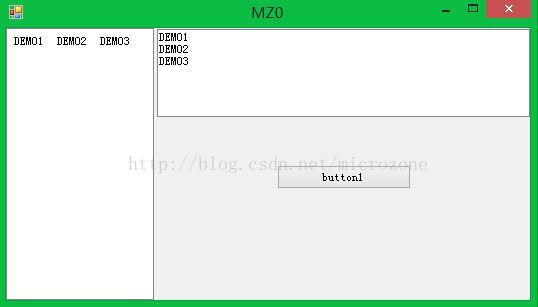
5、效果测试
更多精彩内容其他人还在看

mongo中模糊查询的综合应用

这篇文章主要给大家介绍了关于mongo中模糊查询的相关资料,文中通过示例代码介绍的非常详细,对大家学习或者使用mongodb具有一定的参考学习价值,需要的朋友们下面来一起学习学习吧
收藏 0 赞 0 分享

mongoDB中聚合函数java处理示例详解

这篇文章主要给大家介绍了关于mongoDB中聚合函数java处理的相关资料,文中通过示例代码介绍的非常详细,对大家学习或者使用mongoDB具有一定的参考学习价值,需要的朋友们下面来一起学习学习吧
收藏 0 赞 0 分享

Ubuntu 18.04安装MongoDB 4.0 的教程详解

这篇文章主要介绍了Ubuntu 18.04安装MongoDB 4.0 的教程,非常不错,具有一定的参考借鉴价值,需要的朋友可以参考下
收藏 0 赞 0 分享

MongoDB实现自动备份的全过程记录

这篇文章主要给大家介绍了关于MongoDB实现自动备份的全过程,文中通过示例代码介绍的非常详细,对大家学习或者使用MongoDB具有一定的参考学习价值,需要的朋友们下面来一起学习学习吧
收藏 0 赞 0 分享

MongoDB分片集群部署详解

这篇文章主要介绍了MongoDB分片集群部署详解,文中通过示例代码介绍的非常详细,对大家的学习或者工作具有一定的参考学习价值,需要的朋友们下面随着小编来一起学习学习吧
收藏 0 赞 0 分享

大数据环境下mongoDB为何要加索引浅析

这篇文章主要给大家介绍了关于大数据环境下mongoDB为何要加索引的相关资料,文中通过示例代码介绍的非常详细,对大家学习或者使用mongoDB具有一定的参考学习价值,需要的朋友们下面来一起学习学习吧
收藏 0 赞 0 分享

MongoDB副本集丢失数据的测试实例教程

这篇文章主要给大家介绍了关于MongoDB副本集丢失数据的测试的相关资料,文中通过示例代码介绍的非常详细,对大家学习或者使用MongoDB具有一定的参考学习价值,需要的朋友们下面来一起学习学习吧
收藏 0 赞 0 分享

mongodb数据库基础知识之连表查询

这篇文章主要给大家介绍了关于mongodb数据库基础知识之连表查询的相关资料,文中通过示例代码介绍的非常详细,对大家学习或者使用mongodb具有一定的参考学习价值,需要的朋友们下面来一起学习学习吧
收藏 0 赞 0 分享

MongoDB凭什么跻身数据库排行前五

MongoDB以比去年同期超出65.96分的成绩继续雄踞榜单前五,这个增幅在全榜仅次于PostgreSQL的77.99,而其相对于4月份的6.10分的增长也是仅次于微软SQL Server排名全榜第二
收藏 0 赞 0 分享

Windows下MongoDB的下载安装、环境配置教程图解

这篇文章主要介绍了Windows下MongoDB的下载安装、环境配置教程详解,本文给大家介绍的非常详细,具有一定的参考借鉴价值 ,需要的朋友可以参考下
收藏 0 赞 0 分享
查看更多