

前言
很多新手对图片验证码不是很了解,所以本文尝试通过一个简单的 JSP 小程序来实现验证码功能。文中给出了详细的示例代码,文末给出了完整实例代码的下载地址,下面话不多说了,来一起看看详细的介绍吧。
效果图

示例代码
前台代码如下:
<form action="action.jsp" method="POST">
 <label> 用户名:
 <input type="text" name="name" data-singleTips="请输入用户名" value="admin" />
 </label>
 <label> 密码: <input type="password" name="password" />
 </label>
 <!-- 验证码 -->
 <label class="captchaCode">
 验证码: <img src="img.jsp" style="cursor: pointer;" onclick="this.src=this.src + '?' + new Date().valueOf();" />
 <input type="text" name="captchaImgCode" />
 </label>
 <div>
 <input type="submit" value="登录" />

 </div>
</form>
验证码图片从何而来? img.jsp 是也:
<%@include file="captcha.jsp"%>
<%
 init(pageContext);// 加载图片
%>
返回图片的数据流。
action.jsp 这里不作用户名或密码的检验,只是单纯验证码检验。
如果输入验证码通过,显示如下:
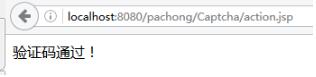
反之,给出已捕获的异常:
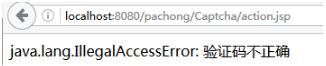
action.jsp 就是调用 captcha.jsp 里面的 isPass(pageContext, captchaImgCode) 方法,以及捕获已知异常。
<%@page pageEncoding="UTF-8"%>
<%@include file="captcha.jsp"%>
<%
 String captchaImgCode = request.getParameter("captchaImgCode");
 try {
 if (isPass(pageContext, captchaImgCode)) {
 out.println("验证码通过!");
 }
 } catch (Throwable e) {
 out.println(e);
 }
%>
核心 captcha,jsp 代码:
<%@page pageEncoding="UTF-8" import="java.io.IOException, java.awt.*, java.awt.image.BufferedImage, java.util.Random, javax.imageio.ImageIO"%>
<%!
 // 定义Captcha 类
 public static class Captcha {
 /**
 * 默认宽度 60
 */
 private int width = 60;

 /**
 * 默认高度 20
 */
 private int height = 20;

 /**
 * 验证码
 */
 private String code;

 /**
 * 生成验证码图片
 *
 * @return 图片对象
 */
 public BufferedImage get() {
 BufferedImage image = new BufferedImage(width, height, BufferedImage.TYPE_INT_RGB);// 在内存中创建图像
 Graphics g;

 g = image.getGraphics(); // 获取图形上下文
 g.setColor(getRandColor(200, 250)); // 设定背景
 g.fillRect(0, 0, width, height);
 g.setFont(new Font("Times New Roman", Font.PLAIN, 18)); // 设定字体
 g.setColor(getRandColor(160, 200));

 Random random = new Random();// 随机产生干扰线
 for (int i = 0; i < 155; i++) {
 int x = random.nextInt(width), y = random.nextInt(height);
 int xl = random.nextInt(12), yl = random.nextInt(12);
 g.drawLine(x, y, x + xl, y + yl);
 }

 String sRand = ""; // 随机产生4位验证码
 for (int i = 0; i < 4; i++) {
 String rand = String.valueOf(random.nextInt(10));
 sRand += rand;
 g.setColor(new Color(20 + random.nextInt(110), 20 + random.nextInt(110), 20 + random.nextInt(110))); // 将认证码显示到图象中
 g.drawString(rand, 13 * i + 6, 16);// 调用函数出来的颜色相同,可能是因为种子太接近,所以只能直接生成
 }

 // 将认证码存入SESSION
 // session.setAttribute("rand", sRand);
 setCode(sRand);
 g.dispose();// 图象生效

 return image;
 }

 /**
 * 生成随机颜色
 *
 * @param fc
 * @param bc
 * @return
 */
 private Color getRandColor(int fc, int bc) {
 if (fc > 255)
 fc = 255;
 if (bc > 255)
 bc = 255;

 Random random = new Random();
 int r = fc + random.nextInt(bc - fc);
 int g = fc + random.nextInt(bc - fc);
 int b = fc + random.nextInt(bc - fc);

 return new Color(r, g, b);
 }

 /**
 * 获取高度
 *
 * @return
 */
 public int getHeight() {
 return height;
 }

 /**
 * 设置高度
 *
 * @param height
 * 高度
 */
 public void setHeight(int height) {
 this.height = height;
 }

 /**
 * 获取验证码
 *
 * @return
 */
 public String getCode() {
 return code;
 }

 /**
 * 设置验证码
 *
 * @param code
 * 验证码
 */
 public void setCode(String code) {
 this.code = code;
 }

 /**
 * 获取宽度
 *
 * @return
 */
 public int getWidth() {
 return width;
 }

 /**
 * 设置宽度
 *
 * @param width
 * 宽度
 */
 public void setWidth(int width) {
 this.width = width;
 }

 }


 /**
 * SESSION 的键值
 */
 public static final String SESSION_KEY = "rand";

 /**
 * 显示验证码图片并将认证码存入 Session
 *
 * @param response
 * 响应对象
 * @param session
 * 会话对象
 */
 public static void init(HttpServletResponse response, HttpSession session) {
 Captcha img = new Captcha();

 // 不用缓存
 response.setHeader("Pragma", "No-cache");
 response.setHeader("Cache-Control", "no-cache");
 response.setDateHeader("Expires", 0);
 response.setContentType("image/jpg");

 try {
 ImageIO.write(img.get(), "JPEG", response.getOutputStream());

 /*
 * 加上下面代码,运行时才不会出现java.lang.IllegalStateException: getOutputStream() has already been called ..........等异常
 * response.getOutputStream().flush();
 * response.getOutputStream().close();
 * response.flushBuffer();
 */

 // JSP内置对象out和response.getWrite()的区别,两者的主要区别:1. 这两个对象的类型是完全不同的……
 // response.getWriter();
 // http://blog.sina.com.cn/s/blog_7217e4320101l8gq.html
 // https://www.jb51.net/kf/201109/103284.html

 // pageContext.getOut().clear();
 } catch (IOException e) {
 e.printStackTrace();
 }

 session.setAttribute(SESSION_KEY, img.getCode()); // 将认证码存入 SESSION
 System.out.println("生成验证码:" + img.getCode());
 }

 /**
 * 显示验证码图片并将认证码存入 Session(For JSP)
 *
 * @param pageContext
 * 页面上下文对象
 */
 public static void init(PageContext pageContext) {
 init((HttpServletResponse) pageContext.getResponse(), pageContext.getSession());
 }


 /**
 * 判断用户输入的验证码是否通过
 *
 * @param pageContext
 * 页面上下文对象
 * @return true 表示通过
 * @throws Throwable
 */
 public static boolean isPass(PageContext pageContext, String code) throws Throwable {
 boolean isCaptchaPass = false;

 String rand = (String) pageContext.getSession().getAttribute(SESSION_KEY);

 System.out.println("rand:" + rand);
 System.out.println("CaptchaCode:" + code);

 if (rand == null)
 throw new UnsupportedOperationException("请刷新验证码。");
 else if (code == null || code.equals("")) {
 throw new IllegalArgumentException("没提供验证码参数");
 } else {
 isCaptchaPass = rand.equals(code);
 if (!isCaptchaPass)
 throw new IllegalAccessError("验证码不正确");
 }

 return isCaptchaPass;
 }
%>
完整代码下载:http://xiazai.jb51.net/201707/yuanma/Captcha(jb51.net).rar
以上就是这篇文章的全部内容了,希望本文的内容对大家的学习或者工作能带来一定的帮助,如果有疑问大家可以留言交流,谢谢大家对脚本之家的支持。


