

一、搭建项目以及初始化配置
vue create ts_vue_btn
这里使用了vue CLI3自定义选择的服务,我选择了ts、stylus等工具。然后创建完项目之后,进入项目。使用快捷命令code .进入Vs code编辑器(如果没有code .,需要将编辑器的bin文件目录地址放到环境变量的path中)。然后,我进入编辑器之后,进入设置工作区,随便设置一个参数,这里比如推荐设置字号,点下。这里是为了生成.vscode文件夹,里面有个json文件。
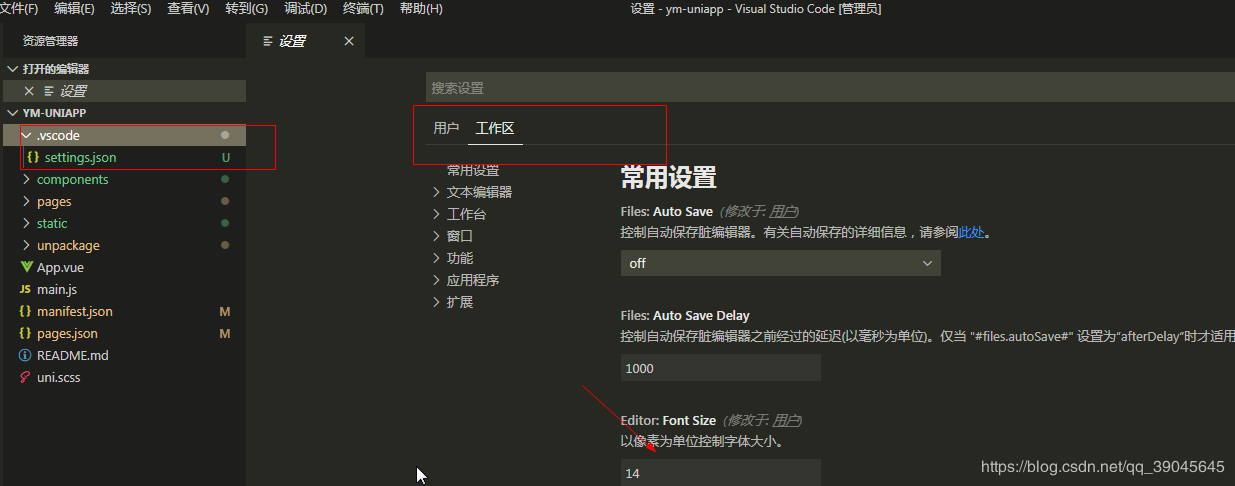
我们在开发项目的时候,项目文件夹内的文件很多,会有时影响视觉。那么这个文件就是设置什么文件隐藏,注意只是隐藏,而不是删除!下面是我自己写的,在Vue cli3生成的项目需要隐藏的文件参数。
{
  "files.exclude": {
    "**/.git": true,
    "**/.svn": true,
    "**/.hg": true,
    "**/CVS": true,
    "**/.DS_Store": true,
    "**/README.md": true,
    "**/node_modules":true,
    "**/shims-tsx.d.ts": true,
    "**/shims-vue.d.ts": true,
    "**/.browserslistrc": true,
    ".eslintrc.js": true,
    "babel.config.js": true,
    "package-lock.json": true,
    ".gitignore": true,
    "tsconfig.json": true
  }
}
以下就是所看到的文件目录,我把一些无关紧要的文件跟文件夹隐藏或者删除后所看到的。
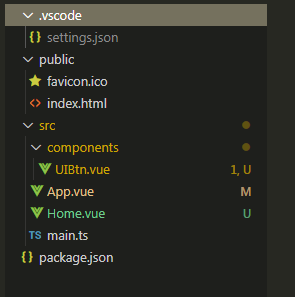
文件解读(从上往下):
| 文件夹或文件 | 包含子文件夹或文件 | 含义 |
|---|---|---|
| .vscode | settings.json | 隐藏文件设置 |
| public | index.html、favicon.ico | 静态文件存放处 |
| src | components文件夹(存放组件)、App.vue、Home.vue、main.js | 项目主要文件夹 |
| package.json | 无 | 项目依赖参数等 |
二、开发实践
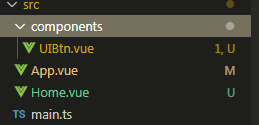
下图为所需要创建的项目文件目录,这里我们开发一个Vue按钮组件。
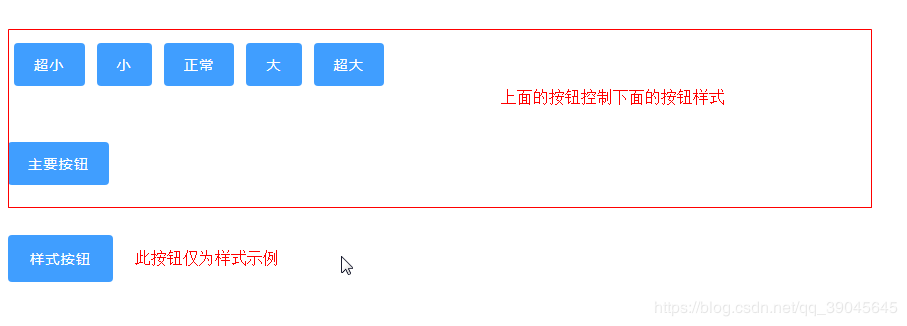
如下图所示,这就是我们要用Typescript开发的组件。
开始编辑:
1、App.vue
<template>
 <div id="app">
  <Home></Home>
 </div>
</template>

<script lang="ts">
import { Component, Vue } from 'vue-property-decorator';// 编写类样式组件所需要的一些类或者是装饰器
import Home from "@/Home.vue"; // 引入页面组件

// 这里我们需要使用Component装饰器,这个装饰器是注册组件用的,里面的参数是一个对象,内有一个components属性,值为引入的组件名
@Component({
 components:{
  Home
 }
})
export default class App extends Vue {}
</script>

<style lang="stylus">

</style>
2、UIBtn.vue
<template>
 <!-- v-on="$listeners" 可以使用,在本类不再监听,在其他地方监听,可以不用$emit(),但是我们这里不用它 -->
 <button
  class="ui-btn"
  @click="onBtnclick('success!')"
  :class="{
  'ui-btn-xsmall':xsmall,
  'ui-btn-small':small,
  'ui-btn-large':large,
  'ui-btn-xlarge':xlarge
 }"
 >
  <slot>Button</slot>
 </button>
</template>

<script lang="ts">
import { Component, Vue, Emit, Prop } from "vue-property-decorator"; // 编写类样式组件所需要的一些类或者是装饰器
@Component
export default class UIBtn extends Vue {
 @Prop(Boolean) private xsmall: boolean | undefined;
 @Prop(Boolean) private small: boolean | undefined;
 @Prop(Boolean) private large: boolean | undefined;
 @Prop(Boolean) private xlarge: boolean | undefined;
 // eslint-disable-next-line @typescript-eslint/no-empty-function
 @Emit("click") private emitclick(x: string) {}
 private mounted() {
  console.log(this.large);
 }
 private onBtnclick(x: string) {
  this.emitclick(x);
 }
}
</script>

<style scoped lang="stylus" >
resize(a, b, c)
 padding a b
 font-size c
.ui-btn
 resize(12px, 20px, 14px)
 border 0 solid #000
 border-radius 4px
 outline none
 font-weight 500;
 letter-spacing 0.09em
 background-color #409eff
 color #fff
 cursor pointer
 user-select none
 &:hover
  filter brightness(120%)
 &:active
  filter brightness(80%)
 &.ui-btn-xsmall
  resize(5px, 15px, 14px)
 &.ui-btn-small
  resize(8px, 18px, 14px)
 &.ui-btn-large
  resize(14px, 22px, 14px)
 &.ui-btn-xlarge
  resize(16px, 24px, 14px)
</style>
3、Home.vue
<template>
 <div class="home-con">
   <div class="btn-group">
      <UIBtn class="btn" @click="resize('xsmall')">超小</UIBtn>
      <UIBtn class="btn" @click="resize('small')">小</UIBtn>
      <UIBtn class="btn" @click="resize('normal')">正常</UIBtn>
      <UIBtn class="btn" @click="resize('large')">大</UIBtn>
      <UIBtn class="btn" @click="resize('xlarge')">超大</UIBtn>
   </div>
   <div class="btn-con">
      <UIBtn @click='onClick'
      :xlarge="xlarge"
      :large="large"
      :small="small"
      :xsmall="xsmall"
      >主要按钮</UIBtn>
   </div>
   <div class="btn-pro">
      <UIBtn large >样式按钮</UIBtn>
   </div>
 </div>
</template>

<script lang="ts">
import { Component, Vue } from 'vue-property-decorator'; // 编写类样式组件所需要的一些类或者是装饰器
import UIBtn from '@/components/UIBtn.vue';
@Component({
  components:{
   UIBtn
  }
})
export default class Home extends Vue {
  // eslint-disable-next-line @typescript-eslint/no-inferrable-types
  private xlarge: boolean = false;
  // eslint-disable-next-line @typescript-eslint/no-inferrable-types
  private large: boolean = false;
  // eslint-disable-next-line @typescript-eslint/no-inferrable-types
  private xsmall: boolean = false;
  // eslint-disable-next-line @typescript-eslint/no-inferrable-types
  private small: boolean = false;
  private resize (name: string){
    console.log(name)
    switch (name) {
      case 'xsmall':
        this.xsmall=true;
        this.small=false;
        this.large=false;
        this.xlarge=false;
        break;
      case 'small':
        this.xsmall=false;
        this.small=true;
        this.large=false;
        this.xlarge=false;
        break;
      case 'normal':
        this.xsmall=false;
        this.small=false;
        this.large=false;
        this.xlarge=false;
        break;
      case 'large':
        this.xsmall=false;
        this.small=false;
        this.large=true;
        this.xlarge=false;
        break;
      case 'xlarge':
        this.xsmall=false;
        this.small=false;
        this.large=false;
        this.xlarge=true;
        break;
    }
  }
  private onClick(x: string) {
    console.log(x)
  }
}
</script>

<style lang="stylus" scoped>
.btn-group
  margin 50px 0
.btn
  margin 6px
.btn-pro
  margin-top 50px
</style>


