

本文为大家分享了vue中音频wavesurfer.js的使用方法,供大家参考,具体内容如下
效果图

首先引入wavesurfer.js
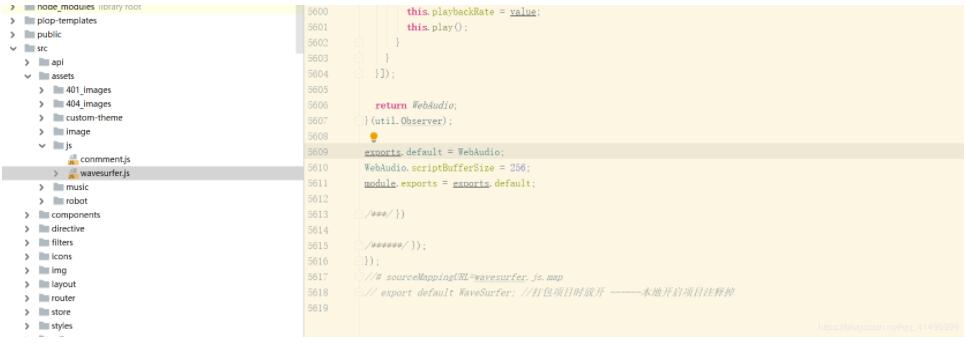
其次 封装 wavesurfer.js`
<template>
 <div class="waveformOuter">
 <div id="waveform" ref="waveform" />
 <div class="play" @click="playMusic">
  <svg-icon v-if="!isPlaying" icon-class="play" class="icon myplay" />
  <svg-icon v-else icon-class="stop" class="icon mystop" />
  <p>{{ time }}</p>
 </div>
  <!-- <p>{{ url }}</p> -->
 </div>
</template>
<script>
import WaveSurfer from '@/assets/js/wavesurfer'
export default {
 props: ['url', 'toStopMusic', 'loadWave'],
 data() {
 return {
  isPlaying: false,
  time: '00:00',
  wavesurfer: null,
 }
 },
 watch: {
 'loadWave': function() {
  this.loadMusic()
 },
 'url': function() {
  // return this.wavesurfer.getCurrentTime()
  this.loadMusic(true)
  console.log('url---------------------------------------')
 },
 'toStopMusic': function() {
  console.log('toStopMusic---------------------------------------')
  if (this.wavesurfer) {
  this.wavesurfer.pause()
  }
 }
 },
 mounted() {
 this.$nextTick(() => {
  if (this.loadWave) {
  console.log('haha')
  this.loadMusic()
  }
 })
 },
 methods: {
 itemClick(node) {
  console.log(node.model.id)
 },
 buZero(num) {
  return num > 9 ? num : '0' + num
 },
 loadMusic(bool) {
  console.log('this.WaveSurfer--------------------------------------', WaveSurfer)
  if (this.wavesurfer) {
  if (bool) {
   this.time = '00:00'
   this.wavesurfer.load(this.url)
  }
  } else {
  this.wavesurfer = WaveSurfer.create({
   container: this.$refs.waveform,
   waveColor: 'violet',
   progressColor: 'purple'
  })
  this.wavesurfer.load(this.url)
  this.wavesurfer.on('ready', () => {
   // this.wavesurfer.play()
  })
  this.wavesurfer.on('audioprocess', (e) => {
   const times = Math.floor(e)
   this.time = this.buZero(Math.floor(times / 60)) + ':' + this.buZero(times % 60)
  })
  this.wavesurfer.on('finish', () => {
   this.isPlaying = false
  })
  }
 },
 stopMusic(){
  if (this.wavesurfer) {
   this.wavesurfer.stop();
  }
 },
 playMusic() {
  console.log("开始")
  console.log(this.wavesurfer)
  console.log("点击开始播放按钮",this.url)
  if (this.wavesurfer) {
  if (this.wavesurfer.isPlaying()) {
   this.isPlaying = false
  debugger
   this.wavesurfer.pause()
  } else {
   this.isPlaying = true
   this.wavesurfer.play()
  }
  }
 }
 }
}
</script>

<!-- Add "scoped" attribute to limit CSS to this component only -->
<style scoped>
.myplay{
 position: absolute;
 top: 50%;
 font-size: 17px;
 margin: -10px 0 0 -9px;
 left: 50%;
}
.mystop{
 position: absolute;
 top: 50%;
 margin: -15px 0 0 -18px;
 left: 50%;
 font-size: 25px;
}
#waveform{
 width: calc(100% - 150px);
 height:128px;
 float: left;
 margin-right: 22px;
 background: black;
}
.play{
 position: relative;
 width: 128px;
 height:128px;
 border-radius:3px;
 background-color:#EBEEF5;
 float: left;
 text-align: center;
}
.play p{
 margin-top: 85px;
 color: #3683FA;
}

.waveformOuter{
 margin-bottom: 20px;
 overflow: hidden;
}
</style>
再然后 在需要的组件中引入
<div class="luyin" v-if="this.isYinyin">
 <!-- {{this.isYinyin}} -->
 <my-wave-sufer ref="handleDialogClose" :url="luyinUrl" :load-wave="showDialog" :to-stop-music="!showDialog" />
</div>
isYinyin: false,//是否加载录音组件
showDialog: true, //是否初始化录音组件
luyinUrl: "", //录音url
数据库录音格式 123.wav
以上就是本文的全部内容,希望对大家的学习有所帮助,也希望大家多多支持脚本之家。


