

使用vue制作一个购物车功能,只是一个测试版本,注重的是功能实现,界面并没有做好,数据也是模拟数据等
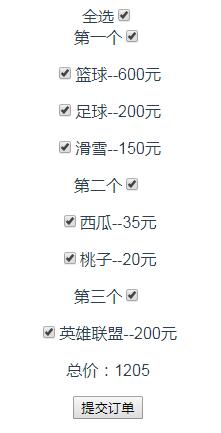
不说那么多,直接上代码
<template>
 <div id="app">

 全选<input type="checkbox" v-model="checkall" @change="check_all()">
 <div v-for="(item,index) in mylist" :key="index">
  <span>{{item.oname}}</span><input type="checkbox" v-model="item.this_all" @change="check_list(index)">
  <p v-for="(goods,nindex) in item.newlist" :key="nindex">
  <input type="checkbox" v-model="goods.check_one" @change="click_input(index,nindex)">{{goods.newname}}--{{goods.price}}元
  </p>

 </div>
 <p>总价:{{allprice}}</p>
 <button @click="btn()">提交订单</button>

 </div>
</template>

<script>
export default {
 name: 'App',
 data(){
  return{
   mylist:[
    {oname:"第一个",this_all:true,newlist:[{newname:"篮球",check_one:true,price:600},{newname:"足球",check_one:true,price:200},{newname:"滑雪",check_one:true,price:150}]},
    {oname:"第二个",this_all:true,newlist:[{newname:"西瓜",check_one:true,price:35},{newname:"桃子",check_one:true,price:20}]},
    {oname:"第三个",this_all:true,newlist:[{newname:"英雄联盟",check_one:true,price:200}]},

   ],
   checkall:true,
   allprice:0,
   cpmylist:[]
  }
 },
 mounted:function(){
  this.money();
 },

 methods: {
 money:function(){
 var that = this;
 this.allprice=0;
 that.mylist.forEach(item1 =>{
  item1.newlist.forEach(item2 =>{
  if(item2.check_one==true){
   that.allprice+=item2.price;
  }
  })
 })

 },
 check_all:function(){
 var that = this;
 that.mylist.forEach(item1 => {
  item1.this_all=that.checkall
  item1.newlist.forEach(item2 => {
  item2.check_one=that.checkall
  })
 });
 that.money();
 },

 abc:function(){
 var that = this;
  var aaa = that.mylist.filter(item2 =>{
  return item2.this_all==true
 })
 aaa.length==that.mylist.length ? that.checkall = true : that.checkall = false
 that.money();
 },

 check_list:function(i){
 var that = this;
 that.mylist[i].newlist.forEach(item1 =>{
  item1.check_one=that.mylist[i].this_all
 })
 that.abc();

 },

 click_input:function(i,j){
 var that = this;
 var checklist = that.mylist[i].newlist.filter(item1 =>{
  return item1.check_one==true
 })

 checklist.length==that.mylist[i].newlist.length ? that.mylist[i].this_all = true : that.mylist[i].this_all = false
 that.abc();

 },

 btn:function(){
 var that = this;


 that.cpmylist=JSON.parse(JSON.stringify(that.mylist));
 that.cpmylist.filter(item1 =>{
  item1.newlist = item1.newlist.filter(item2 =>{
  return item2.check_one==true
  })
 })
 that.cpmylist=that.cpmylist.filter(item3 =>{
  return item3.newlist.length!=0
 })

 if(that.cpmylist.length==0){
  alert("请选择商品哦!")
 }else{

  console.log("★★★您购买的商品是:");
  that.cpmylist.forEach(item4 =>{
  console.log("----------"+item4.oname+"店铺----------");
  item4.newlist.forEach(item5 =>{
   console.log("——>:"+item5.newname);
  })
  })
 }
 }
 },

}
</script>

<style>
#app {
 font-family: 'Avenir', Helvetica, Arial, sans-serif;
 -webkit-font-smoothing: antialiased;
 -moz-osx-font-smoothing: grayscale;
 text-align: center;
 color: #2c3e50;
 margin-top: 60px;
}
</style>
以上就是本文的全部内容,希望对大家的学习有所帮助,也希望大家多多支持脚本之家。


