

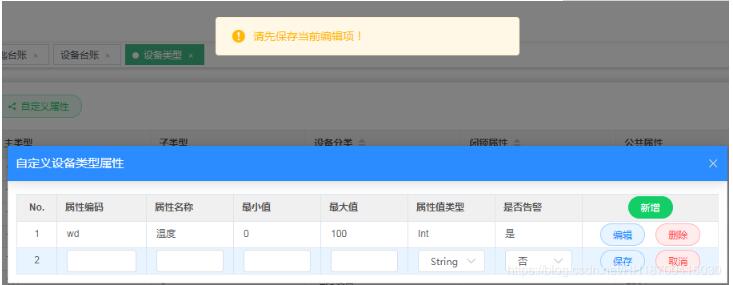
最近做一个vue前后端分离的项目,前端框架用element ui,在 使用 el-table 的过程中,需要实现行内编辑,效果大概是这样:

分为下面几个步骤:
(1) 自定义 el-table 的表头(即添加 “新增” 按钮):
<el-table :data="propTableData.col.filter(data => handleAdd || data.name.toLowerCase().includes(handleAdd.toLowerCase()))"
   highlight-current-row
   border>
</el-table>
<template slot="header"
  slot-scope="scope">
  <el-button v-model="handleAdd"
    size="mini"
    type="success"
    round
    plain
    @click="handleAdd(scope.$index, scope.row)">{{ $t('common.add') }}</el-button>
</template>
表头自定义了一个“添加”按钮,点击 el-table 动态添加一行。
(2) el-table 动态添加一行:
let row = {
  code: '',
  maxValue: '',
  minValue: '',
  name: '',
  valueType: 'String',
  id: '',
  typeId: '',
  warning: false,
  isSet: true
}
this.propTableData.col.push(row)
vue 数据变化驱动 dom 进行更新,给 table 绑定的数据 propTableData.col 添加一个元素,则表格会添加一行。
propTableData.sel 保存当前行数据:
this.propTableData.sel = row
(3) el-table 动态删除一行:
子组件中触发父组件的 delete 事件:
this.$emit('delete', row.id)
(4)当前行状态判断,即是否处于编辑状态,控制表格每一行的按钮元素的移除与插入:
<template slot-scope="scope">
   <el-button size="mini"
      type="primary"
      round
      plain
      v-if="!scope.row.isSet"
      @click="valChange(scope.row,scope.$index,true)">{{ $t('common.edit') }}</el-button>
   <el-button size="mini"
      type="primary"
      round
      plain
      v-else
      @click="valChange(scope.row,scope.$index,true)">{{ $t('common.save') }}</el-button>
   <el-button size="mini"
      type="danger"
      round
      plain
      v-if="!scope.row.isSet"
      @click="handleDelete(scope.$index, scope.row)">{{ $t('common.delete') }}</el-button>
   <el-button size="mini"
      type="danger"
      round
      plain
      v-else
      @click="valChange(scope.row,scope.$index,false)">{{ $t('common.cancel') }}</el-button>
</template>
上面代码中,通过 v-if=“scope.row.isSet” 来判断当前行是否处于编辑状态。
如果当前行处于编辑状态,则按钮为“保存”和“取消”,此时可对当前行进行保存和取消操作,且不能新增,除非先保存当前行;
如果当前行处于非编辑状态,则按钮为“编辑”和“删除”状态,此时可对当前行进行编辑和删除操作。
这样,就可以实现 el-table 行内编辑的需求。
完整版代码如下:
<template>
 <el-dialog class="uiot-dialog"
    width="900px"
    :visible.sync="isShow"
    :before-close="beforeClose"
    :close-on-click-modal="false"
    :title="$t('basicData.device.propDlg.dlgTitle')"
    @open="open">
 <el-table :data="propTableData.col.filter(data => handleAdd || data.name.toLowerCase().includes(handleAdd.toLowerCase()))"
    highlight-current-row
    border>
  <el-table-column label="No."
      type="index"
      align="center"
      width="50"></el-table-column>
  <el-table-column :label="$t('basicData.device.propDlg.code')">
  <template slot-scope="scope">
   <span v-if="scope.row.isSet">
   <el-input size="mini"
      v-model="scope.row.code"></el-input>
   </span>
   <span v-else>{{ scope.row.code }}</span>
  </template>
  </el-table-column>
  <el-table-column :label="$t('basicData.device.propDlg.name')">
  <template slot-scope="scope">
   <span v-if="scope.row.isSet">
   <el-input size="mini"
      v-model="scope.row.name"></el-input>
   </span>
   <span v-else>{{ scope.row.name }}</span>
  </template>
  </el-table-column>
  <el-table-column :label="$t('basicData.device.propDlg.minValue')">
  <template slot-scope="scope">
   <span v-if="scope.row.isSet">
   <el-input size="mini"
      v-model="scope.row.minValue"></el-input>
   </span>
   <span v-else>{{ scope.row.minValue }}</span>
  </template>
  </el-table-column>
  <el-table-column :label="$t('basicData.device.propDlg.maxValue')">
  <template slot-scope="scope">
   <span v-if="scope.row.isSet">
   <el-input size="mini"
      v-model="scope.row.maxValue"></el-input>
   </span>
   <span v-else>{{ scope.row.maxValue }}</span>
  </template>
  </el-table-column>
  <el-table-column :label="$t('basicData.device.propDlg.valueType')">
  <template slot-scope="scope">
   <span v-if="scope.row.isSet">
   <el-select size="mini"
      v-model="scope.row.valueType"
      :placeholder="$t('common.pleSelect')">
    <el-option v-for="item in valTypeOptions"
       :key="item.value"
       :label="item.label"
       :value="item.value"></el-option>
   </el-select>
   </span>
   <span v-else>{{ scope.row.valueType }}</span>
  </template>
  </el-table-column>
  <el-table-column :label="$t('basicData.device.propDlg.warning')">
  <template slot-scope="scope">
   <span v-if="scope.row.isSet">
   <el-select v-model="scope.row.warning"
      size="mini">
    <el-option v-for="item in warnOptions"
       :key="item.value"
       :label="item.label"
       :value="item.value"></el-option>
   </el-select>
   </span>
   <span v-else>{{ scope.row.warning===true?'是':'否' }}</span>
  </template>
  </el-table-column>
  <el-table-column align="center"
      width="170px">
  <template slot="header"
     slot-scope="scope">
   <el-button v-model="handleAdd"
      size="mini"
      type="success"
      round
      plain
      @click="handleAdd(scope.$index, scope.row)">{{ $t('common.add') }}</el-button>
  </template>
  <template slot-scope="scope">
   <el-button size="mini"
      type="primary"
      round
      plain
      v-if="!scope.row.isSet"
      @click="valChange(scope.row,scope.$index,true)">{{ $t('common.edit') }}</el-button>
   <el-button size="mini"
      type="primary"
      round
      plain
      v-else
      @click="valChange(scope.row,scope.$index,true)">{{ $t('common.save') }}</el-button>
   <el-button size="mini"
      type="danger"
      round
      plain
      v-if="!scope.row.isSet"
      @click="handleDelete(scope.$index, scope.row)">{{ $t('common.delete') }}</el-button>
   <el-button size="mini"
      type="danger"
      round
      plain
      v-else
      @click="valChange(scope.row,scope.$index,false)">{{ $t('common.cancel') }}</el-button>
  </template>
  </el-table-column>
 </el-table>
 </el-dialog>
</template>

<script>
import { open } from 'fs'
import '@/styles/uiot.scss'

const defaultProp = {
 code: '',
 maxValue: '',
 minValue: '',
 name: '',
 valueType: 'String',
 id: '',
 typeId: '',
 warning: false
}

export default {
 props: {
 isShow: Boolean,
 oneRow: {
  type: Array,
  default: function() {
  return defaultProp
  }
 }
 },
 data() {
 return {
  propTableData: {
  sel: null, // 选中行
  col: []
  },
  warnOptions: [
  {
   value: true,
   label: '是'
  },
  {
   value: false,
   label: '否'
  }
  ],
  valTypeOptions: [
  {
   value: 'String',
   label: 'String'
  },
  {
   value: 'Int',
   label: 'Int'
  },
  {
   value: 'Double',
   label: 'Double'
  },
  {
   value: 'Boolean',
   label: 'Boolean'
  },
  {
   value: 'Date',
   label: 'Date'
  }
  ]
 }
 },
 created() {},
 methods: {
 open() {
  this.propTableData.col = this.oneRow
  this.propTableData.col.map(i => {
  i.isSet = false
  })
  console.log('open', this.propTableData.col)
 },
 // 添加
 handleAdd() {
  for (let i of this.propTableData.col) {
  if (i.isSet) {
   return this.Message(
   this.$t('basicData.device.propDlg.pleSave'),
   'warning'
   )
  }
  }
  let row = {
  code: '',
  maxValue: '',
  minValue: '',
  name: '',
  valueType: 'String',
  id: '',
  typeId: '',
  warning: false,
  isSet: true
  }
  this.propTableData.col.push(row)
  this.propTableData.sel = row
 },
 //修改
 valChange(row, index, qx) {
  console.log('edit', this.propTableData)
  //点击修改,判断是否已经保存所有操作
  for (let i of this.propTableData.col) {
  console.log('i.isSet', i.isSet, i.id, row.id)
  if (i.isSet && i.id != row.id) {
   this.Message(this.$t('basicData.device.propDlg.pleSave'), 'warning')
   return false
  }
  }
  //是否是取消操作
  if (!qx) {
  console.log('qx', this.propTableData.sel.id)
  if (!this.propTableData.sel.id) {
   this.propTableData.col.splice(index, 1)
  }
  return (row.isSet = !row.isSet)
  }
  //提交数据
  if (row.isSet) {
  console.log('this.propTableData.sel', this.propTableData.sel)
  const v = this.propTableData.sel
  // 必填项判断
  if (v.code == '' || v.name == '') {
   this.Message(this.$t('common.pleEnter'), 'warning')
  } else {
   this.$emit('confirm', this.propTableData.sel)
   row.isSet = false
  }
  } else {
  this.propTableData.sel = row
  row.isSet = true
  }
 },
 // 删除
 handleDelete(index, row) {
  this.$emit('delete', row.id)
 },
 beforeClose() {
  this.$emit('cancel')
 },
 Message(msg, type) {
  this.$message({ type: type ? type : 'info', message: msg })
 }
 }
}
</script>

<style lang="scss">
</style>
以上就是本文的全部内容,希望对大家的学习有所帮助,也希望大家多多支持脚本之家。


