

注:本文基于上一篇文章【Vue-Cli 3.0 中配置高德地图 】 ,采用直接引入高德 SDK 的方式来使用高德地图api
一、效果图
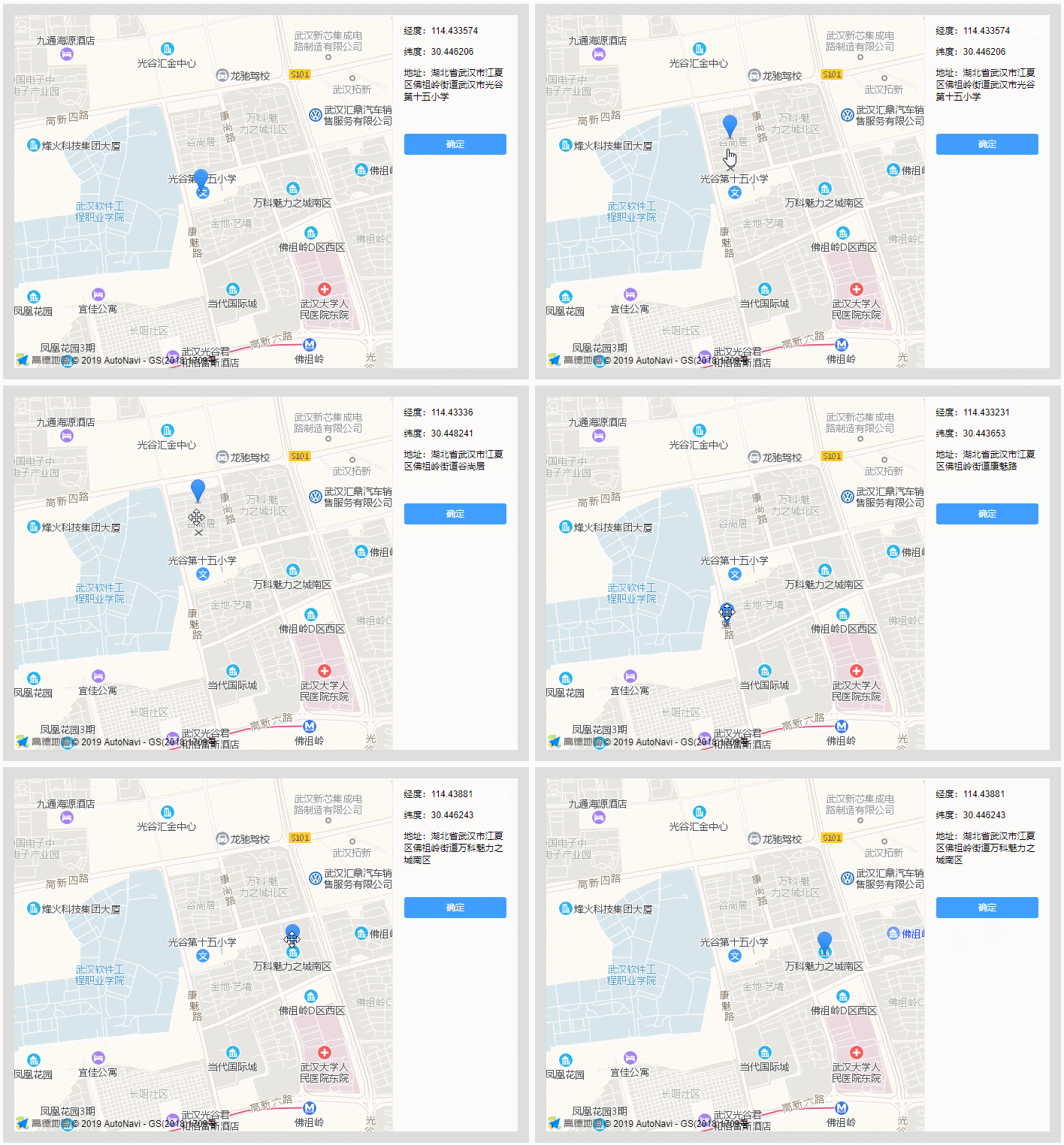
二、组件要实现的功能
1. 如果有传入坐标点,则定位到坐标点
2. 如果没有传入坐标点,则定位到当前所在位置
3. 定位成功要在右侧显示经纬度和地址
4. 可以通过拖动 标记 来调整定位点
5. 标记 拖动后,右侧要显示拖动后的经纬度和地址
6. 点击确定按钮,返回最后的坐标点和地名给父组件
三、 组件实现具体代码
<template>
 <div class="map-box" :style="{ width: width, height: height }">
 <div id="amap" class="amap"></div>
 <div class="detail">
  <p>经度:{{point ? point[0] : '-'}}</p>
  <p>纬度:{{point ? point[1] : '-'}}</p>
  <p>地址:{{address}}</p>
  <button size="mini" class="btnmap" @click="commit">确定</button>
 </div>
 </div>
</template>
<script>
import AMap from 'AMap'
export default {
 props: {
 width: { type: String, default: '100%' },
 height: { type: String, default: '400px' },
 lnglat: {
  type: Array,
  validator: (value) => {
  return value.length === 2
  }
 }
 },
 data () {
 return { address: '', point: this.lnglat }
 },
 mounted () {
 this.init(this.point)
 },
 methods: {

 // 初始化
 init (lnglat) {

  // 地图实例对象 (amap 为容器的id)
  let amap = new AMap.Map('amap', {
  resizeEnable: true,
  zoom: 15
  })

  // 注入插件(定位插件,地理编码插件)
  amap.plugin(['AMap.Geolocation', 'AMap.Geocoder'])

  // 定位
  this.currentPosition(amap, lnglat)
 },

 currentPosition (map, lnglat) {
  if (lnglat) {
  // 有传入坐标点,直接定位到坐标点
  map.setCenter(lnglat)
  this.addMark(map, lnglat)

  // 获取地址
  this.getAddress(lnglat)
  } else {
  // 没有传入坐标点,则定位到当前所在位置
  let geolocation = new AMap.Geolocation({
   enableHighAccuracy: true,
   timeout: 10000,
   zoomToAccuracy: true,
   buttonPosition: 'RB'
  })
  geolocation.getCurrentPosition((status, result) => {
   if (status === 'complete') {
   let points = [result.position.lng, result.position.lat]
   map.setCenter(points) // 设置中心点
   this.addMark(map, points) // 添加标记

   // 存下坐标与地址
   this.point = points
   this.getAddress(points)
   } else {
   console.log('定位失败', result)
   }
  })
  }
 },

 // 添加标记
 addMark (map, points) {
  let marker = new AMap.Marker({
  map: map,
  position: points,
  draggable: true, // 允许拖动
  cursor: 'move',
  raiseOnDrag: true
  })
  marker.on('dragend', (e) => {
  let position = marker.getPosition()

  // 存下坐标与地址
  this.point = [position.lng, position.lat]
  this.getAddress([position.lng, position.lat])
  })
 },

 // 根据坐标返回地址(逆地理编码)
 getAddress (points) {
  let geocoder = new AMap.Geocoder({ radius: 1000 })
  geocoder.getAddress(points, (status, result) => {
  if (status === 'complete' && result.regeocode) {
   this.address = result.regeocode.formattedAddress
  }
  })
 },

 commit () {
  this.$emit('location', this.point, this.address)
 }
 }
}
</script>

<style lang="scss" scoped>
.map-box {
 box-sizing: border-box;
 background-color: #ddd;
 padding: 15px;
 &:after {
 content: '';
 display: block;
 clear: both;
 }
 .amap, .detail {
 float: left;
 height: 100%;
 }
 .amap {
 width: 75%;
 }
 .detail {
 width: 25%;
 background-color: #fff;
 padding: 0 15px;
 border-left: 1px solid #eee;
 box-sizing: border-box;
 word-wrap: break-word;
 }
 .btnmap {
 width: 100%;
 margin: 30px 0 0 0;
 padding: 5px 0;
 color: #fff;
 cursor: pointer;
 background-color: #409eff;
 border: none;
 border-radius: 3px;
 &:hover {
  background-color: #66b1ff;
 }
 }
}
</style>
四、调用组件
<template>
 <div class="box">
 <xmap width="700px" height="500px" :lnglat="[114.433703, 30.446243]" @location="location"></xmap>
 </div>
</template>
<script>
import xmap from '@/components/map'
export default {
 components: { xmap },
 methods: {
 location(point, address) {
  alert(`坐标:${point[0]},${point[1]} - 地址:${address}`)
 }
 }
}
</script>
以上所述是小编给大家介绍的Vue组件之高德地图地址选择功能的实例代码,希望对大家有所帮助,如果大家有任何疑问欢迎给我留言,小编会及时回复大家的!


