

一个包含用户名,密码,验证码的简单的登陆界面,如下图所示:
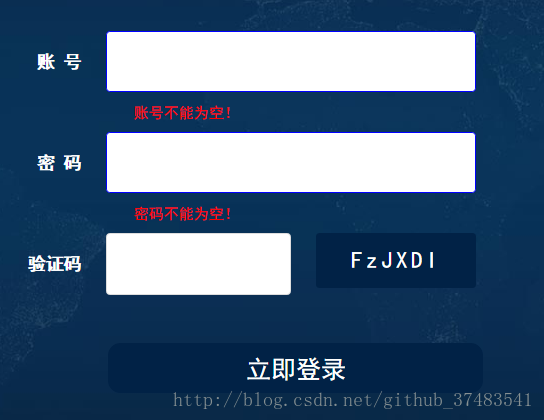
首先是 HTML 代码:
<div id="divID">
 <div style="background-color:transparent;">
  <form id="ff" method="post">
   <ul class="reg-box">
    <li>
     <label for="">账 号</label>
     <input type="text" name="accName" value="" class="account" maxlength="11" style="color:#999;" onBlur="textBlur(this)" onFocus="textFocus(this)"/>
     <span class="error error5"></span>
    </li>
    <li>
     <label for="">密 码</label>
     <input type="password" name="accPassWord" class="admin_pwd" value="" style="color:#999;" onBlur="textBlur(this)" onFocus="textFocus(this)"/>
     <span class="error error6"></span>
    </li>
    <li>
     <label for="">验证码</label>
     <input type="text" class="sradd photokey" id="key" value="" style="color:#999;ime-mode:disabled;-webkit-ime-mode:inactive;" onBlur="textBlur(this)" onFocus=" textFocus(this) " />
     <span class="add phoKey"></span>
     <span class="error error7"></span>
    </li>
   </ul>
   <div class="sub">
    <input type="submit" value="立即登录"/>
   </div>
  </form>
 </div>
</div>
然后是实现验证用户的输入是否正确的 JS 代码:
//文本框默认提示文字
function textFocus(el) {
 if (el.defaultValue == el.value) { el.value = ''; el.style.color = '#333'; }
}
function textBlur(el) {
 if (el.value == '') { el.value = el.defaultValue; el.style.color = '#999'; }
}

$(function(){
 /*生成验证码*/
 create_code();

 //登录页面的提示文字
 //账户输入框失去焦点
 (function login_validate(){
  $(".reg-box .account").blur(function(){
   //reg=/^1[3|4|5|8][0-9]\d{4,8}$/i;//验证手机正则(输入前7位至11位)

   if( $(this).val()==""|| $(this).val()=="请输入您的账号")
   {
    $(this).addClass("errorC");
    $(this).next().html("账号不能为空!");
    $(this).next().css("display","block");
    $(".sub input").prop('disabled', true);
   }
//    else if($(".reg-box .account").val().length<11)
//    {
//     $(this).addClass("errorC");
//     $(this).next().html("账号长度有误!");
//     $(this).next().css("display","block");
//    }
//    else if(!reg.test($(".reg-box .account").val()))
//    {
//     $(this).addClass("errorC");
//     $(this).next().html("账号不存在!");
//     $(this).next().css("display","block");
//    }
   else
   {
    $(".sub input").prop('disabled', false);
    $(this).addClass("checkedN");
    $(this).removeClass("errorC");
    $(this).next().empty();
   }
  });
  /*密码输入框失去焦点*/
  $(".reg-box .admin_pwd").blur(function(){
   //reg=/^[\@A-Za-z0-9\!\#\$\%\^\&\*\.\~]{6,22}$/;

   if($(this).val() == ""){
    $(this).addClass("errorC");
    $(this).next().html("密码不能为空!");
    $(this).next().css("display","block");
    $(".sub input").prop('disabled', true);
   }
//    else if(!reg.test($(".admin_pwd").val())) {
//     $(this).addClass("errorC");
//     $(this).next().html("密码为6~12位的数字、字母或特殊字符!");
//     $(this).next().css("display","block");
//    }
   else {
    $(".sub input").prop('disabled', false);
    $(this).addClass("checkedN");
    $(this).removeClass("errorC");
    $(this).next().empty();
   }
  });

  /*验证码输入框失去焦点*/
  $(".reg-box .photokey").blur(function(){
   var code1=$('.reg-box input.photokey').val().toLowerCase();
   var code2=$(".reg-box .phoKey").text().toLowerCase();
   if(code1!=code2)
   {
    $(this).addClass("errorC");
    $(this).next().next().html("验证码输入错误!!!");
    $(this).next().next().css("display","block");
    $(".sub input").prop('disabled', true);
   }
   else
   {
    $(".sub input").prop('disabled', false);
    $(this).removeClass("errorC");
    $(this).next().next().empty();
    $(this).addClass("checkedN");
   }
  })
 })();
});
函数 create_code() 用于生成验证码:
function create_code() {
 function shuffle() {
  var arr = ['1', 'r', 'Q', '4', 'S', '6', 'w', 'u', 'D', 'I', 'a', 'b', 'c', 'd', 'e', 'f', 'g', 'h', 'i', 'j', 'k', 'l', 'm', 'n', 'o', 'p',
   'q', '2', 's', 't', '8', 'v', '7', 'x', 'y', 'z', 'A', 'B', 'C', '9', 'E', 'F', 'G', 'H', '0', 'J', 'K', 'L', 'M', 'N', 'O', 'P', '3', 'R',
   '5', 'T', 'U', 'V', 'W', 'X', 'Y', 'Z'];
  return arr.sort(function () {
   return (Math.random() - .5);
  });
 };
 shuffle();
 function show_code() {
  var ar1 = '';
  var code = shuffle();
  for (var i = 0; i < 6; i++) {
   ar1 += code[i];
  }
  ;
  //var ar=ar1.join('');
  $(".reg-box .phoKey").text(ar1);
 };
 show_code();
 $(".reg-box .phoKey").click(function () {
  show_code();
 });
}
最后是非常重要的 CSS 代码:
body{
 background: #000;
}
#divID {
  position: fixed;
  left: 47%;
  top: 53%;
  width: 500px;
  margin-left: -200px;
  margin-top: -150px;
  font-family: "黑体";
  /*禁止复制粘贴*/
  -moz-user-select: none;
  -webkit-user-select: none;
  user-select:none;
  color:#fff;
 }
 .register_dialog_info {
  float: left;
  margin-left:10px;
  color: #fff;
  margin-top: 5px;
  font-size: 20px;
 }
 form{padding: 20px 0px;}
 ul li {list-style: none;}
 .sub {
  text-align: center;
 }
 .sub input {
  display: inline-block;
  width: 300px;
  background-color: #012246;
  color: rgb(255, 255, 255);
  font-size: 20px;
  text-align: center;
  height: 40px;
  line-height: 40px;
  font-family: 黑体;
  outline: none;
  border: none;
  margin: auto;
  border-radius: 10px;
 }
 input[type = "submit"]:hover{cursor: pointer;}

 .reg-box { padding-left: 30px; }

 .reg-box li { line-height: 44px; width: 500px; overflow: hidden; }

 .reg-box li label { width: 68px; height: 50px; float: left; line-height: 50px; text-align: right; padding-right: 20px; }

 .reg-box li input,.reg-box li select{ border-radius: 3px; padding: 6px 0; font-size: 16px; width: 296px; height: 49px; line-height: 28px; border: 1px solid #dddddd; text-indent: 0.5em; float: left; }

 .reg-box li select option{font-size:16px;}

 /*验证码*/
 .add { width: 128px; height: 44px; float: left; _display: inline; cursor: pointer; margin-left: 20px; }

 .reg-box li .sradd { width: 148px; text-indent: 4px; font-size: 14px; }

 .reg-box li .input-code { width: 106px; padding: 10px; font-family: Arial; font-style: italic; color: red; letter-spacing: 1px; cursor: pointer; text-align: center; text-indent: 0; }

 .yzm,.phoKey { background: #012246; text-align: center; line-height: 44px; color: #fff; border-radius: 3px;}

 .phoKey{letter-spacing: 3px; font-size:18px;}

 .yzmc { background: #dddddd; text-align: center; line-height: 44px; color: #999; }

 .error { clear:both;display:block;color: red; padding-left: 90px; padding-bottom:5px;height:20px;float: left; font-size:12px;line-height: 20px;}

 input { background-color: #fff; outline: none; }

 .reg-box li { width: auto; }

 .reg-box li input.errorC, .errorC{ border: 1px solid blue; }

 .reg-box li input.checkedN , .checkedN{ border: 1px solid #1ece6d; }
以上所述是小编给大家介绍的如何写一个含验证码的登录界面详解整合,希望对大家有所帮助,如果大家有任何疑问请给我留言,小编会及时回复大家的。在此也非常感谢大家对脚本之家网站的支持!


