

cli本质是一种用户操作界面,根据一些指令和参数来与程序完成交互并得到相应的反馈,好的cli还提供帮助信息,我们经常使用的vue-cli就是一个很好的例子。本文将使用nodejs从头开发并发布一款cli工具,用来查询天气。
项目效果图如下:
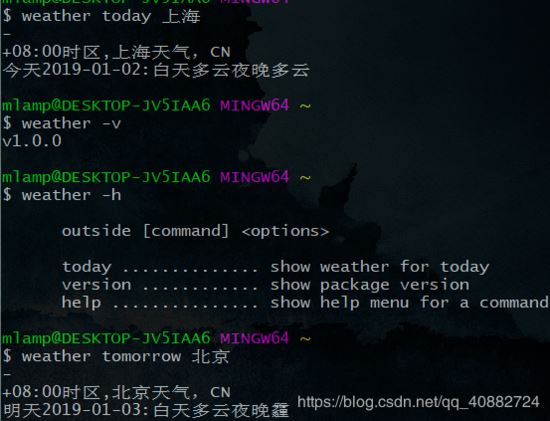
配置项目
初始化一个项目: npm init -y 编写入口文件index.js:
module.exports = function(){
	console.log('welcome to Anderlaw weather')
}
创建bin文件
bin目录下创建index:
#!/usr/bin/env node
require('../')()
package.json配置bin信息
{
 "name": "weather",
 "version": "1.0.0",
 "description": "",
 "main": "index.js",
 "bin": {
 "weather": "bin/index"
 }
}
然后在根目录(package.json同级)运行 npm link ,该操作会将该项目的模块信息和bin指令信息以软链接的形式添加到npm全局环境中:
C:\Users\mlamp\AppData\Roaming\npm\node_modules 下多了一个模块链接C:\Users\mlamp\AppData\Roaming\npm 下多了个名为 weather 的cmd文件。好处是可以更方便地进行本地调试。 然后我们打开终端输入: weather 就会看到 welcome to Anderlaw weather 的log信息
解析命令与参数
此处我们使用 minimist 库来解析如:npm --save ,npm install 的参数。
安装依赖库 npm i -S minimist
使用 process.argv 获取完整的输入信息
使用 minimist 解析,例如:
weather today === args:{_:['today']}
weather -h === args:{ h:true }
weather --location 'china' === args:{location:'china'}
首先我们要实现查询今天和明天的天气,执行 weather today[tomorrow]
const minimist = require('minimist');
module.exports = ()=>{
 const args = minimist(process.argv.slice(2));//前两个是编译器相关路径信息,可以忽略
 let cmd = args._[0];
 switch(cmd){
 	case 'today':
 	console.log('今天天气不错呢,暖心悦目!');
 	break;
 	case 'tomorrow':
 	console.log('明天下大雨,注意带雨伞!');
 	break;
 }
}
以上,如果我们输入 weather 就会报错,因为没有取到参数.而且还没添加版本信息,因此我们还需要改善代码
const minimist = require('minimist')
const edition = require('./package.json').version
module.exports = ()=>{
 const args = minimist(process.argv.slice(2));//前两个是编译器相关路径信息,可以忽略
 let cmd = args._[0] || 'help';
 if(args.v || args.version){
		cmd = 'version';//查询版本优先!
	}
 switch(cmd){
 	case 'today':
 	console.log('今天天气不错呢,暖心悦目!');
 	break;
 	case 'tomorrow':
 	console.log('明天下大雨,注意带雨伞!');
 	break;
 	case 'version':
 	console.log(edition)
 	break;
 	case 'help':
 	console.log(`
  	weather [command] <options>

		  today .............. show weather for today
		  tomorrow ............show weather for tomorrow
		  version ............ show package version
		  help ............... show help menu for a command
		`)
 }
}
接入天气API
截止目前工作顺利进行,我们还只是手工输入的一些mock信息,并没有真正的实现天气的查询。 要想实现天气查询,必须借助第三方的API工具,我们使用心知天气提供的免费数据服务接口。
需要先行注册,获取API key和id 发送请求我们使用axios库(http客户请求库)
安装依赖: npm i -S axios 封装http模块
///ajax.js
const axios = require('axios')
module.exports = async (location) => {
 const results = await axios({
 method: 'get',
 url: 'https://api.seniverse.com/v3/weather/daily.json',
 params:{
  key:'wq4aze9osbaiuneq',
  language:'zh-Hans',
  unit:'c',
  location
 }
 })
 return results.data
}
该模块接收一个 地理位置 信息返回今天、明天、后台的天气信息。
例如查询上海今天的天气: weather today --location shanghai
修改入口文件,添加 async标志
const minimist = require('minimist')
const ajax = require('./ajax.js')
const edition = require('./package.json').version
module.exports = async ()=>{
 const args = minimist(process.argv.slice(2));//前两个是编译器相关路径信息,可以忽略
 let cmd = args._[0] || 'help';
 if(args.v || args.version){
		cmd = 'version';//查询版本优先!
	}
 let location = args.location || '北京';
 let data = await ajax(location);
 data = data.results[0];
	let posotion= data.location;
 let daily = data.daily;
 switch(cmd){
 	case 'today':
 	//console.log('今天天气不错呢,暖心悦目!');
 	console.log(`${posotion.timezone_offset}时区,${posotion.name}天气,${posotion.country}`)
  console.log(`今天${daily[0].date}:白天${daily[0].text_day}夜晚${daily[0].text_night}`)
 	break;
 	case 'tomorrow':
 	//console.log('明天下大雨,注意带雨伞!');
 	console.log(`${posotion.timezone_offset}时区,${posotion.name}天气,${posotion.country}`)
  console.log(`今天${daily[1].date}:白天${daily[1].text_day}夜晚${daily[1].text_night}`)
 	break;
 	case 'version':
 	console.log(edition)
 	break;
 	case 'help':
 	console.log(`
  	weather [command] <options>

		  today .............. show weather for today
		  tomorrow ............show weather for tomorrow
		  version ............ show package version
		  help ............... show help menu for a command
		`)
 }
}
我们输入 weather today --location shanghai ,发现有结果了:

修修补补,添加loading提示和默认指令
截止当前,基本完成了功能开发,后续有一些小问题需要弥补一下,首先是一个进度提示,使用起来就更加可感知,我们使用 ora 库.
其次我们需要当用户输入无匹配指令时给予一个引导,提供一个默认的log提示。
安装依赖 npm i -S ora
编写loading模块:
const ora = require('ora')
module.exports = ora()
// method start and stop will be use
修改入口文件
const minimist = require('minimist')
const ajax = require('./ajax.js')
const loading = require('./loading')
const edition = require('./package.json').version
module.exports = async ()=>{
 const args = minimist(process.argv.slice(2));//前两个是编译器相关路径信息,可以忽略
 let cmd = args._[0] || 'help';
 if(args.v || args.version){
		cmd = 'version';//查询版本优先!
	}
 let location = args.location || '北京';
 loading.start();
 let data = await ajax(location);
 data = data.results[0];
	let posotion= data.location;
 let daily = data.daily;
 switch(cmd){
  case 'today':
 	//console.log('今天天气不错呢,暖心悦目!');
 	console.log(`${posotion.timezone_offset}时区,${posotion.name}天气,${posotion.country}`)
  console.log(`今天${daily[0].date}:白天${daily[0].text_day}夜晚${daily[0].text_night}`)
  loading.stop();
  break;
  case 'tomorrow':

 	//console.log('明天下大雨,注意带雨伞!');
 	console.log(`${posotion.timezone_offset}时区,${posotion.name}天气,${posotion.country}`)
  console.log(`今天${daily[1].date}:白天${daily[1].text_day}夜晚${daily[1].text_night}`)
  loading.stop();
 	break;
  case 'version':

  console.log(edition)
  loading.stop();
 	break;
 	case 'help':
 	console.log(`
  	weather [command] <options>

		  today .............. show weather for today
		  tomorrow ............show weather for tomorrow
		  version ............ show package version
		  help ............... show help menu for a command
  `)
  loading.stop();
  default:
  console.log(`你输入的命令无效:${cmd}`)
  loading.stop();
 }
}
发布
发布至npm仓库之后 可以直接以npm i -g weather全局方式安装我们发布的cli,并在任何地方输入weather命令查询天气了哟!
如果不清楚如何发布可查看我的另一篇文章发布一款npm包帮助理解npm
以上就是本文的全部内容,希望对大家的学习有所帮助,也希望大家多多支持脚本之家。


