

我们在用JS写程序的时候,经常会遇到像在程序中直接控制字体的大小颜色等基本信息,尤其的在后台方便,小编测试用javascript写了一个这个控件,喜欢的拿走吧。
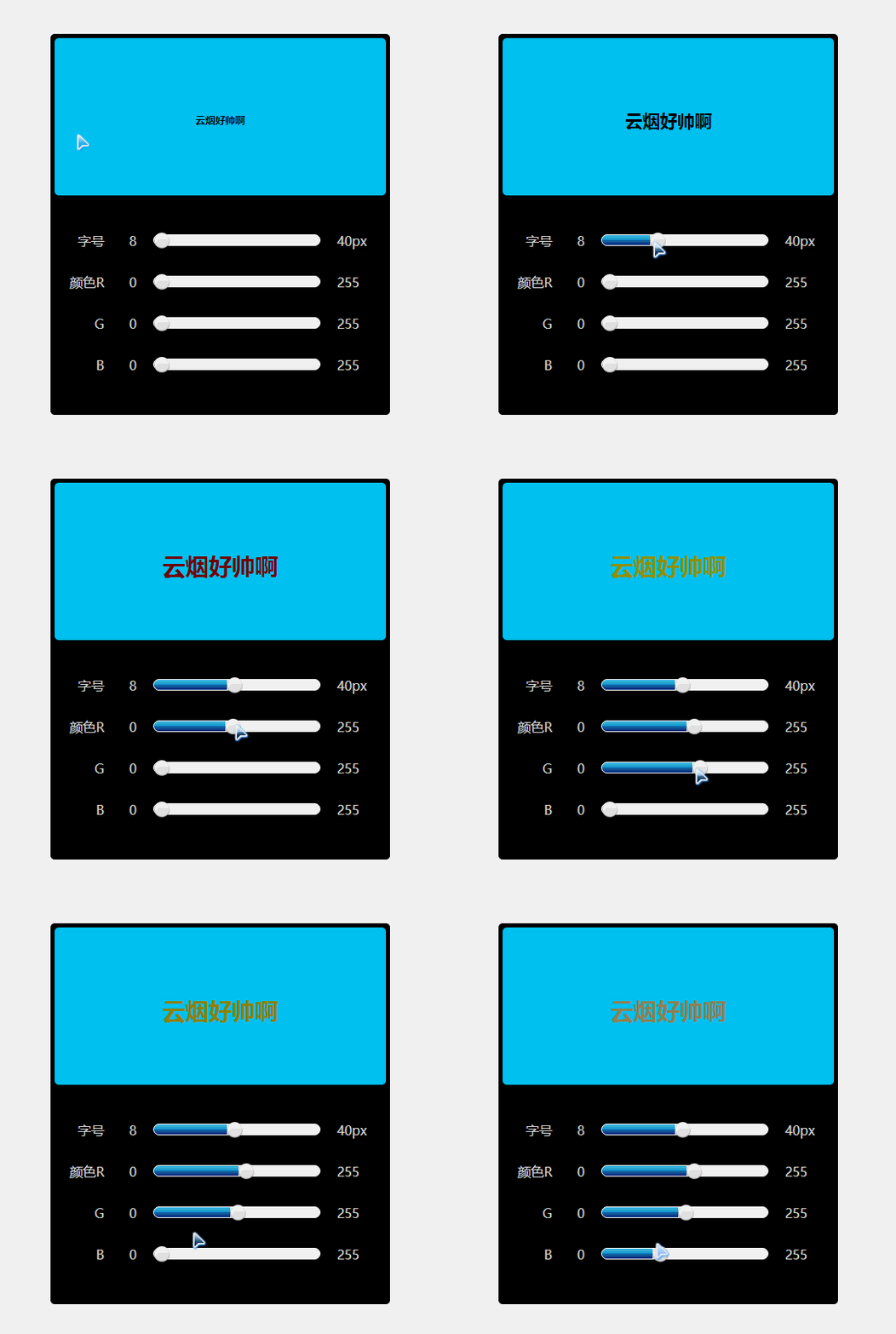
以上就是用JS写的运行效果,一下我们来看看代码具体实现方式:
知识点:for循环语句,字符串方法,进制转换,this指向问题,变量,数组方法,基本事件处理等。
<!doctype html><!--声明html版本编写指令 H5-->
<html>
  <head>
    <!--声明页面编码 uft-8 国际编码-->
    <meta charset="UTF-8">
    <!--网站三要素 关键字 页面描述 标题-->
    <meta name="Keywords" content="">
    <meta name="Description" content="">
    <title>Document</title>
    <style type="text/css">
    *{margin:0px;padding:0px;font-family:"微软雅黑";}
  #box{width:400px;
    height:450px;
    background:#000;
    margin:50px auto;
    border:5px
solid #000;
    border-radius:5px;
    }
  #show{width:100%;
     height:190px;
     background:#00ccff;
     line-height:200px;
     font-size:8px;
     font-weight:bold;
     text-align:center;
     border-radius:5px;
    }
  #font ul{margin-left:10px;
      margin-top:30px;}
  #font ul li{width:380px;
        height:50px;
        list-style-type:none;
        color:#ddd;}
  #font ul li span{display:block;
          width:50px;
          height:50px;
          line-height:50px;
          text-align:right;
          float:left;
          }
  #font ul li .roll{width:290px;
          height:50px;
          float:left;
          line-height:50px;
          padding-left:30px;
          }
  #font ul li .roll .move{width:200px;
              height:12px;
              display:inline-block;
              background:#fff;
              margin-left:15px;
              margin-right:15px;
              border-radius:10px;
              background-size:cover;
              border:1px solid #fff;
              position:relative;
              }
  #font ul li .roll .move .prog{position:absolute;
                top:0px;
                width:0px;
                height:12px;
                border-radius:10px 0 0 10px;
                background:url("images/slider-bar.png") bottom;}
  #font ul li .roll .move .prog .but{width:22px;
                   height:22px;
                   position:absolute;
                   top:-3px;
                   background:url("images/dot-bg.png") no-repeat;
                   cursor:pointer;
                   left:0px;}
    </style>
  </head>
  <body>
  <div id="box">
    <div id="show">云烟好帅啊</div>
    <div id="font">
      <ul>
        <li>
          <span>字号</span>
          <div class="roll">
            8
              <div class="move">
                <div class="prog">
                  <div class="but"></div>
                </div>
              </div>
            40px
          </div>
        </li>
        <li>
          <span>颜色R</span>
          <div class="roll">
            0
              <div class="move">
                <div class="prog">
                  <div class="but"></div>
                </div>
              </div>
            255
          </div>
        </li>
        <li>
          <span>G</span>
          <div class="roll">0
              <div class="move">
                <div class="prog">
                  <div class="but"></div>
                </div>
              </div>
            255
          </div>
        </li>
        <li>
          <span>B</span>
          <div class="roll">
          0
<div class="move">
                <div class="prog">
                  <div class="but"></div>
                </div>
              </div>
            255
          </div>
        </li>
      </ul>
    </div>
  </div>
  </body>
  <script type="text/javascript">
  /*
    1.JS主要针对页面当中的HTML元素以及样式进行修改,从而得到特效
    2.我们一般用JS写特效,要知道触发特效的条件是什么
    3.促发这个条件的对象是谁
    4.写这个事件里面发生的事情
    5.获取鼠标的移动水平方向的距离
    6.this代表当前执行这个事件的对象
    (这个事件是谁做的 那么这个事件当中的this就是谁)
  */
  var oBut =document.getElementsByClassName("but");//通过元素的类名 是以一个数组的形式保存
  var oFont =document.getElementById("show");//通过ID名获取元素
  var oProg =document.getElementsByClassName("prog");
  var width = [0,0,0,0];
  var rgb = ["00","00","00"];
  for (var i=0;i<oBut.length;i++)//重复执行某一个语句(循环体)限制条件
  {
    oBut[i].index=i;//自定义一个index属性保存i
    oBut[i].onmousedown =function(e){//鼠标点击下去
      //event事件对象 clientX clientY
      var e = e || window.event;//做IE兼容
      this.x =e.clientX;//当前对象的属性去保存这个值(自定义一个x属性)
      var thisIndex = this;//定义一个变量保存this指向对象
      var lastLeft = width[this.index];
      //console.log("鼠标点击下去");
      document.onmousemove =function(e){//鼠标移动事件
        //console.log("鼠标移动事件");
        var e = e || window.event;//做IE兼容
        width[thisIndex.index] =e.clientX-thisIndex.x+lastLeft;
        if (width[thisIndex.index]>180)width[thisIndex.index]=180;
        if (width[thisIndex.index]<0)width[thisIndex.index]=0;
        oBut[thisIndex.index].style.left =width[thisIndex.index]+"px";
        oProg[thisIndex.index].style.width =width[thisIndex.index]+"px";
        if (thisIndex.index ==0)
        {
oFont.style.fontSize =width[thisIndex.index]/180*40+8+"px";
          //驼峰命名法
        }else{
          var num = parseInt(width[thisIndex.index]/180*255);
          /*if (num<16)
          {
            numStr ="0"+num.toString(16);
          }else{
            numStr = num.toString(16);
          }*/
rgb[thisIndex.index-1] =num<16?"0"+num.toString(16):num.toString(16);
oFont.style.color ="#"+rgb[0]+rgb[1]+rgb[2];
        }
      }
document.onmouseup =function(){//鼠标松开事件
//console.log("鼠标松开事件");
this.onmousemove =null;//终止移动事件
this.onmouseup =null;//终止鼠标松开事件
      }
    }
  }
</script>
</html>


