

我们需要额外两个依赖vuex 和 axios:(还是接着上一个项目MyFirstProject写)
npm i vuex axios -D
首先简单的阐述下http请求
1、main.js 中引入axios
import axios from 'axios'
Vue.prototype.$http = axios;
2、focus.vue中写个函数获取数据
<template>
	<div id="focus">
		<ul >
			<li v-for="(item,index) in focusList">
				<div class="fportraits">
					<img :src="'./src/'+item.portrait" :alt="item.name">
				</div>
				<div class="details">
					<div class="ftitle"><strong> {{ item.name }} </strong></div>
					<p> {{ item.production }} </p>
				</div>
				<div class="isfocused">
					<p>取消关注</p>
				</div>
				<div class="clearfix"></div>
			</li>
		</ul>
	</div>
</template>
<script>
	export default{
		data(){
			return {
				focusList:[] //存储请求返回的数据
			}
		},
		mounted(){
			this.getFocusList()
		},
		methods:{
			getFocusList(){   //http get请求data.json 的数据
				var vm = this;
				this.$http.get('src/assets/data/data.json')
					.then(function(res){
						vm.focusList = res.data;
					})
					.catch(function(err){
						console.log(err)
					})
			}
		}
	}
</script>
<style scoped>
#focus{text-align:left;}
#focus ul{margin:0 auto;width:50rem;border-bottom:none;}
#focus p{margin:0;}
#focus li{width:46rem;display:block;border-bottom:1px solid #ddd;padding:0.5rem 2rem;cursor:default;}
#focus img{height:4rem;margin-left:-1rem;}
.fportraits{float:left;width:4rem;height:4rem;border-radius:50%;overflow:hidden;}
.details{float:left;margin-left:1rem;}
.isfocused{float:right;font-size:0.8rem;height:0.8rem;line-height:0.8rem;margin:0;}
.clearfix{clear:both;}
</style>
获取成功后展示效果如图:
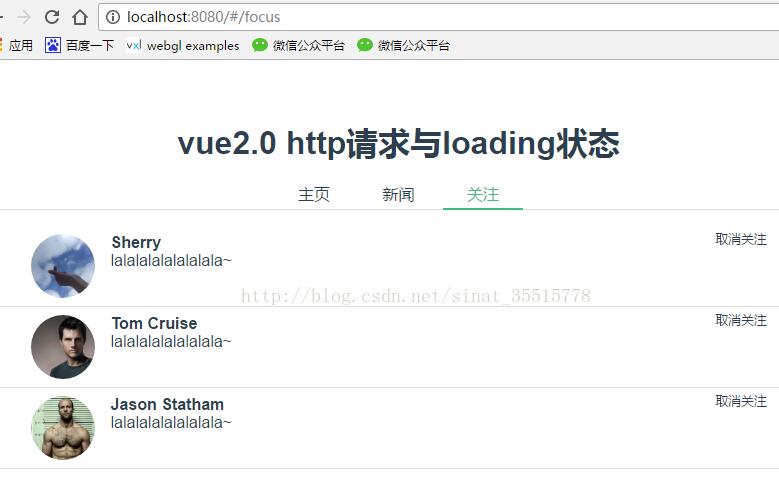
我的两个男神羡慕羡慕有没有很帅
到此请求数据就结束了,是不是很简单,然额接下来涉及到store就有点复杂了,欲知后事如何,且听下回分解~


