

本文实例为大家分享了vue移动端图片裁剪上传的具体代码,供大家参考,具体内容如下
1.安装cropperjs依赖库
npm install cropperjs
2.编写组件SimpleCropper.vue
<template>
 <div class="v-simple-cropper">
 <slot>
 <button @click="upload">上传图片</button>
 </slot>
 <input class="file" ref="file" type="file" accept="image/*" @change="uploadChange">
 <div class="v-cropper-layer" ref="layer">
 <div class="layer-header">
 <button class="cancel" @click="cancelHandle">取消</button>
 <button class="confirm" @click="confirmHandle">裁剪</button>
 </div>
 <img ref="cropperImg">
 </div>
 </div>
</template>

<script>
import Cropper from 'cropperjs'
import 'cropperjs/dist/cropper.min.css'
export default {
 name: 'v-simple-cropper',
 props: {
 initParam: Object,
 successCallback: {
 type: Function,
 default: () => {}
 }
 },
 data () {
 return {
 cropper: {},
 filename: ''
 }
 },
 mounted () {
 this.init()
 },
 methods: {
 // 初始化裁剪插件
 init () {
 let cropperImg = this.$refs['cropperImg']
 this.cropper = new Cropper(cropperImg, {
 aspectRatio: 1 / 1,
 dragMode: 'move'
 })
 },
 // 点击上传按钮
 upload () {
 this.$refs['file'].click()
 },
 // 选择上传文件
 uploadChange (e) {
 let file = e.target.files[0]
 this.filename = file['name']
 let URL = window.URL || window.webkitURL
 this.$refs['layer'].style.display = 'block'
 this.cropper.replace(URL.createObjectURL(file))
 },
 // 取消上传
 cancelHandle () {
 this.cropper.reset()
 this.$refs['layer'].style.display = 'none'
 this.$refs['file'].value = ''
 },
 // 确定上传
 confirmHandle () {
 let cropBox = this.cropper.getCropBoxData()
 let scale = this.initParam['scale'] || 1
 let cropCanvas = this.cropper.getCroppedCanvas({
 width: cropBox.width * scale,
 height: cropBox.height * scale
 })
 let imgData = cropCanvas.toDataURL('image/jpeg')
 let formData = new window.FormData()
 formData.append('fileType', this.initParam['fileType'])
 formData.append('img', imgData)
 formData.append('signId', this.$localStorage('signId'))
 formData.append('originalFilename', this.filename)
 window.$axios(this.initParam['uploadURL'], formData, {
 method: 'post',
 headers: {'Content-Type': 'multipart/form-data'}
 }).then(res => {
 this.successCallback(res.data)
 this.cancelHandle()
 })
 }
 }
}
</script>

<style lang="less">
.v-simple-cropper {
 .file {
 display: none;
 }
 .v-cropper-layer {
 position: fixed;
 top: 0;
 bottom: 0;
 left: 0;
 right: 0;
 background: #fff;
 z-index: 99999;
 display: none;
 .layer-header {
 position: absolute;
 top: 0;
 left: 0;
 z-index: 99999;
 background: #fff;
 width: 100%;
 height: .8rem;
 padding: 0 .2rem;
 box-sizing: border-box;
 }
 .cancel,
 .confirm {
 line-height: .8rem;
 font-size: .28rem;
 background: inherit;
 border: 0;
 outline: 0;
 float: left;
 }
 .confirm {
 float: right;
 }
 img {
 position: inherit!important;
 border-radius: inherit!important;
 float: inherit!important;
 }
 }
}
</style>
3.引用组件
<template>
 <simple-cropper :initParam="uploadParam" :successCallback="uploadHandle" ref="cropper">
 <img :src="userImg" @click="upload">
 </simple-cropper>
</template>

<script>
import SimpleCropper from '@/components/SimpleCropper'
export default {
 name: 'info',
 data () {
 return {
 uploadParam: {
 fileType: 'recruit', // 其他上传参数
 uploadURL: this.$dataURL + 'uploadAction/qcloudImg', // 上传地址
 scale: 4 // 相对手机屏幕放大的倍数: 4倍
 },
 userImg: this.$dataURL + 'test.png'
 }
 },
 methods: {
 // 上传头像
 upload () {
 this.$refs['cropper'].upload()
 },
 // 上传头像成功回调
 uploadHandle (data) {
 if (data.state === 'SUCCESS') {
 this.userImg = this.form.headImgUrl = data.fileId
 }
 }
 },
 components: {
 SimpleCropper
 }
}
</script>
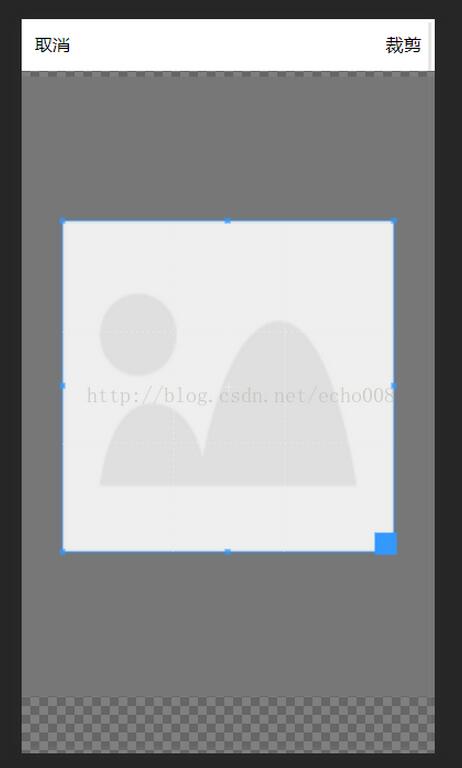
4.示例图
关于vue.js组件的教程,请大家点击专题vue.js组件学习教程进行学习。
更多vue学习教程请阅读专题《vue实战教程》
以上就是本文的全部内容,希望对大家的学习有所帮助,也希望大家多多支持脚本之家。


