

基于Vue的日历小功能,可根据实际开发情况按每年、每月、每周、进行切换,具体内容如下
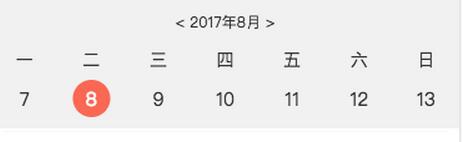
<template>
 <div class="date">
  <!-- 年份 月份 -->
  <div class="month">
  <p>{{ currentYear }}年{{ currentMonth }}月</p>
  </div>
  <!-- 星期 -->
  <ul class="weekdays">
  <li>一</li>
  <li>二</li>
  <li>三</li>
  <li>四</li>
  <li>五</li>
  <li>六</li>
  <li>日</li>
  </ul>
  <!-- 日期 -->
  <ul class="days">
  <li @click="pick(day)" v-for="(day, index) in days" :key="index">
   <!--本月-->
   <span v-if="day.getMonth()+1 != currentMonth" class="other-month">{{ day.getDate() }}</span>
   <span v-else>
   <!--今天-->
   <span v-if="day.getFullYear() == new Date().getFullYear() && day.getMonth() == new Date().getMonth() && day.getDate() == new Date().getDate()" class="active">{{ day.getDate() }}</span>
   <span v-else>{{ day.getDate() }}</span>
   </span>
  </li>
  </ul>
 </div>
</template>
js部分:目前默认显示一周,可根据实际情况更改
<script>


 export default {
 name: 'date',

 data () {
  return {
  currentYear: 1970, // 年份
  currentMonth: 1, // 月份
  currentDay: 1, // 日期
  currentWeek: 1, // 星期
  days: [],
  }
 },

 mounted () {

 },

 created () {
  this.initData(null)
 },

 methods: {
  formatDate (year, month, day) {
  const y = year
  let m = month
  if (m < 10) m = `0${m}`
  let d = day
  if (d < 10) d = `0${d}`
  return `${y}-${m}-${d}`
  },

  initData (cur) {
  let date = ''
  if (cur) {
   date = new Date(cur)
  } else {
   date = new Date()
  }
  this.currentDay = date.getDate()   // 今日日期 几号
  this.currentYear = date.getFullYear()  // 当前年份
  this.currentMonth = date.getMonth() + 1 // 当前月份
  this.currentWeek = date.getDay() // 1...6,0 // 星期几
  if (this.currentWeek === 0) {
   this.currentWeek = 7
  }
  const str = this.formatDate(this.currentYear, this.currentMonth, this.currentDay)// 今日日期 年-月-日
  this.days.length = 0
  // 今天是周日,放在第一行第7个位置,前面6个 这里默认显示一周,如果需要显示一个月,则第二个循环为 i<= 35- this.currentWeek
  /* eslint-disabled */
  for (let i = this.currentWeek - 1; i >= 0; i -= 1) {
   const d = new Date(str)
   d.setDate(d.getDate() - i)
   // console.log(y:" + d.getDate())
   this.days.push(d)
  }
  for (let i = 1; i <= 7 - this.currentWeek; i += 1) {
   const d = new Date(str)
   d.setDate(d.getDate() + i)
   this.days.push(d)
  }
  },

  // 上个星期
  weekPre () {
  const d = this.days[0] // 如果当期日期是7号或者小于7号
  d.setDate(d.getDate() - 7)
  this.initData(d)
  },

  // 下个星期
  weekNext () {
  const d = this.days[6] // 如果当期日期是7号或者小于7号
  d.setDate(d.getDate() + 7)
  this.initData(d)
  },

  // 上一個月 传入当前年份和月份
  pickPre (year, month) {
  const d = new Date(this.formatDate(year, month, 1))
  d.setDate(0)
  this.initData(this.formatDate(d.getFullYear(), d.getMonth() + 1, 1))
  },


  // 下一個月 传入当前年份和月份
  pickNext (year, month) {
  const d = new Date(this.formatDate(year, month, 1))
  d.setDate(35)
  this.initData(this.formatDate(d.getFullYear(), d.getMonth() + 1, 1))
  },

  // 当前选择日期
  pick (date) {
  alert(this.formatDate(date.getFullYear(), date.getMonth() + 1, date.getDate()))
  },
 },
 }
</script>
<style lang="scss">
 @import "~base";

 .date {
 height: px2rem(180);
 color: #333;

 .month {
  font-size: px2rem(24);
  text-align: center;
  margin-top: px2rem(20);
 }

 .weekdays {
  display: flex;
  font-size: px2rem(28);
  margin-top: px2rem(20);

  li {
  flex: 1;
  text-align: center;
  }
 }

 .days {
  display: flex;

  li {
  flex: 1;
  font-size: px2rem(30);
  text-align: center;
  margin-top: px2rem(10);
  line-height: px2rem(60);

  .active {
   display: inline-block;
   width: px2rem(60);
   height: px2rem(60);
   color: #fff;
   border-radius: 50%;
   background-color: #fa6854;
  }

  .other-month {
   color: #e4393c;
  }
  }
 }
 }
</style>
相关参考链接:Vue.js创建Calendar日历效果
以上就是本文的全部内容,希望对大家的学习有所帮助,也希望大家多多支持脚本之家。


