

本文实例为大家分享了Node.js实现用户登录注册的具体代码,供大家参考,具体内容如下
IDE:WebStorm
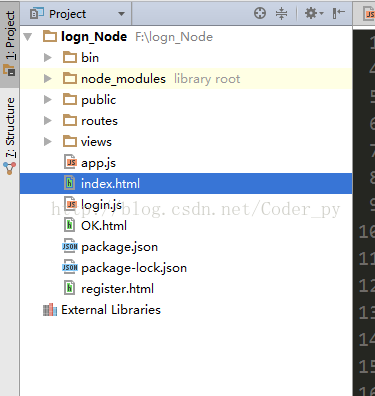
工程目录:
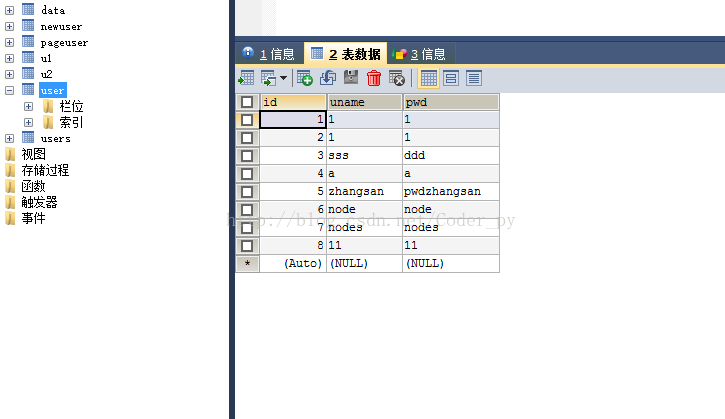
数据库表
Login.js:
 /**
 * Created by linziyu on 2017/7/8.
 */
/**
 * express接收html传递的参数
 */

var express=require('express');
var app=express();
var mysql=require('mysql');

/**
 * 配置MySql
 */
var connection = mysql.createConnection({
 host  : '127.0.0.1',
 user  : 'root',
 password : '1996112lin',
 database : 'mydata',
 port:'3306'
});
connection.connect();
app.get('/',function (req,res) {
 res.sendfile(__dirname + "/" + "index.html" );
})

/**
 * 实现登录验证功能
 */
app.get('/login',function (req,res) {
 var name=req.query.name;
 var pwd=req.query.pwd;

 var selectSQL = "select * from user where uname = '"+name+"' and pwd = '"+pwd+"'";
 connection.query(selectSQL,function (err,rs) {
  if (err) throw err;
  console.log(rs);
  console.log('OK');
  res.sendfile(__dirname + "/" + "OK.html" );
 })
})

app.get('/register.html',function (req,res) {
 res.sendfile(__dirname+"/"+"register.html");
})

/**
 * 实现注册功能
 */
app.get('/register',function (req,res) {
 var name=req.query.name;
 var pwd=req.query.pwd;
 var user={uname:name,pwd:pwd};
 connection.query('insert into user set ?',user,function (err,rs) {
  if (err) throw err;
  console.log('ok');
  res.sendfile(__dirname + "/" + "index.html" );
 })
})


var server=app.listen(7744,function () {
 console.log("start");
})
Index.html:
<!DOCTYPE html>
<html lang="en">
<head>
 <meta charset="UTF-8">
 <title>Title</title>
</head>
<body>
  <form action="http://127.0.0.1:7744/login">
    <input type="text" name="name"/>
    <input type="text" name="pwd"/>
   <input type="submit" value="提交"/>
  </form>
 <a href="register.html" rel="external nofollow" >注册</a>

</body>
</html>
Register.html:
<!DOCTYPE html>
<html lang="en">
<head>
 <meta charset="UTF-8">
 <title>Title</title>
</head>
<body>
<form action="http://127.0.0.1:7744/register">
 <input type="text" name="name"/>
 <input type="text" name="pwd"/>
 <input type="submit" value="提交"/>
</form>
</body>
</html>
启动后访问:http://localhost:7744/
以上就是本文的全部内容,希望对大家的学习有所帮助,也希望大家多多支持脚本之家。


