

微信小程序canvas写字板效果及实例
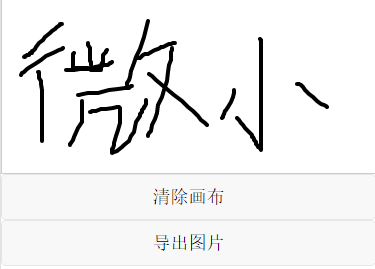
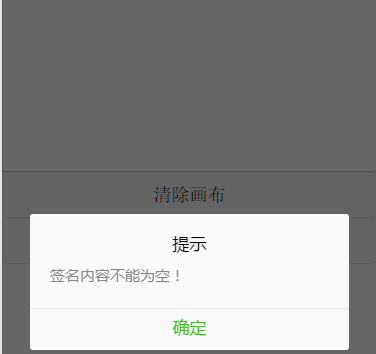
写字板效果:书写文字,画板重置,导出图片,导出图片前判断是否书写内容
app.json:
添加一个路由:"pages/canvas/canvas"
{
 "pages":[
  "pages/index/index",
  "pages/logs/logs",
  "pages/canvas/canvas"
 ],
 "window":{
  "navigationBarBackgroundColor": "#ea6a46",
  "navigationBarTextStyle":"white",
  "navigationBarTitleText": "写字板",
  "backgroundTextStyle":"dark",
  "backgroundColor":"white",
  "enablePullDownRefresh":"true"
 }
}
然后就是:
canvas.wxml:
<!--pages/canvas/canvas.wxml-->
<canvas class="canvas" id="canvas" canvas-id="canvas" disable-scroll="true" bindtouchstart="canvasStart" bindtouchmove="canvasMove" bindtouchend="canvasEnd" touchcancel="canvasEnd" binderror="canvasIdErrorCallback"></canvas>
<button type="default" bindtap="cleardraw">清除画布</button>
<button type="default" bindtap="getimg">导出图片</button>
canvas.js:
// canvas 全局配置
var context = null;// 使用 wx.createContext 获取绘图上下文 context
var isButtonDown = false;
var arrx = [];
var arry = [];
var arrz = [];
var canvasw = 0;
var canvash = 0;
//获取系统信息
wx.getSystemInfo({
 success: function (res) {
  canvasw = res.windowWidth;//设备宽度
  canvash = res.windowWidth*7/15;
 }
});
//注册页面
Page({
 canvasIdErrorCallback: function (e) {
  console.error(e.detail.errMsg)
 },
 canvasStart: function (event){
  isButtonDown = true;
  arrz.push(0);
  arrx.push(event.changedTouches[0].x);
  arry.push(event.changedTouches[0].y);
  //context.moveTo(event.changedTouches[0].x, event.changedTouches[0].y);

 },
 canvasMove: function (event) {
  if (isButtonDown) {
   arrz.push(1);
   arrx.push(event.changedTouches[0].x);
   arry.push(event.changedTouches[0].y);
   // context.lineTo(event.changedTouches[0].x, event.changedTouches[0].y);
   // context.stroke();
   // context.draw()

  };

  for (var i = 0; i < arrx.length; i++) {
   if (arrz[i] == 0) {
    context.moveTo(arrx[i], arry[i])
   } else {
    context.lineTo(arrx[i], arry[i])
   };

  };
  context.clearRect(0, 0, canvasw, canvash);
  context.stroke();

  context.draw(true);
 },
 canvasEnd: function (event) {
  isButtonDown = false;
 },
 cleardraw: function () {
  //清除画布
  arrx = [];
  arry = [];
  arrz = [];
  context.clearRect(0, 0, canvasw, canvash);
  context.draw(true);
 },
 getimg: function(){
  if (arrx.length==0){
   wx.showModal({
    title: '提示',
    content: '签名内容不能为空!',
    showCancel: false
   });
   return false;
  };
  //生成图片
  wx.canvasToTempFilePath({
   canvasId: 'canvas',
   success: function (res) {
    console.log(res.tempFilePath);
    //存入服务器
    wx.uploadFile({
     url: 'a.php', //接口地址
     filePath: res.tempFilePath,
     name: 'file',
     formData: {                 //HTTP 请求中其他额外的 form data
      'user': 'test'
     },
     success: function (res) {
      console.log(res);
     },
     fail: function (res) {
      console.log(res);
     },
     complete: function (res) {

     }
    });
   }
  })

 },
 /**
  * 页面的初始数据
  */
 data: {
  src: ""
 },
 /**
  * 生命周期函数--监听页面加载
  */
 onLoad: function (options) {
  // 使用 wx.createContext 获取绘图上下文 context
  context = wx.createCanvasContext('canvas');
  context.beginPath()
  context.setStrokeStyle('#000000');
  context.setLineWidth(4);
  context.setLineCap('round');
  context.setLineJoin('round');


 }
})
感谢阅读,希望能帮助到大家,谢谢大家对本站的支持!


