

点击右下角图片进行状态切换,效果图
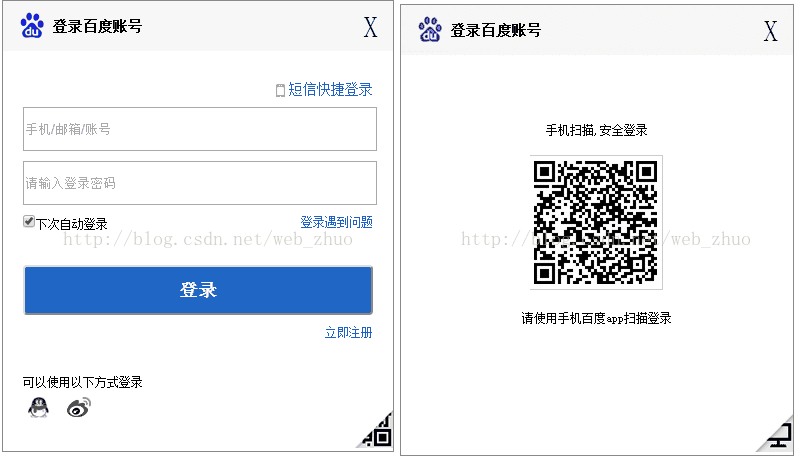
<!doctype html>
<html lang="en">
<head>
  <meta charset="UTF-8">
  <title>百度登录框</title>
  <style type="text/css">
    *{margin: 0;padding: 0;}
    body
    {
      font-size: 12px;
    }
    a
    {
      text-decoration: none;
      color: #2647CB;
    }
    a:hover
    {
      text-decoration: underline;
      color: red;
    }
    .wrap
    {
      width: 390px;
      height: 450px;
      margin: 50px auto;
      border: 1px solid #8A8989;
      position: relative;
    }
    .main
    {
      width: 350px;
      height: 400px;
      margin: 0 auto;
    }
    .header
    {
      width: 100%;
      height: 50px;
      line-height: 50px;
      background-image: url(images/foot.png);
      background-color: rgb(247,247,247);
      background-repeat: no-repeat;
    }
    .header h3
    {
      display: inline-block;
      line-height: 50px;
      margin-left: 50px;
    }
    .header span
    {
      display: inline-block;
      float: right;
      margin: auto 15px;
      font-size: 30px;
    }
    .inputDiv
    {
      display: block;
      width: 350px;
      height: 40px;
      margin: 10px auto;
    }
    .phoneIn
    {
      display: inline-block;
      float: right;
      font-size: 14px;
      background-image: url(images/phone.png);
      background-repeat: no-repeat;
      padding-left: 20px;
      margin: 30px 0px 10px 0px;
    }
    .smBtn
    {
      background: #2066C5;
      color: white;
      font-size: 18px;
      font-weight: bold;
      height: 50px;
      border-radius: 4px;
    }
    .smBtn:hover
    {
      background: #4067EE;
    }
    .pull-right
    {
      display: inline-block;
      float: right;
    }
    .other
    {
      width: 350px;
      padding-top: 50px;
      margin: 0 auto;
    }
    .toggleDiv1,.toggleDiv2
    {
      position: absolute;
      right: 0;
      bottom: 0;
      z-index: 1000;
    }
    .weima
    {
      text-align: center;
      padding-top: 50px;
      width: 390px;
      height: 400px;
    }
    .weima p
    {
      line-height: 50px;
    }
    .choice2
    {
      display: none;
    }
    #close:hover
    {
      cursor: pointer;
      color: blue;
    }
  </style>
</head>
<body>
<!-- 账号密码登录 -->
  <div class="wrap">
    <div class="header">
      <h3>登录百度账号</h3>
      <span id="close" title="关闭">X</span>
    </div>
    <div class="choice1">
      <div class="main">
      <a href="" class=" rel="external nofollow" rel="external nofollow" rel="external nofollow" phoneIn">短信快捷登录</a>
      <form action="">
        <input type="text" class="inputDiv" placeholder="手机/邮箱/账号">
        <input type="password" class="inputDiv" placeholder="请输入登录密码">
        <p class="inputDiv">
        <input type="checkbox" value="checked" checked="checked"><label for="">下次自动登录</label>
        <a href="" class=" rel="external nofollow" rel="external nofollow" rel="external nofollow" pull-right" >登录遇到问题</a>
        </p>
        <input type="submit" value="登录" class="inputDiv smBtn">
        <a href="" class=" rel="external nofollow" rel="external nofollow" rel="external nofollow" pull-right" >立即注册</a>
      </form>
      <div class="other">
      <p>可以使用以下方式登录</p>
      <a href=""><img src=" rel="external nofollow" rel="external nofollow" images/qq.png" alt=""></a>
      <a href=""><img src=" rel="external nofollow" rel="external nofollow" images/wb.png" alt=""></a>
      </div>
    </div>
    <div class="toggleDiv1">
      <img src="images/small2wm.png" alt="">
      </div>
    </div>
    <!-- 二维码登录 -->
<div class="choice2">
    <div class="weima">
    <p>手机扫描,安全登录</p>
    <img src="images/2weima.png" alt="">
    <p>请使用手机百度app扫描登录</p>
  </div>
    <div class="toggleDiv2">
      <img src="images/cpt.png" alt="">
    </div>
  </div>
  </div>
</body>
<!-- 导入jquery文件 -->
<script type="text/javascript" src="jquery-3.1.1.min.js"></script>
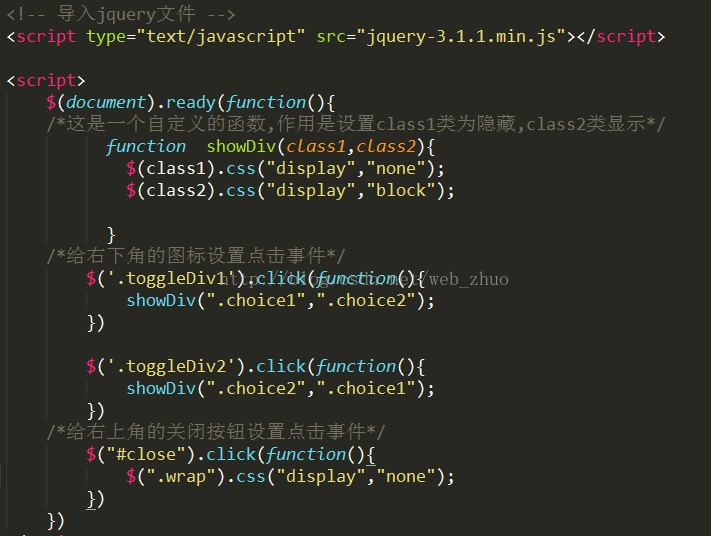
<script>
  $(document).ready(function(){
  /*这是一个自定义的函数,作用是设置class1类为隐藏,class2类显示*/
     function showDiv(class1,class2){
      $(class1).css("display","none");
      $(class2).css("display","block");
     }
  /*给右下角的图标设置点击事件*/
    $('.toggleDiv1').click(function(){
      showDiv(".choice1",".choice2");
    })
    $('.toggleDiv2').click(function(){
      showDiv(".choice2",".choice1");
    })
  /*给右上角的关闭按钮设置点击事件*/
    $("#close").click(function(){
      $(".wrap").css("display","none");
    })
  })
</script>
</html>
以上所述是小编给大家介绍的jQuery实现百度登录框的动态切换效果,希望对大家有所帮助,如果大家有任何疑问请给我留言,小编会及时回复大家的。在此也非常感谢大家对脚本之家网站的支持!


