

本来想这一周做一个关于vuex的总结的,但是由于朋友反应说还不知道如何用vue去写一个组件,所以在此写写一篇文章来说明下如何去写vue页面或者组件。vue的核心思想就是组件,什么是组件呢?按照我的理解组件就是装配页面的零件,比如一辆车有大大小小许多零件组成,那么同样的一个页面,也是有许多组件构成的比如说头部组件 按钮组件等等,vue三大核心组件 路由 状态管理,路由控制页面的渲染,页面由组件组成,数据有vuex进行管理和改变。下面我会以一个简单的案例来说
第一步:构建一个简单的vue项目,老规矩直接在命令行输入
vue init webpack myproject
cd my vue
cnpm/npm install
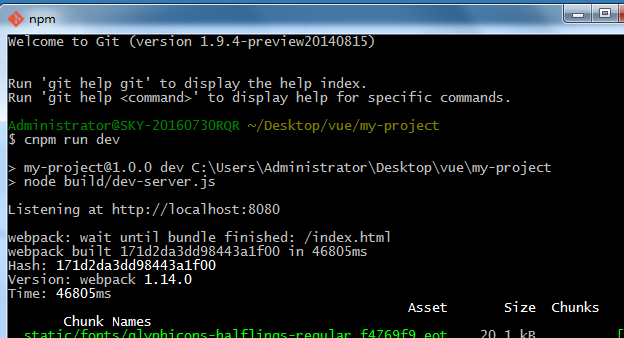
cnpm/npm run dev
执行结果如下
然后你会在8080端口看到vue的标志页面
第二步:分析目录结构 主要是组件入口app.vue和main.js
第三步:写页面
我们在app.vue下这样写
<template>
 <div id="wrapper">
 <router-view></router-view>
 </div>
</template>
<script>
 export default {
  data () {
  return {

  }
  },
  components: {
  }
 }
</script>
在main.js中这样写
import Vue from 'vue'
import App from './App'
import Home from './pages/Home.vue'
import VueRouter from 'vue-router'
import 'bootstrap/dist/css/bootstrap.css'
Vue.use(VueRouter)
const routes = [{
 path: '/',
 component: Home
}]
const router = new VueRouter({
 routes
})
/* eslint-disable no-new */
new Vue({
 el: '#app',
 router,
 template: '<App/>',
 components: { App }
})
main.js主要包括模块导入以及组件导入和注册,路由配置,当然路由配置可以单独写出来。
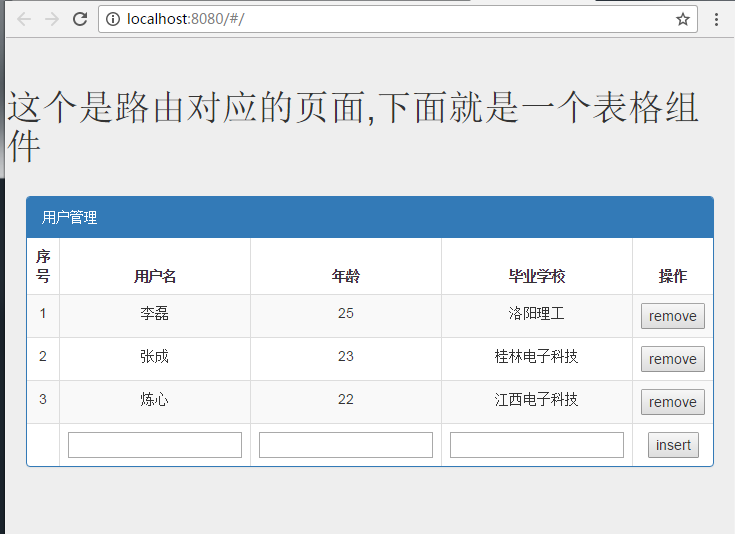
由上面的路由配置可以知道当path为‘/'时候,我们渲染到app.vue中的页面为home.vue页面,如下
<template>
 <div class="jumbotron">
 <h1>这个是路由对应的页面,下面就是一个表格组件</h1>
 <table-com/>
 </div>
</template>
<script>
 import table from '../components/Hello.vue'
 export default {
  data () {
  return {
  }
  },
  components: {
  tableCom: table
  }
 }
</script>
其中import table from '../components/Hello.vue'表示导入这个table组件到home.vue页面
但是只导入而没有注册这个组件是无效的,就好像定义了一个函数而没有执行。所以我们需要注册这个组件
也就是components:{tableCom: table}意思是自定义一个tableCom标签来映射这个组件,但是vue规定但标签名过长的时候,需要以分开方式去写比如tableCom 要写成table-com.
这样就完成了一个组件的导入和注册,下面我们来完成这个组件
table.vue界面如下
<template>
 <div style="padding:20px;" id="app">
  <div class="panel panel-primary">
   <div class="panel-heading">用户管理</div>
   <table class="table table-bordered table-striped text-center">
    <thead>
     <tr>
      <th>序号</th>
      <th>用户名</th>
      <th>年龄</th>
      <th>毕业学校</th>
      <th>操作</th>
     </tr>
    </thead>
    <tbody>
     <tr v-for ="(user,index) in users">
      <td>{{index+1}}</td>
      <td>{{user.name}}</td>
      <td>{{user.age}}</td>
      <td>{{user.school}}</td>
      <td><button v-on:click="remove(index)">remove</button></td>
     </tr>
     <tr>
      <td></td>
      <td><input type="text" id="name" v-model="user.name"/></td>
      <td><input type="text" id="age"v-model="user.age"/></td>
      <td><input type="text" id="school"v-model="user.school"/></td>
      <td><button @click="insert">insert</button></td>
     </tr>
    </tbody>
   </table>
  </div>
 </div>
</template>
<script>
export default {
 name: 'hello',
 data () {
 return {
  user: {'name': '', 'age': '', 'school': ''},
  users: [
  {'name': '李磊', 'age': '25', 'school': '洛阳理工'},
  {'name': '张成', 'age': '23', 'school': '桂林电子科技'},
  {'name': '炼心', 'age': '22', 'school': '江西电子科技'}
  ]
 }
 },
 methods: {
 insert: function () {
  this.users.push(this.user)
 },
 remove: function (index) {
  this.users.splice(index, 1)
 }
 }
}
</script>
<!-- Add "scoped" attribute to limit CSS to this component only -->
<style scoped>
h1, h2 {
 font-weight: normal;
}
ul {
 list-style-type: none;
 padding: 0;
}
li {
 display: inline-block;
 margin: 0 10px;
}
a {
 color: #42b983;
}
tr,th{
 text-align:center;
}
</style>
这个组件实现了简单的增删功能,主要是对data数据的修改,我们要明白,我们平常使用的jquery只是对dom节点的操作,比如我们要改变一个数据我们就要首先获取dom然后通过jquery的方法来获取值,而vue则不然它是对data数据进行操作,数据双向绑定,数据改变则视图改变,同样视图改变则数据改变。
以上所述是小编给大家介绍的vue实现简单表格组件实例详解,希望对大家有所帮助,如果大家有任何疑问欢迎给我留言,小编会及时回复大家的,在此也非常感谢大家对脚本之家网站的支持!


