

微信小程序仿猫眼
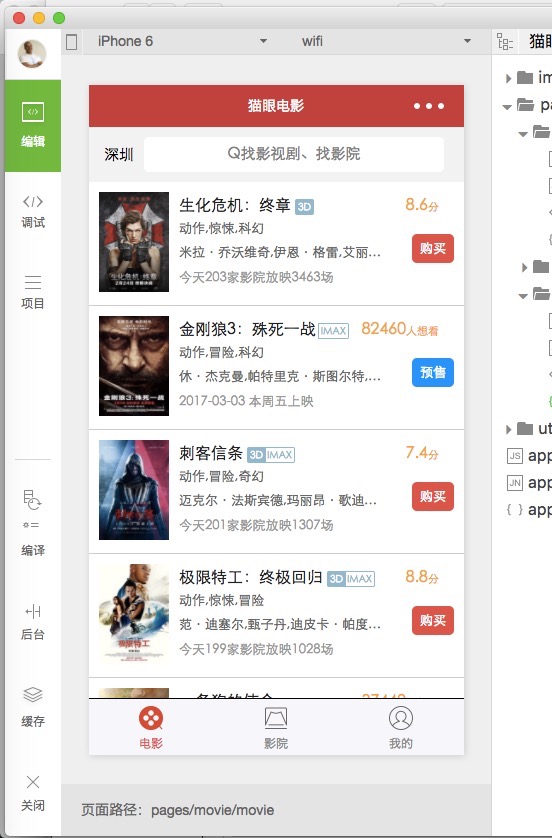
实现效果图:
movie.js
Page({
  data: {
    movies:null,
    scrollTop : 0,
    scrollHeight:0
  },
  onLoad: function (options) {
    // 生命周期函数--监听页面加载
     // 这里要非常注意,微信的scroll-view必须要设置高度才能监听滚动事件,所以,需要在页面的onLoad事件中给scroll-view的高度赋值
    var that = this;
    wx.getSystemInfo({
     success:function(res){
       console.info(res.windowHeight);
       that.setData({
         scrollHeight:res.windowHeight
       });
     }
   });
   that.getAllMovies();
  },

  getAllMovies() {
    let thispage=this;
    //展示 加载框
    wx.showToast({
      title: '加载中',
      icon: 'loading',
      duration: 10000
    })

    //网络请求数据
    wx.request({
     url: 'http://m.maoyan.com/movie/list.json?type=hot&offset=0&limit=1000',
     method: 'GET', // OPTIONS, GET, HEAD, POST, PUT, DELETE, TRACE, CONNECT
     header: {'content-type':'json'}, // 设置请求的 header
     success: function(res){
      // success
      let obj=res.data.data.movies;
      //将获取到的数据设置到 page 中的movies上
      thispage.setData({movies:obj});
      //隐藏加载框
      wx.hideToast();
      //停止刷新
      wx.stopPullDownRefresh();
     },
     fail: function() {
      // fail
     },
     complete: function() {
      // complete
     }
    })
  },
  //点击事件
  itemClick(event){


  },
  //刷新
  onPullDownRefresh: function () {
  this.getAllMovies();
 },
})
movie.json
{

  "enablePullDownRefresh": true
}
movie.wxml
<view class="top">
  <text class="top_text">深圳</text>
  <view class="top_input">
   <input placeholder="Q找影视剧、找影院" />
  </view>
 </view>
 <view class="item" wx:for="{{movies}}" wx:key="{{index}}" bindtap="itemClick" hover-class="item_press" hover="true" >
  <view class="pic">
   <image src="{{item.img}}"></image>
  </view>
  <view class="detail">
   <title>{{item.nm}}
    <text class="threeD" wx:if='{{item["3d"]}}'>3D</text>
    <text class="iMax" wx:if='{{item["imax"]}}'>IMAX</text>
    <text class="score" wx:if="{{item.preSale !=1}}">{{item.sc}}<text style='font-size:11px'>分</text>
    </text>
    <text class="wish" wx:else>{{item.wish}}<text style='font-size:11px'>人想看</text>
    </text>
   </title>
   <view class="type">
    {{item.cat}}
   </view>
   <view class="star">
    {{item.star}}
   </view>
   <view class="showinfo">
    {{item.showInfo}}
   </view>
   <view class="buy" wx:if="{{item.preSale !=1}}" >购买</view>
   <view class="buy" wx:else style="background:#008aff">预售</view>
  </view>
 </view>
movie.wxss
page{
 background-color: #f2f2f2;
}
.top {
 background-color: #f2f2f2;
 display: flex;
}

.top_text {
 margin-left: 15px;
 font-size: 15px;
 padding: 20px 0;
}

.top_input {
 border-radius: 10rpx;
 text-align: center;
 padding: 4px;
 font-size: 15px;
 flex: 1;
 margin: 10px 20px 10px 10px;
 background-color: #fff;
}

.item {
 background-color: #FFFFFF;
 position:relative;
 padding: 10px;
 display: flex;
 border-width:1px;
 border-bottom-style: solid;
 border-color: #ccc;
}
.item_press {
 background-color: #F0F0F0;
}

.pic image {
 margin-right: 10px;
 width: 70px;
 height: 100px;
}
.detail{
  flex: 1;
  display: flex;
  flex-direction: column;
}
.detail title{
  margin-top: 5px;
  color: #222222;
  flex: 1;
  font-size: 16px;
}
.threeD{
  border-radius: 2px;
  padding: 3px;
  background-color: #8bb7ce;
  font-size: 10px;
  color: white;
}
.iMax{
  border-style:solid;
  border-width:1px;
  margin-left: -2px;
  border-top-right-radius: 2px;
  border-bottom-right-radius: 2px;
  font-size: 10px;
  color: #8bb7ce;
  padding: 2px;
}
.score,
.wish{
  float:right;
  color: orange;
  margin-right: 15px;
}

.type,
.star{
  color: #666666;
  font-size: 13px;
  overflow:hidden;
  white-space: nowrap;
  text-overflow:ellipsis;
  width: 210px;
  flex: 1;
}
.showinfo{
  color: #999999;
  font-size: 13px;
  flex: 1;
}

.buy{
  padding: 8px;
  border-radius: 5px;
  font-size: 13px;
  color: #FFFFFF;
  background-color: #ee4137;
  float: right;
  position: absolute;
  right: 10px;
  top:52px;
}
感谢阅读,希望能帮助到大家,谢谢大家对本站的支持!


