

本文实例讲述了JS基于面向对象实现的多个倒计时器功能。分享给大家供大家参考,具体如下:
运行效果图如下:
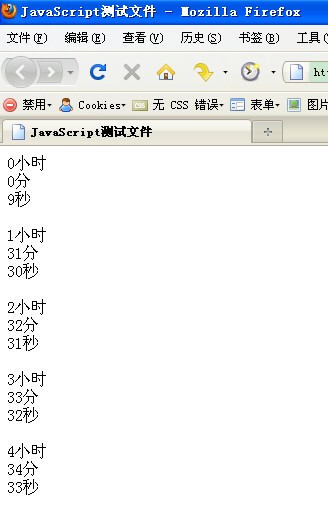
实现代码如下:
代码
<!DOCTYPE HTML PUBLIC "-//W3C//DTD HTML 4.01 Transitional//EN"
"http://www.w3.org/TR/html4/loose.dtd">
<html xmlns="http://www.w3.org/1999/xhtml">
 <head>
  <meta http-equiv="Content-Type" content="text/html; charset=utf-8" />
  <title>JavaScript测试文件</title>
 </head>
 <body>
  <div><span id="hour0">0</span>小时</div>
  <div><span id="minute0">0</span>分</div>
  <div><span id="seconds0">10</span>秒</div>
  <br/>
  <div><span id="hour1">1</span>小时</div>
  <div><span id="minute1">31</span>分</div>
  <div><span id="seconds1">31</span>秒</div>
  <br/>
  <div><span id="hour2">2</span>小时</div>
  <div><span id="minute2">32</span>分</div>
  <div><span id="seconds2">32</span>秒</div>
  <br/>
  <div><span id="hour3">3</span>小时</div>
  <div><span id="minute3">33</span>分</div>
  <div><span id="seconds3">33</span>秒</div>
  <br/>
  <div><span id="hour4">4</span>小时</div>
  <div><span id="minute4">34</span>分</div>
  <div><span id="seconds4">34</span>秒</div>
  <br/>
 </body>
</html>
<script type="text/javascript">
//名山计时器:
function msTimeCount(){
 this._hour=0;   //“小时”数
 this._minute=0;   //“分”数
 this._seconds=0;  //“秒”数
 //
 this._hourHtmlObj={};//“小时”html对象
 this._minuteHtmlObj={};//“分”html对象
 this._secondsHtmlObj={};//“秒”html对象
 //
 this._totalSeconds=0;//总秒数
};
msTimeCount.prototype={
 //1.获取对象
 $:function(ID){
  return document.getElementById(ID);
 },
 //2.初始化:
 /*
  * arrTime:  传入时间数组,格式为[1,30,30],代表 1小时30分30秒;
  * arrHtmlObj: 更新时间数据的Html对象数组,格式为["hour","minute","seconds"];
 */
 init:function(arrTime,arrHtmlObj){
  var _this=this;
  _this._hour=parseInt(arrTime[0]);
  _this._minute=parseInt(arrTime[1]);
  _this._seconds=parseInt(arrTime[2]);
  _this._hourHtmlObj=_this.$(arrHtmlObj[0]);
  _this._minuteHtmlObj=_this.$(arrHtmlObj[1]);
  _this._secondsHtmlObj=_this.$(arrHtmlObj[2]);
  _this._totalSeconds=parseInt(_this._hour*60*60+_this._minute*60+_this._seconds);
  //开始计时:
  _this.timeCount();
 },
 //3.计时器:
 timeCount:function(){
  var _this=this;
  var tmpTimeCount=setInterval(
   function(){
    _this._totalSeconds--;
    //alert(_this._totalSeconds);
    _this.refreshTime();
    if(_this._totalSeconds<1){
     clearInterval(tmpTimeCount);
     return;
    }
   }
   ,1000);
 },
 //4.刷新页面时间:
 refreshTime:function(){
  var _this=this;
  if(_this._totalSeconds>0){
   _this._hour=parseInt(_this._totalSeconds/3600);
   _this._minute=parseInt((_this._totalSeconds-_this._hour*3600)/60);
   _this._seconds=_this._totalSeconds-_this._hour*3600-_this._minute*60;
  }else{
   _this._hour=_this._minute=_this._seconds=0;
  }
  _this._hourHtmlObj.innerHTML=_this._hour;
  _this._minuteHtmlObj.innerHTML=_this._minute;
  _this._secondsHtmlObj.innerHTML=_this._seconds;
 }
}
var timeCount0=new msTimeCount();
timeCount0.init([0,0,10],["hour0","minute0","seconds0"]);
var timeCount1=new msTimeCount();
timeCount1.init([1,31,31],["hour1","minute1","seconds1"]);
var timeCount2=new msTimeCount();
timeCount2.init([2,32,32],["hour2","minute2","seconds2"]);
var timeCount3=new msTimeCount();
timeCount3.init([3,33,33],["hour3","minute3","seconds3"]);
var timeCount4=new msTimeCount();
timeCount4.init([4,34,34],["hour4","minute4","seconds4"]);
</script>
PS:这里再为大家推荐几款时间及计时器相关工具供大家参考使用:
在线秒表工具:
http://tools.jb51.net/bianmin/miaobiao
Unix时间戳(timestamp)转换工具:
http://tools.jb51.net/code/unixtime
在线世界各地时间查询:
http://tools.jb51.net/zhuanhuanqi/worldtime
更多关于JavaScript相关内容感兴趣的读者可查看本站专题:《JavaScript时间与日期操作技巧总结》、《javascript面向对象入门教程》、《JavaScript错误与调试技巧总结》、《JavaScript数据结构与算法技巧总结》、《JavaScript遍历算法与技巧总结》及《JavaScript数学运算用法总结》
希望本文所述对大家JavaScript程序设计有所帮助。


