

自己写了个alert提示框。因为系统alert在苹果手机微信中,提示时,顶部会显示网站地址。
同时其他后续操作需要在js中继续填写。因此简单用div写了一个alert提示框,并自动关闭。
效果图
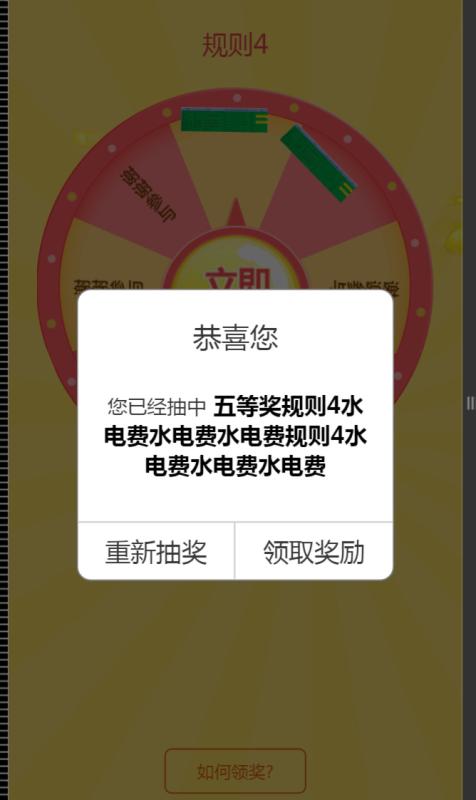
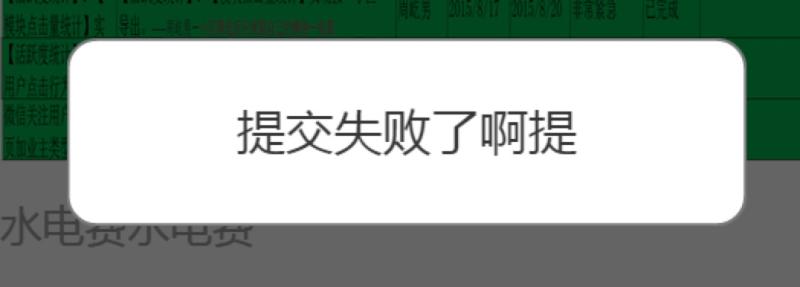
css样式
/*弹出消息对话框样式*/
.show_alert_box{
width:100%;
height:100%;
position:fixed;
top:0px;
left:0px;
background-color:rgba(0,0,0,0.6);
display:none;
z-index:200;
}
.show_alert_div{
width:70%;
position:absolute;
top:50%;
left:15%;
margin-top:-80px;
background-color:#fff;
-webkit-border-radius: 10px;
-moz-border-radius: 10px;
border-radius: 10px;
border:1px solid #797979;
overflow:hidden;
box-sizing:border-box;
}


.show_alert_div h1{
width:100%;
float:left;
font-size:20px;
color:#353535;
text-align:center;
line-height:26px;
margin-top:20px;
}
.show_alert_div h2{
width:100%;
float:left;
font-size:16px;
color:#353535;
text-align:center;
line-height:20px;
margin:20px 0px 70px 0px;
box-sizing:border-box;
padding:0px 15px;
}


.show_alert_div h3{
width:100%;
float:left;
font-size:16px;
color:#353535;
text-align:center;
line-height:20px;
margin:25px 0px 20px 0px;
box-sizing:border-box;
padding:0px 15px;
}

/*仅显示消息时 showInformation方法填充提示西信息
*/
.alert_message_font{
width:100%;
float:left;
font-size:16px;
color:#353535;
text-align:center;
line-height:20px;
margin:25px 0px 20px 0px !important;
box-sizing:border-box;
padding:0px 15px;
}

.show_alert_div .show_alert_button_box{
width:100%;
height:40px;
position:absolute;
bottom:0px;
left:0px;
border-top:1px solid #ccc;
}
.show_alert_div .show_alert_button_box .alert_button_div{
width:50%;
height:40px;
float:left;
font-size:18px;
line-height:40px;
text-align:center;
color:#353535;
box-sizing:border-box;
border-right:1px solid #ccc;
}

.show_alert_div .show_alert_button_box .show_close_button{
width:100%;
height:40px;
float:left;
font-size:18px;
line-height:40px;
text-align:center;
color:#353535;
box-sizing:border-box;
border-right:1px solid #ccc;
}
.show_cancel_button{
width:50%;
border-right:0;
}
/*输入对话框样式*/
.show_alert_box_input{
width:100%;
position:fixed;
top:0px;
left:0px;
background-color:rgba(0,0,0,0.6);
display:none;
z-index:200;
}
.show_alert_div_input{
width:90%;
position:absolute;
top:50%;
left:5%;
margin-top:-80px;
background-color:#fff;
-webkit-border-radius: 10px;
-moz-border-radius: 10px;
border-radius: 10px;
border:1px solid #797979;
overflow:hidden;
box-sizing:border-box;
}


.show_alert_div_input h1{
width:100%;
float:left;
font-size:20px;
color:#353535;
text-align:center;
line-height:26px;
margin-top:20px;
}
.show_alert_div_input h2{
width:100%;
float:left;
font-size:14px;
color:#353535;
text-align:center;
line-height:20px;
margin:25px 0px 70px 0px;
box-sizing:border-box;
padding:0px 15px;
}
.show_alert_div_input .show_alert_button_box_input{
width:100%;
height:40px;
position:absolute;
bottom:0px;
left:0px;
border-top:1px solid #ccc;
}
.show_alert_div_input .show_alert_button_box_input .alert_button_div_input{
width:50%;
height:40px;
float:left;
font-size:18px;
line-height:40px;
text-align:center;
color:#353535;
box-sizing:border-box;
border-right:1px solid #ccc;
}
.show_alert_div_input .show_alert_button_box_input .show_close_button_input{
width:100%;
height:40px;
float:left;
font-size:18px;
line-height:40px;
text-align:center;
color:#353535;
box-sizing:border-box;
border-right:1px solid #ccc;
}

/*如何领奖提示框样式*/
.show_alert_box_how_button{
width:100%;
position:fixed;
top:0px;
left:0px;
background-color:rgba(0,0,0,0.6);
display:none;
z-index:200;
}
.show_alert_div_how_button{
width:90%;
position:absolute;
top:50%;
left:5%;
margin-top:-80px;
background-color:#fff;
-webkit-border-radius: 10px;
-moz-border-radius: 10px;
border-radius: 10px;
border:1px solid #797979;
overflow:hidden;
box-sizing:border-box;
}


.show_alert_div_how_button h1{
width:100%;
float:left;
font-size:20px;
color:#353535;
text-align:center;
line-height:26px;
margin-top:20px;
}
.show_alert_div_how_button h2{
width:100%;
float:left;
font-size:14px;
color:#353535;
text-align:center;
line-height:20px;
margin:25px 0px 70px 0px;
box-sizing:border-box;
padding:0px 15px;
}
.show_alert_div_how_button .show_alert_button_box_how_button{
width:100%;
height:40px;
position:absolute;
bottom:0px;
left:0px;
border-top:1px solid #ccc;
}
.show_alert_div_how_button .show_alert_button_box_how_button .alert_button_div_how_button{
width:50%;
height:40px;
float:left;
font-size:18px;
line-height:40px;
text-align:center;
color:#353535;
box-sizing:border-box;
border-right:1px solid #ccc;
}
.show_alert_div_how_button .show_alert_button_box_how_button .show_close_button_how_button{
width:100%;
height:40px;
float:left;
font-size:18px;
line-height:40px;
text-align:center;
color:#353535;
box-sizing:border-box;
border-right:1px solid #ccc;
}
js 代码
$(function () {
$(".show_close_button").click(function () {
$(".show_alert_box").css("display", "none");
});

$(".show_cancel_button").click(function () {
$(".show_alert_box").css("display", "none");
});
})

/*
* 显示提示对话框
* title 标题
* content 提示内容
* isShowAlertButton 是否显示操作按钮 仅用于错误提示
* url 多按钮时 主按钮跳转url
* urltext主按钮内容提示西信息
* isTimer是否自动关闭对话框,仅用于错误提示时
*
* 页面布局 在页面中添加如下代码
*
<div class="show_alert_box">
<div class="show_alert_div">
<h1>恭喜您</h1>
<h2></h2>
<div class="show_alert_button_box">
<div class="show_close_button">知道了</div>
<div onclick="requestLotteryPrize()" class="alert_button_div viewawardbtn">领取奖励</div>
<div class="alert_button_div show_cancel_button">取消</div>
</div>
</div>
</div>
* */
function showInformation(title, content,isShowTitle,isShowAlertButton,isTimer,url, urltxt){
$(".show_alert_div h1").html(title);
$(".show_alert_div h2").html(content);

// 隐藏标题
if(isShowTitle!=null&&isShowTitle==false){
$(".show_alert_div h1").css("display", "none");
}

if(url==null || url==""){
//显示单条
$(".alert_button_div").css("display", "none");
$(".show_close_button").css("display", "block");

// 隐藏底部按钮
if(isShowAlertButton!=null&&isShowAlertButton==false){
$(".show_alert_button_box").css("display", "none");

$(".show_alert_div h2").addClass("alert_message_font");
}

// 定时自动关闭
if(isTimer!=null&&isTimer==true){
setTimeout("timerCloseAlertBox()",2000);
}
}else{
//显示多条
$(".show_alert_div h2").css("display", "block");

$(".viewaward").attr('href',url);
$(".viewawardbtn").html(urltxt);

/*注释于2016-07-08 屏蔽底部取消领奖等按钮 */
$(".alert_button_div").css("display", "block");
$(".show_close_button").css("display", "none");

/* $(".alert_button_div").css("display", "none");
$(".show_close_button").css("display", "block") */
}

$('.show_alert_box').css("display", "block");
}

/*
* 弹出简单信息提示
* 页面布局 在页面中添加如下代码
* <div class="show_alert_box">
<div class="show_alert_div">
<h3></h3>
</div>
</div>
*/
function showAlertMessage(message){

// 显示提示框
$('.show_alert_box').css("display", "block");

// 填充信息提示
$(".show_alert_div h3").html(message);

// 自动关闭
setTimeout("timerCloseAlertBox()",2000);
}

// 定时关闭提示框
function timerCloseAlertBox(){
$('.show_alert_box').css("display", "none");
}
使用示例
首先引用js文件,前提必须应用jquery.基础js文件
然后引入样式文件
在页面任务位置添加一些div层
<div class="show_alert_box">
<div class="show_alert_div">
<h1>恭喜您</h1>
<h2></h2>
<div class="show_alert_button_box">
<div class="show_close_button">知道了</div>
<div onclick="requestLotteryPrize()" class="alert_button_div viewawardbtn">领取奖励</div>
<div class="alert_button_div show_cancel_button">取消</div>
</div>
</div>
</div>
在js中调用
参数分别是 标题 ,提示内容,是否显示标题,是否显示操作按钮,是否启用自动关闭,要跳转的url 点击要跳转的按钮描述文件信息
showInformation(title, content,isShowTitle,isShowAlertButton,isTimer,url, urltxt)方法或者

showAlertMessage(message)
以上这篇js提示框替代系统alert,自动关闭alert对话框的实现方法就是小编分享给大家的全部内容了,希望能给大家一个参考,也希望大家多多支持脚本之家。


