

本文实例讲述了JavaScript编写简单计算器的代码。分享给大家供大家参考。具体如下:
运行效果截图如下:
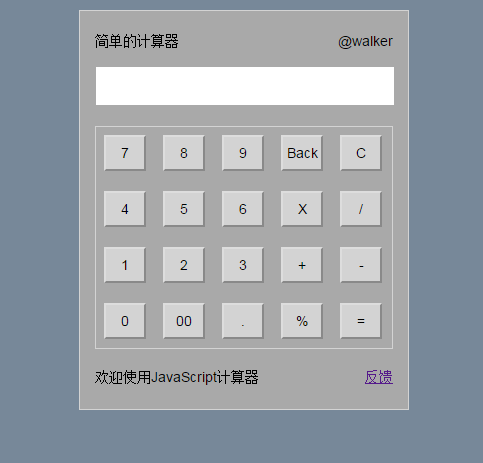
具体代码如下
<!DOCTYPE html>
<html lang="en">
<head>
 <meta charset="utf-8">
 <title>计算器</title>
 <style>
  /*Basic reset*/
*{
 margin:0;
 padding:0;
 box-sizing: border-box;
 font: 14px Arial,sans-serif;
}
html{
 height:100%;
 background-color:lightslategrey;
}

#calculator{
 margin: 15px auto;
 width:330px;
 height:400px;
 border: 1px solid lightgray;
 background-color:darkgrey;
 padding:15px;
}

/*LOGO*/
.LOGO{
 height:20px;

}
.LOGO .name{
 float:left;
 line-height:30px;
}
.LOGO .verson{
 float:right;
 line-height:30px;
}
/*screen*/
#shuRu{
 margin-top:15px;
}
.screen{
 margin-top:5px;
 width:300px;
 height:40px;
 text-align: right;
 padding-right:10px;
 font-size:20px;
}
#keys{
 border:1px solid lightgray;
 height:223px;
 margin-top:25px;
 padding:8px;
}
#keys .last{
 margin-right:0px;
}
.footer{
 margin-top:20px;
 height:20px;
}
.footer .link{
 float:right;
}

#keys .buttons{
 float:left;
 width: 42px;
 height: 36px;
 text-align:center;
 background-color:lightgray;
 margin: 0 17px 20px 0;
}
 </style>
</head>
<body>
<div id="calculator">
 <div class="LOGO">
  <span class="name">简单的计算器</span>
  <span class="verson">@walker</span>
 </div>
 <div id="shuRu">
  <!--screen输入栏-->
  <div class="screen">
   <input type="text" id="screenName" name="screenName" class="screen">
  </div>
 </div>
 <div id="keys">
  <!-- j -->
  <!--第一排-->
  <input type="button" id="7" onclick="jsq(this.id)" value="7" class="buttons">
  <input type="button" id="8" onclick="jsq(this.id)" value="8" class="buttons">
  <input type="button" id="9" onclick="jsq(this.id)" value="9" class="buttons">
  <input type="button" id="Back" onclick="tuiGe()" value="Back" class="buttons">
  <input type="button" id="C" onclick="clearNum()" value="C" class="buttons" style="margin-right:0px">
  <!--第二排-->
  <input type="button" id="4" onclick="jsq(this.id)" value="4" class="buttons">
  <input type="button" id="5" onclick="jsq(this.id)" value="5" class="buttons">
  <input type="button" id="6" onclick="jsq(this.id)" value="6" class="buttons">
  <input type="button" id="*" onclick="jsq(this.id)" value="X" class="buttons">
  <input type="button" id="/" onclick="jsq(this.id)" value="/" class="buttons" style="margin-right:0px">
  <!--第三排-->
  <input type="button" id="1" onclick="jsq(this.id)" value="1" class="buttons">
  <input type="button" id="2" onclick="jsq(this.id)" value="2" class="buttons">
  <input type="button" id="3" onclick="jsq(this.id)" value="3" class="buttons">
  <input type="button" id="+" onclick="jsq(this.id)" value="+" class="buttons">
  <input type="button" id="-" onclick="jsq(this.id)" value="-" class="buttons" style="margin-right:0px">
  <!--第四排-->
  <input type="button" id="0" onclick="jsq(this.id)" value="0" class="buttons">
  <input type="button" id="00" onclick="jsq(this.id)" value="00" class="buttons">
  <input type="button" id="." onclick="jsq(this.id)" value="." class="buttons">
  <input type="button" id="%" onclick="jsq(this.id)" value="%" class="buttons">
  <input type="button" id="eva" onclick="eva()" value="=" class="buttons" style="margin-right:0px">
 </div>
 <div class="footer">
  <span class="aside">欢迎使用JavaScript计算器</span>
   <span class="link">
    <a href="#" title="声明" target="_blank">反馈</a>
   </span>
 </div>
</div>
</body>
</html>
js代码:
<script>
 var num = 0; // 定义第一个输入的数据
 function jsq(num) {
  //获取当前输入
  if(num=="%"){
   document.getElementById('screenName').value=Math.round(document.getElementById('screenName').value)/100;
  }else{
   document.getElementById('screenName').value += document.getElementById(num).value;
  }
 }
 function eva() {
  //计算输入结果
  document.getElementById("screenName").value = eval(document.getElementById("screenName").value);
 }
 function clearNum() {
  //清0
  document.getElementById("screenName").value = null;
  document.getElementById("screenName").focus();
 }
 function tuiGe() {
  //退格
  var arr = document.getElementById("screenName");
  arr.value = arr.value.substring(0, arr.value.length - 1);
 }
</script>
关于计算器的精彩文章请查看《计算器专题》 ,更多精彩等你来发现!
一个简单的计算器就是这样实现的,大家也可以利用javascript编写计算器,,希望对大家的学习有所帮助。


