知识点: 主要是对Date对象的使用。(下面的介绍内容来自网络)
创建 Date 对象的语法: var myDate=new Date()
Date 对象会自动把当前日期和时间保存为其初始值。
参数形式有以下5种:
new Date("month dd,yyyy hh:mm:ss");
new Date("month dd,yyyy");
new Date(yyyy,mth,dd,hh,mm,ss);
new Date(yyyy,mth,dd);
new Date(ms);
注意:最后一种形式,参数表示的是需要创建的时间和GMT时间1970年1月1日之间相差的毫秒数。
参数的含义如下:
month:用英文表示月份名称,从January到December
mth:用整数表示月份,从(1月)到11(12月)
dd:表示一个月中的第几天,从1到31
yyyy:四位数表示的年份
hh:小时数,从0(午夜)到23(晚11点)
mm:分钟数,从0到59的整数
ss:秒数,从0到59的整数
ms:毫秒数,为大于等于0的整数
Date对象的方法: getDate() 从 Date 对象返回一个月中的某一天 (1 ~ 31)。
getDay() 从 Date 对象返回一周中的某一天 (0 ~ 6)。
getMonth() 从 Date 对象返回月份 (0 ~ 11)。
getFullYear() 从 Date 对象以四位数字返回年份。
getYear() 请使用 getFullYear() 方法代替。
getHours() 返回 Date 对象的小时 (0 ~ 23)。
getMinutes() 返回 Date 对象的分钟 (0 ~ 59)。
getSeconds() 返回 Date 对象的秒数 (0 ~ 59)。
getMilliseconds() 返回 Date 对象的毫秒(0 ~ 999)。
getTime() 返回 1970 年 1 月 1 日至今的毫秒数。
getTimezoneOffset() 返回本地时间与格林威治标准时间 (GMT) 的分钟差。
getUTCDate() 根据世界时从 Date 对象返回月中的一天 (1 ~ 31)。
getUTCDay() 根据世界时从 Date 对象返回周中的一天 (0 ~ 6)。
getUTCMonth() 根据世界时从 Date 对象返回月份 (0 ~ 11)。
getUTCFullYear() 根据世界时从 Date 对象返回四位数的年份。
getUTCHours() 根据世界时返回 Date 对象的小时 (0 ~ 23)。
getUTCMinutes() 根据世界时返回 Date 对象的分钟 (0 ~ 59)。
getUTCSeconds() 根据世界时返回 Date 对象的秒钟 (0 ~ 59)。
getUTCMilliseconds() 根据世界时返回 Date 对象的毫秒(0 ~ 999)。
parse() 返回1970年1月1日午夜到指定日期(字符串)的毫秒数。
setDate() 设置 Date 对象中月的某一天 (1 ~ 31)。
setMonth() 设置 Date 对象中月份 (0 ~ 11)。
setFullYear() 设置 Date 对象中的年份(四位数字)。
setYear() 请使用 setFullYear() 方法代替。
setHours() 设置 Date 对象中的小时 (0 ~ 23)。
setMinutes() 设置 Date 对象中的分钟 (0 ~ 59)。
setSeconds() 设置 Date 对象中的秒钟 (0 ~ 59)。
setMilliseconds() 设置 Date 对象中的毫秒 (0 ~ 999)。
setTime() 以毫秒设置 Date 对象。
setUTCDate() 根据世界时设置 Date 对象中月份的一天 (1 ~ 31)。
setUTCMonth() 根据世界时设置 Date 对象中的月份 (0 ~ 11)。
setUTCFullYear() 根据世界时设置 Date 对象中的年份(四位数字)。
setUTCHours() 根据世界时设置 Date 对象中的小时 (0 ~ 23)。
setUTCMinutes() 根据世界时设置 Date 对象中的分钟 (0 ~ 59)。
setUTCSeconds() 根据世界时设置 Date 对象中的秒钟 (0 ~ 59)。
setUTCMilliseconds() 根据世界时设置 Date 对象中的毫秒 (0 ~ 999)。
toSource() 返回该对象的源代码。
toString() 把 Date 对象转换为字符串。
toTimeString() 把 Date 对象的时间部分转换为字符串。
toDateString() 把 Date 对象的日期部分转换为字符串。
toGMTString() 请使用 toUTCString() 方法代替。 1 3
toUTCString() 根据世界时,把 Date 对象转换为字符串。
toLocaleString() 根据本地时间格式,把 Date 对象转换为字符串。
toLocaleTimeString() 根据本地时间格式,把 Date 对象的时间部分转换为字符串。
toLocaleDateString() 根据本地时间格式,把 Date 对象的日期部分转换为字符串。
UTC() 根据世界时返回 1997 年 1 月 1 日 到指定日期的毫秒数。
valueOf() 返回 Date 对象的原始值。
var objDate=new Date([arguments list]);
简单日历实现: 效果:
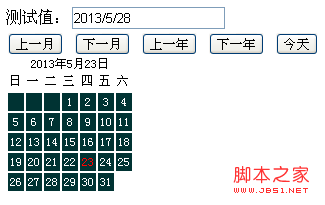
代码:
<style>
#calendar{
font-size: 12px;
}
#calendar tbody td{
background:#033;
color: #fff;
text-align: center;
padding: 2px;
}
.detail{
text-align:center;
}
</style>
测试值:<input id="calendar_value" name="" type="text" /><br />
<button id="cal_prev">上一月</button>
<button id="cal_next">下一月</button>
<button id="cal_preyear">上一年</button>
<button id="cal_nextyear">下一年</button>
<button id="cal_today">今天</button>
<div id="calendar" style="position:absolute;"></div>
<script>
var Calendar=function(year,monthNum,parent){
this.year=year;
this.parent=parent;
this.monthNum=monthNum-1;
function isLeapYear(y){
return (y>0)&&!(y%4)&&((y%100)||!(y%400));
}
this.numDays=[31,isLeapYear(this.year)?29:28,31,30,31,30,31,31,30,31,30,31][this.monthNum];
this.weekDays=["日","一","二","三","四","五","六"];
this.nowDate=new Date;
this.init();
}
Calendar.prototype={
setMonthNum:function(monthNum){
this.monthNum=monthNum-1;
},
getMonthNum:function(){
return this.monthNum+1;
},
setYearNum:function(year){
this.year=year;
},
getYearNum:function(){
return this.year;
},
init:function(){
this.setup(this.parent);
},
reflesh:function(){
this.setup(this.parent);
},
setup:function(id){
var date=this.nowDate;
var cal=document.getElementById(id);
cal.innerHTML="";
var calDiv=document.createElement("div");
var tab=document.createElement("table");
cal.appendChild(calDiv);
calDiv.innerHTML=this.getSummary();
cal.appendChild(tab);
calDiv.className="detail"
this.thead=document.createElement("thead");
this.tbody=document.createElement("tbody");
this.tfoot=document.createElement("tfoot");
this.tr=document.createElement("tr");
this.td=document.createElement("td");
tab.appendChild(this.thead);
tab.appendChild(this.tbody);
this.setThead();
this.create();
},
setThead:function(){
var day=this.weekDays;
var tr=this.tr.cloneNode(true);
this.thead.appendChild(tr);
for(var i=0;i<7;i++){
var td=this.td.cloneNode(true);
tr.appendChild(td);
td.innerHTML=day[i];
}
},
create:function(){
var day=new Date(this.year,this.monthNum,1);
var tr=this.tr.cloneNode(true);
var dayCount=this.numDays;
var that=this;
that.tbody.appendChild(tr);
for(var j=0;j<day.getDay();j++){
var td=that.td.cloneNode(true);
tr.appendChild(td);
td.innerHTML=" ";
}
for(var i=1;i<=dayCount;i++){
if((j+i)%7-1==0){
tr=that.tr.cloneNode(true);
that.tbody.appendChild(tr);
}
var td=that.td.cloneNode(true);
var s=i;
if(i==that.nowDate.getDate()){
s="<font color='red'>"+i+"</font>";
}
td.innerHTML=s;
td.style.cursor="pointer";
td.onclick=function(){
document.getElementById("calendar_value").value=(that.getYearNum()+"/"+that.getMonthNum()+"/"+this.innerHTML)
}
td.onmouseover=function(){
this.style.background="#fff";
this.style.color="#033"
}
td.onmouseout=function(){
this.style.background="";
this.style.color="#fff"
}
tr.appendChild(td);
}
},
getSummary:function(){
var date=this.nowDate;
return this.year+"年"+(this.monthNum+1)+"月"+date.getDate()+"日";
}
}
var cal=new Calendar(2013,5,"calendar");
cal.init();
document.getElementById("cal_prev").onclick=function(){
cal.monthNum--;
if(cal.getMonthNum()<1){
cal.setMonthNum(12);
cal.year--;
}
cal.reflesh();
}
document.getElementById("cal_next").onclick=function(){
cal.monthNum++
if(cal.getMonthNum()>12){
cal.setMonthNum(1);
cal.year++;
}
cal.reflesh();
}
document.getElementById("cal_today").onclick=function(){
cal.setYearNum((new Date).getFullYear());
cal.setMonthNum((new Date).getMonth()+1)
cal.reflesh();
}
document.getElementById("cal_preyear").onclick=function(){
cal.setYearNum(cal.getYearNum()-1);
cal.reflesh();
}
document.getElementById("cal_nextyear").onclick=function(){
cal.setYearNum(cal.getYearNum()+1);
cal.reflesh();
}
</script>
总结: 以上代码未加注释,写得有点急。以后再整理一下,许多功能未实现。


