

结果:
chrome:
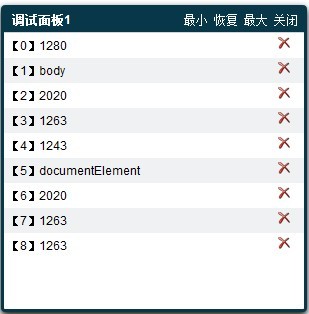
FF
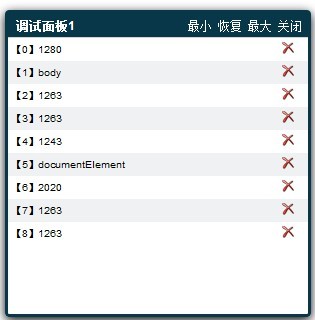
OPERA:
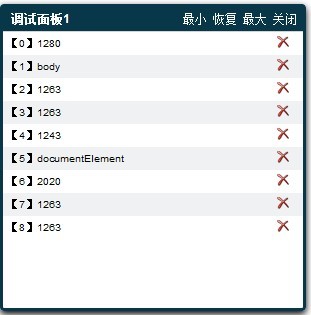
SAFARI:
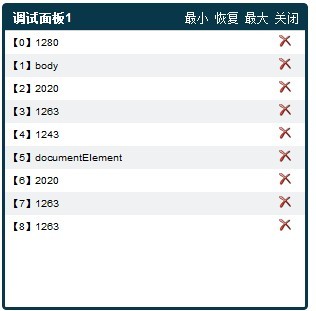
IE9:
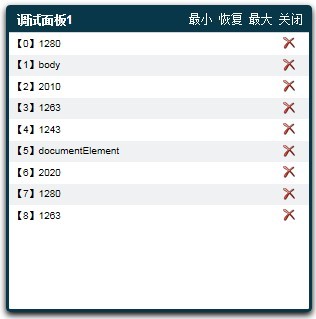
IE8
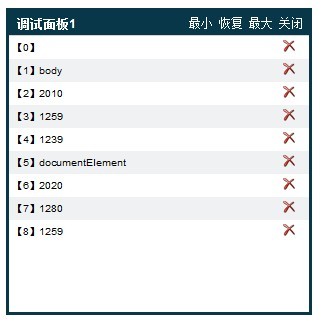
IE7:
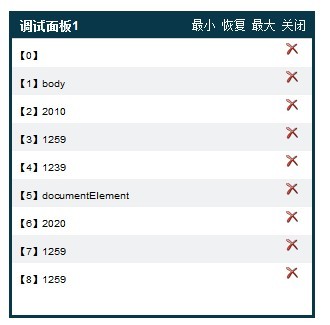
IE6
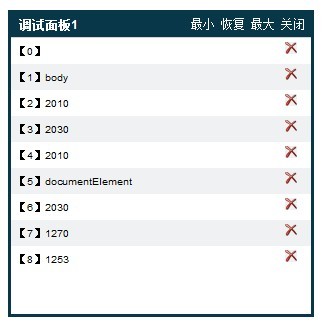
说明:
Chrome/FF/Safari/opera
对这些浏览器而言,window有个属性innerWidth/innerHeight包含的是整个文档的可视区域尺寸,注意,这个尺寸是包含滚动条大小的。
如果我们不计滚动条的影响,就可以直接使用这两个属性。
如果滚动条会影响(比如最大化弹出框),那么应该想另外的办法。

Document对象是每个DOM树的根,但是它并不代表树中的一个HTML元素,document.documentElement属性引用了作为文档根元素的html标记,document.body属性引用了body标记
我们这里获取常见的三个值(scrollWidth、offsetWidth和clientwidth)来比较一下

document.documentElement.scrollWidth返回整个文档的宽度
document.documentElement.offsetWidth返回整个文档的可见宽度
document.documentElement.clientwidth返回整个文档的可见宽度(不包含边框),clientwidth = offsetWidth - borderWidth
不过一般来说,我们不会给document.documentElement来设置边框,所以这里的clientwidth 与 offsetWidth一致

document.body.scrollWidth返回body的宽度
注意,这里的scrollWidth有个不一致的地方,基于webkit的浏览器(chrome和safari)返回的是整个文档的宽度,也就是和document.documentElement.scrollWidth一致,
opera和FF返回的就是标准的body 的scrollWidth,个人觉得opera和FF算是比较合理的。
document.body.offsetWidth返回body的offsetWidth
document.body.clientwidth返回body的clientwidth(不包含边框),clientwidth = offsetWidth - borderWidth

我们看上面的例子,会发现body和documentElement的有些值是相等的,这并不是表示他们是等同的。而是因为当我们没有给body设置宽度的时候,document.body默认占满整个窗口宽度,于是就有:
document.body.scrollWidth = document.documentElement.scrollWidth
document.body.offsetWidth = document.documentElement.offsetWidth
document.body.clientwidth = document.documentElement.clientwidth - document.body.borderWidth(body的边框宽度)
当我们给body设置了一个宽度的时候,区别就出来了。

IE9/IE8
这两个差不多,唯一的区别是IE9包含window.innerWidth属性,而IE8不包含window.innerWidth属性。
document.documentElement.scrollWidth返回整个文档的宽度,和FF等浏览器一致
document.documentElement.offsetWidth返回整个文档的可见宽度(包含滚动条,值和innerWidth一致),注意,这里和FF等浏览器又有点区别。
document.documentElement.clientwidth返回整个文档的可见宽度(不包含边框),和FF等浏览器一致。clientwidth = offsetWidth - 滚动条宽度

document.body.scrollWidth返回body的宽度,注意,这里的scrollWidth和FF等浏览器有点区别,这里并不包括body本身的border宽度。
因此例子中,相比FF少了10px。
document.body.offsetWidth返回body的offsetWidth,和FF等浏览器一致
document.body.clientwidth返回body的clientwidth(不包含边框),和FF等浏览器一致,clientwidth = offsetWidth - borderWidth

IE7
IE7与IE9/IE8的主要区别是
第一、document.documentElement.offsetWidth的返回值不一样,
参见上面说的,IE9/IE8的document.documentElement.offsetWidth包含滚动条,但是,IE7的document.documentElement.offsetWidth不包含滚动条。
第二、document.documentElement.scrollWidth返回整个文档的宽度,注意,这里和IE9/IE8、FF等浏览器又有不一致,对于IE9/IE8、FF等浏览器,scrollWidth最小不会小于窗口的宽度,但是在IE下没有这个限制,文档有多小,这个就有多小
其他倒是挺一致的。

最后是IE6了
IE6的document.documentElement返回值与IE9/IE8没有区别(由此可见,对于document.documentElement,IE7就是个奇葩)。
话说回来,IE的document.body就是个奇葩,当没有给body设置宽度的时候,body是默认占满整个文档的(注意,其他的浏览器都是占满整个窗口),当然,最小值是整个窗口的大小,就是说body指向了根元素。
因此,在算上IE6在解析width方面的bug,和其他的浏览器的区别就淋漓尽致了。
document.body.scrollWidth返回body的宽度,和IE9/IE8/IE7一致
document.body.offsetWidth返回body的offsetWidth,注意,由于body的不同,这里的offsetWidth = scrollWidth + borderWidth
document.body.clientwidth返回body的clientwidth(不包含边框)clientwidth = offsetWidth - borderWidth
另外,有一点和IE7同样,就是document.documentElement.scrollWidth没有最小宽度限制。
总结一下,在标准模式下,我们获取文档可见区域的方法如下:


