效果图:
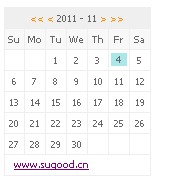
CSS代码:
<style type="text/css">
*{
margin:0;
padding:0;
font:10px tahoma;
}
#calender{
text-align:center;
width:147px;
font-size:10px;
/*color: #27B0C1;*/
margin:12px 0 12px 6px;
border-top:1px solid #EEEEEE;
border-left:1px solid #EEEEEE;
}
#calender .arrow_over{
color: #FF1493;
}
#calender .arrow_out{
color: #FF8C00;
}
#calender td{
border-bottom:1px solid #EEEEEE;
border-right:1px solid #EEEEEE;
width:21px;
height:20px;
line-height:16px;
color:#666666;
}
#calender #cal_title{
width:147px; background:#EFEFEF;
}
#calender #week td{
background: #F8F8F8;
}
#calender .current{
background: #AAE7E8;
display: block;
margin:2px;
}
#calender .notcurrent{
display: block;
margin:2px;
background:#EDEDED;
}
</style>
脚本代码:
<script type="text/javascript">
<!--
document.writeln("<div id='calenderdiv' style>日历加载中...</div>");
var press_tag;
function changecal(action,year,month)
{
var strcal;
switch(action)
{
case "nextmonth":
if(month==11)
{
month = 1;
year = year*1 + 1;
}else{
month = month*1 + 2;
}
strcal = "<span onmouseover=\"this.className='arrow_over'\" onmouseout=\"this.className='arrow_out'\" class='arrow_out' onclick='calender(" + year + "," + month +")' title='下一个月' style='cursor:hand;'>> </span>";
break;
case "premonth":
if(month==0)
{
month = 12;
year = year*1 - 1;
}
strcal = "<span onmouseover=\"this.className='arrow_over'\" onmouseout=\"this.className='arrow_out'\" class='arrow_out' onclick='calender(" + year + "," + month +")' title='上一个月' style='cursor:hand;'> <</span>";
break;
case "nextyear":
year = year*1 + 1;
month = month*1 + 1;
strcal = "<span onmouseover=\"this.className='arrow_over'\" onmouseout=\"this.className='arrow_out'\" class='arrow_out' onclick='calender(" + year + "," + month +")' title='下一年' style='cursor:hand;'>>></span>";
break;
case "preyear":
year = year*1 - 1;
month = month*1 + 1;
strcal = "<span onmouseover=\"this.className='arrow_over'\" onmouseout=\"this.className='arrow_out'\" class='arrow_out' onclick='calender(" + year + "," + month +")' title='上一年' style='cursor:hand;'><<</span>";
break;
default:;
}
strcal = " " + strcal + " ";
return(strcal);
}
function calender(cyear,cmonth)
{
var d,d_date,d_day,d_month;
//定义每月天数数组
var monthdates = ["31","28","31","30","31","30","31","31","30","31","30","31"]
d = new Date();
d_year = d.getYear(); //获取年份
//判断闰月,把monthdates的二月改成29
if (((d_year % 4 == 0) && (d_year % 100 != 0)) || (d_year % 400 == 0)) monthdates[1] = "29";
if ((cyear != "" ) || (cmonth != ""))
{
//如果用户选择了月份和年份,则当前的时间改为用户设定
d.setYear(cyear);
d.setMonth(cmonth-1);
d.setDate(1);
}
d_month = d.getMonth(); //获取当前是第几个月
d_year = d.getYear(); //获取年份
d_date = d.getDate(); //获取日期
//修正19XX年只显示两位的错误
if(d_year<2000){d_year = d_year + 1900}
//===========输出日历===========
var str;
str = "<table cellspacing='0' cellpadding='0' id='calender'>";
str += "<tr><td id='cal_title' colspan='7' >"
str += changecal("preyear",d_year,d_month)
str += changecal("premonth",d_year,d_month)
str += d_year + " - " + (d_month*1+1)
str += changecal("nextmonth",d_year,d_month)
str += changecal("nextyear",d_year,d_month)
str += "</td></tr>";
str += "<tr id='week'><td>Su</td><td>Mo</td><td>Tu</td><td>We</td><td>Th</td><td>Fr</td><td>Sa</td></tr>";
str += "<tr>";
var firstday,lastday,totalcounts,firstspace,lastspace,monthdays;
//需要显示的月份共有几天,可以用已定义的数组来获取
monthdays = monthdates[d.getMonth()];
//设定日期为月份中的第一天
d.setDate(1);
//需要显示的月份的第一天是星期几
firstday = d.getDay();
//1号前面需要补足的的空单元格的数
firstspace = firstday;
//设定日期为月份的最后一天
d.setDate(monthdays);
//需要显示的月份的最后一天是星期几
lastday = d.getDay();
//最后一天后面需要空单元格数
lastspace = 6 - lastday;
//前空单元格+总天数+后空单元格,用来控制循环
totalcounts = firstspace*1 + monthdays*1 + lastspace*1;
//count:大循环的变量;f_space:输出前空单元格的循环变量;l_space:用于输出后空单元格的循环变量
var count,flag,f_space,l_space;
//flag:前空单元格输完后令flag=1不再继续做这个小循环
flag = 0;
for(count=1;count<=totalcounts;count++)
{
//一开始flag=0,首先输出前空单元格,输完以后flag=1,以后将不再执行这个循环
if(flag==0)
{
if(firstspace!=0)
{
for(f_space=1;f_space<=firstspace;f_space++)
{
str += "<td> </td>";
if(f_space!= firstspace) count++;
}
flag = 1;
continue;
}
}
if((count-firstspace)<=monthdays)
{
//输出月份中的所有天数
curday = d_year+","+(d_month*1+1)+","+(count - firstspace)+"|"
linkday = d_year+","+(d_month*1+1)+","+(count - firstspace)
var today = new Date();
if( (d_year == today.getYear()) && (d_month == today.getMonth()) && ((count-firstspace) == today.getDate()) )
{
//将本地系统中的当前天数高亮
str += "<td><span class='current'>" + (count - firstspace) + "</span></td>";
}else{
//不用高亮的部分,没有日志
str += "<td>" + (count - firstspace) + "</td>";
}
if(count%7==0)
{
if(count<totalcounts)
{
str += "</tr><tr>";
}else{
str += "</tr>";
}
}
}else{
//如果已经输出了月份中的最后一天,就开始输出后空单元格补足
for(l_space=1;l_space<=lastspace;l_space++)
{
str += "<td> </td>";
if(l_space!= lastspace) count++;
}
continue;
}
}
str += "<tr><td colspan='7' style='text-indent:9px;'><a href='https://www.jb51.net' title='网站设计'>www.sugood.cn</a></td></tr></table>"
document.getElementById("calenderdiv").innerHTML = "<div id='calenderdiv'>" + str + "</div>";
}
//调用函数
calender("","")
//-->
</script>


