这是一款基于HTML5和CSS3的3D动画特效,与之前的3D特效不同的是,这款是完全用HTML5特性实现的,而并非用多张图片叠加起来。这款3D动画还有一个特点是可以无限的旋转,从而可以从多个视角来观察HTML5 Logo。
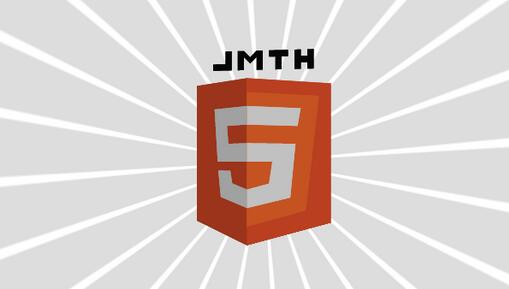
在线演示 源码下载
HTML代码
XML/HTML Code复制内容到剪贴板
- <div class="link-overlay">
-
- </div>
- <canvas id="canvas" style="background-color:#ddd"></canvas>
-
JavaScript代码
JavaScript Code复制内容到剪贴板
-
- window.addEventListener('load', onloadHandler, false);
-
-
-
-
- function onloadHandler()
- {
- var canvas = document.getElementById('canvas');
- canvas.width = window.innerWidth;
- canvas.height = window.innerHeight;
- var k3dmain = new K3D.Controller(canvas, true);
-
-
-
- var obj1 = new K3D.K3DObject();
- with (obj1)
- {
- drawmode = "solid";
- shademode = "lightsource";
- sortmode = "unsorted";
- addphi = -0.5;
- abouty = -90;
- perslevel = 1000;
- init(
- [{x:-80,y:180,z:0},{x:0,y:180,z:-80},{x:0,y:0,z:-80},{x:-80,y:20,z:0},{x:-50,y:150,z:-30},{x:0,y:150,z:-80},{x:0,y:130,z:-80},{x:-30,y:130,z:-50},{x:-28,y:110,z:-52},{x:0,y:110,z:-80},{x:0,y:90,z:-80},{x:-45,y:90,z:-35},{x:-44,y:80,z:-36},{x:-25,y:80,z:-55},{x:-22,y:66,z:-58},{x:0,y:60,z:-80},{x:0,y:40,z:-80},{x:-40,y:50,z:-40}],
- [],
- [{color:[227,76,38],vertices:[0,1,2,3,0]},{color:[235,235,235],vertices:[4,5,6,7,8,9,10,11,4]},{color:[235,235,235],vertices:[12,13,14,15,16,17,12]}]
- );
- }
- k3dmain.addK3DObject(obj1);
-
- var obj2 = new K3D.K3DObject();
- with (obj2)
- {
- drawmode = "solid";
- shademode = "lightsource";
- sortmode = "unsorted";
- addphi = -0.5;
- abouty = -90;
- perslevel = 1000;
- init(
- [{x:0,y:180,z:-80},{x:80,y:180,z:0},{x:80,y:20,z:0},{x:0,y:0,z:-80},{x:0,y:165,z:-80},{x:68,y:165,z:-12},{x:55,y:35,z:-25},{x:0,y:20,z:-80},{x:0,y:150,z:-80},{x:50,y:150,z:-30},{x:47,y:130,z:-33},{x:0,y:130,z:-80},{x:0,y:110,z:-80},{x:45,y:110,z:-35},{x:40,y:50,z:-40},{x:0,y:40,z:-80},{x:0,y:60,z:-80},{x:20,y:66,z:-60},{x:23,y:90,z:-57},{x:0,y:90,z:-80}],
- [],
- [{color:[227,76,38],vertices:[0,1,2,3,0]},{color:[240,101,41],vertices:[4,5,6,7,4]},{color:[235,235,235],vertices:[8,9,10,11,8]},{color:[235,235,235],vertices:[12,13,14,15,16,17,18,19,12]}]
- );
- }
- k3dmain.addK3DObject(obj2);
-
- var obj3 = new K3D.K3DObject();
- with (obj3)
- {
- drawmode = "solid";
- shademode = "lightsource";
- sortmode = "unsorted";
- addphi = -0.5;
- abouty = -90;
- perslevel = 1000;
- init(
- [{x:80,y:180,z:0},{x:0,y:180,z:80},{x:0,y:0,z:80},{x:80,y:20,z:0},{x:50,y:150,z:30},{x:0,y:150,z:80},{x:0,y:130,z:80},{x:30,y:130,z:50},{x:28,y:110,z:52},{x:0,y:110,z:80},{x:0,y:90,z:80},{x:45,y:90,z:35},{x:44,y:80,z:36},{x:25,y:80,z:55},{x:22,y:66,z:58},{x:0,y:60,z:80},{x:0,y:40,z:80},{x:40,y:50,z:40}],
- [],
- [{color:[227,76,38],vertices:[0,1,2,3,0]},{color:[235,235,235],vertices:[4,5,6,7,8,9,10,11,4]},{color:[235,235,235],vertices:[12,13,14,15,16,17,12]}]
- );
- }
- k3dmain.addK3DObject(obj3);
-
- var obj4 = new K3D.K3DObject();
- with (obj4)
- {
- drawmode = "solid";
- shademode = "lightsource";
- sortmode = "unsorted";
- addphi = -0.5;
- abouty = -90;
- perslevel = 1000;
- init(
- [{x:0,y:180,z:80},{x:-80,y:180,z:0},{x:-80,y:20,z:0},{x:0,y:0,z:80},{x:0,y:165,z:80},{x:-68,y:165,z:12},{x:-55,y:35,z:25},{x:0,y:20,z:80},{x:0,y:150,z:80},{x:-50,y:150,z:30},{x:-47,y:130,z:33},{x:0,y:130,z:80},{x:0,y:110,z:80},{x:-45,y:110,z:35},{x:-40,y:50,z:40},{x:0,y:40,z:80},{x:0,y:60,z:80},{x:-20,y:66,z:60},{x:-23,y:90,z:57},{x:0,y:90,z:80}],
- [],
- [{color:[227,76,38],vertices:[0,1,2,3,0]},{color:[240,101,41],vertices:[4,5,6,7,4]},{color:[235,235,235],vertices:[8,9,10,11,8]},{color:[235,235,235],vertices:[12,13,14,15,16,17,18,19,12]}]
- );
- }
- k3dmain.addK3DObject(obj4);
-
- var objBase = new K3D.K3DObject();
- with (objBase)
- {
- drawmode = "solid";
- shademode = "lightsource";
- sortmode = "unsorted";
- addphi = -0.5;
- abouty = -90;
- perslevel = 1000;
- init(
- [{x:0,y:0,z:-80},{x:-80,y:20,z:0},{x:0,y:0,z:80},{x:80,y:20,z:0}],
- [],
- [{color:[227,76,38],vertices:[0,2,1,0]},{color:[227,76,38],vertices:[0,3,2,0]}]
- );
- }
- k3dmain.addK3DObject(objBase);
-
- var objHtml = new K3D.K3DObject();
- with (objHtml)
- {
- drawmode = "solid";
- shademode = "lightsource";
-
- color = [64,64,64];
- doublesided = true;
- addphi = -0.5;
- abouty = 100;
- scale = 0.75;
- perslevel = 1000;
- init(
- [{x:-80,y:40,z:0},{x:-70,y:40,z:0},{x:-70,y:30,z:0},{x:-60,y:30,z:0},{x:-60,y:40,z:0},{x:-50,y:40,z:0},{x:-50,y:10,z:0},{x:-60,y:10,z:0},{x:-60,y:20,z:0},{x:-70,y:20,z:0},{x:-70,y:10,z:0},{x:-80,y:10,z:0},{x:-40,y:40,z:0},{x:-10,y:40,z:0},{x:-10,y:30,z:0},{x:-20,y:30,z:0},{x:-20,y:10,z:0},{x:-30,y:10,z:0},{x:-30,y:30,z:0},{x:-40,y:30,z:0},{x:0,y:40,z:0},{x:10,y:40,z:0},{x:20,y:30,z:0},{x:30,y:40,z:0},{x:40,y:40,z:0},{x:40,y:10,z:0},{x:30,y:10,z:0},{x:30,y:30,z:0},{x:20,y:20,z:0},{x:10,y:30,z:0},{x:10,y:10,z:0},{x:0,y:10,z:0},{x:50,y:40,z:0},{x:60,y:40,z:0},{x:60,y:20,z:0},{x:80,y:20,z:0},{x:80,y:10,z:0},{x:50,y:10,z:0}],
- [],
- [{vertices:[0,1,2,3,4,5,6,7,8,9,10,11,0]},{vertices:[12,13,14,15,16,17,18,19,12]},{vertices:[20,21,22,23,24,25,26,27,28,29,30,31,20]},{vertices:[32,33,34,35,36,37,32]}]
- );
- }
- k3dmain.addK3DObject(objHtml);
-
-
- var ctx = canvas.getContext('2d');
- var rotationOffset = 0;
- var len = (canvas.height > canvas.width ? canvas.height : canvas.width) * 0.7;
- k3dmain.clearBackground = false;
- k3dmain.callback = function()
- {
-
- ctx.clearRect(0, 0, canvas.width, canvas.height);
-
-
- ctx.save();
- ctx.translate(canvas.width/2, canvas.height/2);
- ctx.rotate(rotationOffset);
-
-
- var RAYCOUNT = 24;
- ctx.fillStyle = "#eee";
- ctx.beginPath();
- for (var i=0; i<RAYCOUNT; i++)
- {
-
- ctx.rotate(TWOPI / RAYCOUNT);
- ctx.moveTo(0, 0);
- ctx.lineTo(-20, len);
- ctx.lineTo(20, len);
- }
- ctx.closePath();
- ctx.fill();
-
- ctx.fillStyle = "#fff";
- ctx.beginPath();
- for (var i=0; i<RAYCOUNT; i++)
- {
-
- ctx.rotate(TWOPI / RAYCOUNT);
- ctx.moveTo(0, 0);
- ctx.lineTo(-15, len);
- ctx.lineTo(15, len);
- }
- ctx.closePath();
- ctx.fill();
- ctx.restore();
- rotationOffset += 0.005;
-
-
- for (var i=0, objs=k3dmain.objects; i<objs.length; i++)
- {
- objs[i].ophi += targetRotationX;
- }
-
- if (targetRotationX > -0.5) targetRotationX -= 0.05;
- else if (targetRotationX < -0.55) targetRotationX += 0.05;
- if (targetRotationX > -0.55 && targetRotationX < -0.5) targetRotationX = -0.5;
- };
-
-
- k3dmain.paused = true;
- setInterval(function(){k3dmain.tick()}, 1000/60);
- }
-
-
- var targetRotationX = 0;
- var targetRotationOnMouseDownX = 0;
- var mouseX = 0;
- var mouseXOnMouseDown = 0;
- var targetRotationY = 0;
- var targetRotationOnMouseDownY = 0;
- var mouseY = 0;
- var mouseYOnMouseDown = 0;
-
- var windowHalfX = window.innerWidth / 2;
- var windowHalfY = window.innerHeight / 2;
-
- document.addEventListener('mousedown', onDocumentMouseDown, false);
- document.addEventListener('touchstart', onDocumentTouchStart, false);
- document.addEventListener('touchmove', onDocumentTouchMove, false);
-
- function onDocumentMouseDown( event ) {
-
- event.preventDefault();
-
- document.addEventListener('mousemove', onDocumentMouseMove, false);
- document.addEventListener('mouseup', onDocumentMouseUp, false);
- document.addEventListener('mouseout', onDocumentMouseOut, false);
-
- mouseXOnMouseDown = event.clientX - windowHalfX;
- targetRotationOnMouseDownX = targetRotationX;
- mouseYOnMouseDown = event.clientY - windowHalfY;
- targetRotationOnMouseDownY = targetRotationY;
- }
-
- function onDocumentMouseMove( event )
- {
- mouseX = event.clientX - windowHalfX;
- targetRotationX = targetRotationOnMouseDownX + (mouseX - mouseXOnMouseDown) * 0.02;
- mouseY = event.clientY - windowHalfY;
- targetRotationY = targetRotationOnMouseDownY + (mouseY - mouseYOnMouseDown) * 0.02;
- }
-
- function onDocumentMouseUp( event )
- {
- document.removeEventListener('mousemove', onDocumentMouseMove, false);
- document.removeEventListener('mouseup', onDocumentMouseUp, false);
- document.removeEventListener('mouseout', onDocumentMouseOut, false);
- }
-
- function onDocumentMouseOut( event )
- {
- document.removeEventListener('mousemove', onDocumentMouseMove, false);
- document.removeEventListener('mouseup', onDocumentMouseUp, false);
- document.removeEventListener('mouseout', onDocumentMouseOut, false);
- }
-
- function onDocumentTouchStart( event )
- {
- if (event.touches.length == 1)
- {
- event.preventDefault();
-
- mouseXOnMouseDown = event.touches[0].pageX - windowHalfX;
- targetRotationOnMouseDownX = targetRotationX;
- mouseYOnMouseDown = event.touches[0].pageY - windowHalfY;
- targetRotationOnMouseDownY = targetRotationY;
- }
- }
-
- function onDocumentTouchMove( event )
- {
- if (event.touches.length == 1)
- {
- event.preventDefault();
-
- mouseX = event.touches[0].pageX - windowHalfX;
- targetRotationX = targetRotationOnMouseDownX + (mouseX - mouseXOnMouseDown) * 0.05;
- mouseY = event.touches[0].pageY - windowHalfY;
- targetRotationY = targetRotationOnMouseDownY + (mouseX - mouseYOnMouseDown) * 0.05;
- }
- }
以上就是本文的全部内容,希望对大家的学习有所帮助。


