

效果图如下所示:
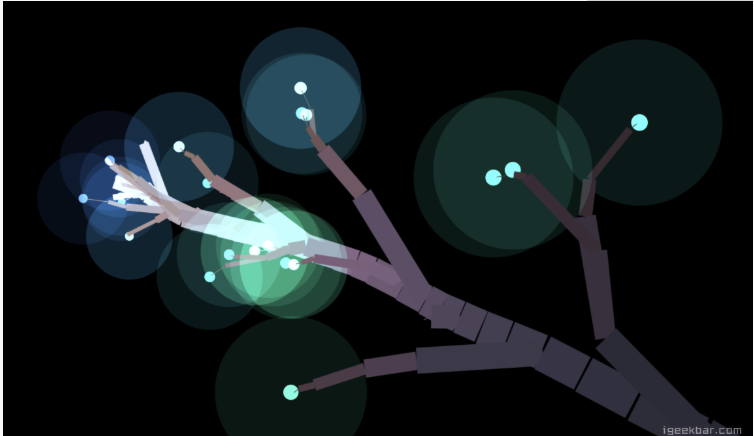
在线演示:Here~
给大家分享一个使用css与js生成的唯美炫酷的图形树效果,相关代码如下:
<!doctype html>
<html lang="en">
<head>
  <meta charset="UTF-8">
  <title>cloth</title>
  <style>
    @import url(http://fonts.googleapis.com/css?family=Poiret+One);
html {
  overflow: hidden;
  touch-action: none;
  content-zooming: none;
}
body {
  position: absolute;
  margin: 0;
  padding: 0;
  background: #000;
  width: 100%;
  height: 100%;
}
#canvas {
  width: 100%;
  height: 100%;
  background: #000;
  position: absolute;
}
#text {
  position: absolute;
  left: 0;
  top: 50%;
  width: 100%;
  pointer-events: none;
}
#text div {
  position: absolute;
  color: #888;
  left: 0;
  width: 100%;
  text-align: center;
  top: -12vmin;
  font-family: 'Poiret One', cursive;
  font-size: 6vmin;
}
  </style>
</head>
<body>
  <canvas id="canvas"></canvas>
<div id="text">
  <div id="clic" nowrap>
</div>
<script type="text/javascript" src="http://cdn.gbtags.com/jquery/1.11.1/jquery.min.js"></script>
  <script>
    ! function() {
  "use strict";
  // variables
  var root = null;
  var hue = 0;
  var automove = true;
  var angleX = 0;
  var angleY = 0;
  /////////////////////////
  var resolution = 1;
  var maxLevels = 6;
  var branchLength = 10 * resolution;
  var leafSize = 100;
  var growSpeed = 2;
  var maxAngle = 1.2;
  var freq = 0.3;
  /////////////////////////
  // branch constructor
  function Branch(parent, level, hue, x, y) {
    this.parent = parent;
    this.b1 = null;
    this.b2 = null;
    this.b3 = null;
    this.hue = hue;
    this.p0 = parent ? parent.p1 : new Point(x, y, 0);
    this.p1 = new Point(
      x,
      y,
      parent === root ?
      0 :
      (
        parent ?
        parent.p1.z + (
          level ?
          Math.random() * 10 - 5 :
          0
        ) :
        0
      )
    );
    this.level = level;
    this.life = 0;
    this.angle = 0;
    this.vx = 0;
    this.vy = 0;
  }
  // grow branch
  Branch.prototype.grow = function() {
    // z move
    this.p1.z--;
    // 3D projection
    this.p1.project();
    // recursively grow children branches
    this.b1 && this.b1.grow();
    this.b2 && this.b2.grow();
    // grow
    if (this.life-- > 1) {
      this.p1.x += this.vx;
      this.p1.y += this.vy;
    }
    // done - push more children branches
    if (this.life === 1 && this.level > 0) {
      this.b1 = newBranch(this);
      if (Math.random() <= freq) this.b2 = newBranch(this);
      this.life--;
    }
    // cut the tree
    if (this.p0.z <= -250) {
      this.parent = null;
    }
    // draw the branch
    var width = resolution * (this.level === 1 ?
      1 :
      ((this.level + 1) * (this.level + 1)) * 0.5 * this.p1.scale
    );
    var color = 100 - Math.abs(this.p0.z * 0.5);
    ctx.beginPath();
    if (this.level) {
      ctx.lineWidth = width;
      ctx.strokeStyle = "hsl(" + (this.hue % 360) + ", 14%," + color + "%)";
      ctx.moveTo(this.p0.xp, this.p0.yp);
      ctx.lineTo(this.p1.xp, this.p1.yp);
      ctx.stroke();
    } else {
      ctx.globalCompositeOperation = "lighter";
      var c = ((this.hue + 180) % 360);
      ctx.fillStyle = "hsl(" + c + ", 100%, 70%)";
      ctx.arc(this.p1.xp, this.p1.yp, width * leafSize * 0.1, 0, Math.PI * 2);
      ctx.fill();
      ctx.beginPath();
      ctx.fillStyle = "hsl(" + c + ", 60%, 6%)";
      ctx.arc(this.p1.xp, this.p1.yp, width * leafSize, 0, Math.PI * 2);
      ctx.fill();
      ctx.globalCompositeOperation = "source-over";
    }
  }
  // 3D point constructor
  function Point(x, y, z) {
    this.x = x;
    this.y = y;
    this.z = z;
    this.scale = 0;
    this.xp = 0;
    this.yp = 0;
  }
  // 3D point projection
  Point.prototype.project = function() {
    this.scale = 265 / (265 + this.z);
    this.xp = canvas.centerX + (this.x - canvas.centerX) * this.scale;
    this.yp = canvas.centerY + (this.y - canvas.centerY) * this.scale;
  }
  // new branch factory
  function newBranch(parent) {
    var branch = new Branch(parent, parent.level - 1, hue, parent.p1.x, parent.p1.y);
    branch.angle = Math.atan2(
      parent.p1.y - parent.p0.y,
      parent.p1.x - parent.p0.x
    ) + (branch.level ?
      (Math.random() * maxAngle - (maxAngle * 0.5)) :
      0
    );
    branch.vx = Math.cos(branch.angle) * growSpeed;
    branch.vy = Math.sin(branch.angle) * growSpeed;
    branch.life = branch.level ?
      Math.round(Math.random() * branch.level * branchLength) + 1 :
      2;
    return branch;
  }
  // animate the tree
  function tree() {
    // clear screen
    ctx.fillStyle = '#000';
    ctx.fillRect(0, 0, canvas.width, canvas.height);
    // pointer trail
    if (pointer.moveDistance > 10 * resolution) {
      pointer.moveDistance = 0;
      // main trunk
      var branch = new Branch(
        root,
        root.level,
        hue,
        root.p1.x,
               root.p1.y
      );
      // add another branch
      if (Math.random() <= freq) root.b1 = newBranch(root);
      // new root
      root = branch;
      root.p1.x = pointer.x;
      root.p1.y = pointer.y;
    }
    // increment color
    hue++;
    // traverse the tree
    var trunk = root;
    while (trunk) {
      trunk.grow();
      trunk = trunk.parent;
    }
  }
  // prepare the canvas
  var canvas = {
    elem: document.getElementById('canvas'),
    resize: function() {
      this.width = this.elem.width = this.elem.offsetWidth * resolution;
      this.height = this.elem.height = this.elem.offsetHeight * resolution;
      this.centerX = this.width * 0.5;
      this.centerY = this.height * 0.5;
    }
  }
  var ctx = canvas.elem.getContext("2d");
  window.addEventListener('resize', canvas.resize.bind(canvas), false);
  canvas.resize();
  // pointer events
  var pointer = {
    x: 0,
    y: 0,
    px: 0,
    py: 0,
    moveDistance: 0,
    move: function(e) {
      e.preventDefault();
      var pointer = e.targetTouches ? e.targetTouches[0] : e;
      // stop automove
      if (automove) {
        automove = false;
        document.getElementById("clic").innerHTML = "";
      }
      this.x = pointer.clientX * resolution;
      this.y = pointer.clientY * resolution;
      this.distance();
      // render tree
      requestAnimationFrame(tree);
    },
    distance: function() {
      var dx = this.x - this.px;
      var dy = this.y - this.py;
      this.moveDistance += Math.sqrt(dx * dx + dy * dy);
      // speed limit
      if (!automove && this.moveDistance > 40) {
        this.x = this.px + dx * 0.1;
        this.y = this.py + dy * 0.1;
      }
      this.px = this.x;
      this.py = this.y;
    }
  }
  window.addEventListener("mousemove", pointer.move.bind(pointer), false);
  canvas.elem.addEventListener("touchmove", pointer.move.bind(pointer), false);
  // auto start
  ! function auto() {
    automove && requestAnimationFrame(auto);
    // lissajou
    pointer.x = canvas.centerX + canvas.centerX * Math.cos(angleX += 0.02) * 0.20;
    pointer.y = canvas.centerY + canvas.centerY * Math.sin(angleY += 0.04) * 0.25;
    pointer.distance();
    // create the first branch
    if (!root) {
      root = new Branch(false, maxLevels, hue, pointer.x, pointer.y);
      root.p0 = root.p1;
      root.p0.project();
    }
    // render tree
    tree();
  }();
}();
  </script>
</body>
</html>
以上所述是小编给大家介绍的使用css与js生成的唯美炫酷的图形树效果,希望对大家有所帮助,如果大家有任何疑问请给我留言,小编会及时回复大家的。在此也非常感谢大家对脚本之家网站的支持!


