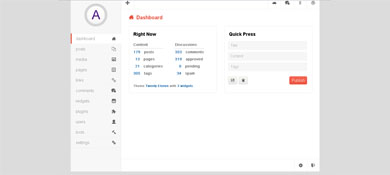
HTML结构
<div class="admin-panel clearfix">
<div class="slidebar">
<div class="logo">
<a href=""></a>
</div>
<ul>
<li><a href="#dashboard" id="targeted">dashboard</a></li>
<li><a href="#posts">posts</a></li>
<li><a href="#media">media</a></li>
<li><a href="#pages">pages</a></li>
<li><a href="#links">links</a></li>
<li><a href="#comments">comments</a></li>
<li><a href="#widgets">widgets</a></li>
<li><a href="#plugins">plugins</a></li>
<li><a href="#users">users</a></li>
<li><a href="#tools">tools</a></li>
<li><a href="#settings">settings</a></li>
</ul>
</div>
<div class="main">
<ul class="topbar clearfix">
<li><a href="#">q</a></li>
<li><a href="#">p</a></li>
<li><a href="#">o</a></li>
<li><a href="#">f</a></li>
<li><a href="#">n</a></li>
</ul>
<div class="mainContent clearfix">
<div id="dashboard">
<h2 class="header"><span class="icon"></span>Dashboard</h2>
<div class="monitor">
<h4>Right Now</h4>
<div class="clearfix">
<ul class="content">
<li>content</li>
<li class="posts"><span class="count">179</span><a href="">posts</a></li>
<li class="pages"><span class="count">13</span><a href="">pages</a></li>
<li class="categories"><span class="count">21</span><a href="">categories</a></li>
<li class="tags"><span class="count">305</span><a href="">tags</a></li>
</ul>
<ul class="discussions">
<li>discussions</li>
<li class="comments"><span class="count">353</span><a href="">comments</a></li>
<li class="approved"><span class="count">319</span><a href="">approved</a></li>
<li class="pending"><span class="count">0</span><a href="">pending</a></li>
<li class="spam"><span class="count">34</span><a href="">spam</a></li>
</ul>
</div>
<p>Theme <a href="">Twenty Eleven</a> with <a href="">3 widgets</a></p>
</div>
<div class="quick-press">
<h4>Quick Press</h4>
<form action="" method="post">
<input type="text" name="title" placeholder="Title"/>
<input type="text" name="content" placeholder="Content"/>
<input type="text" name="tags" placeholder="Tags"/>
<button type="button" class="save">l</button>
<button type="button" class="delet">m</button>
<button type="submit" class="submit" name="submit">Publish</button>
</form>
</div>
</div>
<div id="posts">
<h2 class="header">posts</h2>
</div>
<div id="media">
<h2 class="header">media</h2>
</div>
<div id="pages">
<h2 class="header">pages</h2>
</div>
<div id="links">
<h2 class="header">links</h2>
</div>
<div id="comments">
<h2 class="header">comments</h2>
</div>
<div id="widgets">
<h2 class="header">widgets</h2>
</div>
<div id="plugins">
<h2 class="header">plugins</h2>
</div>
<div id="users">
<h2 class="header">users</h2>
</div>
<div id="tools">
<h2 class="header">tools</h2>
</div>
<div id="settings">
<h2 class="header">settings</h2>
</div>
</div>
<ul class="statusbar">
<li><a href=""></a></li>
<li><a href=""></a></li>
<li class="profiles-setting"><a href="">s</a></li>
<li class="logout"><a href="">k</a></li>
</ul>
</div>
</div>
CSS 代码
body {
background-color: rgb(220,220,220);
padding: 0;
margin: 0;
font-size: 16px;
font-family: sans-serif;
}
.clearfix:after {
content: "";
display: block;
height: 0;
width: 0;
clear: both;
}
.admin-panel {
width: 990px;
margin: 50px auto;
}
/*slidebar侧边栏*/
.slidebar {
width: 20%;
min-height: 690px;
float: left;
border-right: 1px solid rgb(235,235,235);
background-color: rgb(247,247,247);
}
.slidebar .logo {
height: 145px;
border-bottom: 1px solid rgb(235,235,235);
}
.slidebar ul {
padding: 0;
margin:0;
}
.slidebar li {
list-style-type: none;
margin: 0;
position: relative;
}
.slidebar li:before {
content: "";
font-family: 'icomoon';
speak: none;
font-weight: normal;
font-variant: normal;
text-transform: none;
position: absolute;
display: block;
line-height: 40px;
color: rgb(102,102,102);
right: 20px;
-webkit-font-smoothing: antialiased;
}
/*插入icon图标*/
.slidebar li:nth-child(1):before {content: "\63";}
.slidebar li:nth-child(2):before {content: "\64";}
.slidebar li:nth-child(3):before {content: "\62";}
.slidebar li:nth-child(4):before {content: "\65";}
.slidebar li:nth-child(5):before {content: "\74";}
.slidebar li:nth-child(6):before {content: "\66";}
.slidebar li:nth-child(7):before {content: "\67";}
.slidebar li:nth-child(8):before {content: "\68";}
.slidebar li:nth-child(9):before {content: "\69";}
.slidebar li:nth-child(10):before {content: "\6a";}
.slidebar li:nth-child(11):before {content: "\75";}
.slidebar ul a {
color: rgb(140,140,140);
text-decoration: none;
font:16px/40px helvetica,verdana,sans-serif;
box-sizing:border-box;
border-bottom: 1px solid rgb(235,235,235);
display: block;
box-shadow:inset 0 1px 0 rgb(255,255,255);
text-indent: 20px;
text-transform: capitalize;
}
.slidebar li:hover a {
background-color: rgb(255,255,255);
box-shadow: 1px 0 0 rgb(255,255,255),inset 5px 0 0 -1px rgb(234,83,63);
}
/*main*/
.main {
float: left;
width: 79%;
height: 690px;
background-color: rgb(255,255,255);
position: relative;
font-family: helvetica,verdana,sans-serif;
}
.main .topbar {
border-bottom: 1px solid rgb(235,235,235);
margin: 0;
padding: 0;
}
/*topbar顶部按钮栏*/
.topbar li {
float: right;
list-style: none;
}
.topbar li:first-child {float: left;}
.topbar a {
font-family: 'icomoon';
display: block;
line-height: 50px;
width: 50px;
text-align: center;
text-decoration: none;
color: rgb(102,102,102);
border-left: 1px solid rgb(235,235,235);
}
.topbar a:hover {
background-color: rgb(247,247,247);
}
.topbar li:first-child a {
border: none;
border-right: 1px solid rgb(235,235,235);
}
/*mainContent*/
.mainContent h4 {
line-height: 1;
font-size: 18px;
margin: 1.3em 0 1em;
margin-left: 17px;
}
.mainContent>div {
position: absolute;
opacity: 0;
-webkit-transition:opacity 200ms linear;
-moz-transition:opacity 200ms linear;
-ms-transition:opacity 200ms linear;
transition:opacity 200ms linear;
}
/*通过opacity来切换不同的选项卡*/
.mainContent>div:target {
opacity: 1;
}
.mainContent h2 {
margin:1em 30px;
color: rgb(234,83,63);
font-size: 20px;
}
.mainContent h2:before {
font-family: 'icomoon';
content: attr(data-icon);
font-weight: normal;
font-variant: normal;
text-transform: none;
line-height: 1;
margin-right: 10px;
-webkit-font-smoothing: antialiased;
}
.mainContent div:nth-child(1) h2:before {content: "\63";}
.mainContent div:nth-child(2) h2:before {content: "\64";}
.mainContent div:nth-child(3) h2:before {content: "\62";}
.mainContent div:nth-child(4) h2:before {content: "\65";}
.mainContent div:nth-child(5) h2:before {content: "\74";}
.mainContent div:nth-child(6) h2:before {content: "\66";}
.mainContent div:nth-child(7) h2:before {content: "\67";}
.mainContent div:nth-child(8) h2:before {content: "\68";}
.mainContent div:nth-child(9) h2:before {content: "\69";}
.mainContent div:nth-child(10) h2:before {content: "\6a";}
.mainContent div:nth-child(11) h2:before {content: "\75";}
#dashboard>div {
border: 1px solid rgb(235,235,235);
margin-left: 30px;
float: left;
border-radius: 5px;
min-width: 345px;
height: 262px;
display: inline-block;
}
.monitor ul {
float: left;
padding: 0;
margin: 0 31px 0 17px;
}
.monitor li {
list-style:none;
font: 600 14px/28px helvetica,verdana,sans-serif;
color: rgb(102,102,102);
text-transform: capitalize;
}
.monitor li a {
color: rgb(102,102,102);
text-transform: capitalize;
text-decoration: none;
}
.monitor li:first-child {
border-bottom: 1px dotted rgb(153,153,153);
}
.discussions .comments {color: rgb(27,106,173);}
.discussions .approved {color: rgb(105,174,48);}
.discussions .pending {color: rgb(246,129,15);}
.discussions .spam {color: rgb(243,47,47);}
.monitor .count {
color: rgb(27,106,173);
text-align: right;
font-weight: 600;
margin-right: 15px;
min-width: 25px;
display: inline-block;
}
.monitor p {
color: rgb(128,128,128);
margin: 28px 0 18px 17px;
display: block;
font-weight: 600;
font-size: 12px;
}
.monitor p a {
text-decoration: none;
color:rgb(27,106,173);
}
.quick-press form {
margin:0 20px 0 13px;
}
.quick-press input[type="text"] {
display: block;
width: 100%;
-moz-box-sizing:border-box;
box-sizing:border-box;
height: 35px;
line-height: 15px;
padding: 10px 0;
margin:0 0 7px 0;
background-color: rgb(246,246,246);
outline: none;
border: none;
text-indent: 10px;
}
/*统一各浏览器下placeholder内的字体样式*/
.quick-press input[type="text"]::-webkit-input-placeholder {font-size: 14px;}
.quick-press input[type="text"]:-moz-input-placeholder {font-size: 14px;}
.quick-press input[type="text"]::-moz-input-placeholder {font-size: 14px;}
.quick-press input[type="text"]:-ms-input-placeholder {font-size: 14px;}
.quick-press button {
margin-top: 13px;
border-radius: 5px;
text-align: center;
line-height: 30px;
padding: 0;
}
.quick-press .save, .quick-press .delet {
font-family: 'icomoon';
width: 37px;
background: -webkit-linear-gradient(top,rgb(246,246,240),rgb(232,232,232));
background: -moz-linear-gradient(top,rgb(246,246,240),rgb(232,232,232));
background: -ms-linear-gradient(top,rgb(246,246,240),rgb(232,232,232));
background: linear-gradient(top,rgb(246,246,240),rgb(232,232,232));
border: 1px solid rgb(229,229,229);
color: rgb(102,102,102);
float: left;
margin-right: 5px;
}
.quick-press .save:hover, .quick-press .delet:hover {
background: -webkit-linear-gradient(top,rgb(232,232,232),rgb(246,246,240));
background: -moz-linear-gradient(top,rgb(232,232,232),rgb(246,246,240));
background: -ms-linear-gradient(top,rgb(232,232,232),rgb(246,246,240));
background: linear-gradient(top,rgb(232,232,232),rgb(246,246,240));
}
.quick-press .save:active, .quick-press .delet:active {
background: -webkit-linear-gradient(top,rgb(228,228,228),rgb(210,210,210));
background: -moz-linear-gradient(top,rgb(228,228,228),rgb(210,210,210));
background: -ms-linear-gradient(top,rgb(228,228,228),rgb(210,210,210));
background: linear-gradient(top,rgb(228,228,228),rgb(210,210,210));
}
.quick-press .submit {
float: right;
width: 70px;
border: 1px solid rgb(238,85,64);
color: #fff;
font-size: 16px;
background: -webkit-linear-gradient(top,rgb(245,101,82),rgb(234,83,63));
background: -moz-linear-gradient(top,rgb(245,101,82),rgb(234,83,63));
background: -ms-linear-gradient(top,rgb(245,101,82),rgb(234,83,63));
background: linear-gradient(top,rgb(245,101,82),rgb(234,83,63));
}
.quick-press .submit:hover {
background: -webkit-linear-gradient(top,rgb(220,85,70),rgb(210,65,53));
background: -moz-linear-gradient(top,rgb(220,85,70),rgb(210,65,53));
background: -ms-linear-gradient(top,rgb(220,85,70),rgb(210,65,53));
background: linear-gradient(top,rgb(220,85,70),rgb(210,65,53));
}
/*logo*/
.logo a {
width: 88px;
height: 88px;
display: inline-block;
position: relative;
left: 50%;
top: 50%;
margin: -45px 0 0 -45px;
border: 1px solid rgb(200,200,200);
border-radius: 50%;
background-color: rgb(214,214,214);
}
.logo a:before {
content: "A";
width: 70px;
height: 70px;
font: 50px/70px helvetica,verdana,sans-serif;
text-align: center;
position: absolute;
top: 8px;
left: 8px;
border-radius: 35px;
border: 1px solid rgb(210,210,210);
display: inline-block;
background: -webkit-linear-gradient(top,rgb(255,255,255),rgb(245,245,245));
background: -moz-linear-gradient(top,rgb(255,255,255),rgb(245,245,245));
background: -ms-linear-gradient(top,rgb(255,255,255),rgb(245,245,245));
background: linear-gradient(top,rgb(255,255,255),rgb(245,245,245));
}
/*statusbar底部功能按钮*/
.statusbar {
position: absolute;
bottom: 0;
border-top: 1px solid rgb(235,235,235);
width: 100%;
padding: 0;
margin: 0;
}
.statusbar li {
list-style: none;
}
.statusbar a {
color: rgb(102,102,102);
text-decoration: none;
text-align: center;
display: block;
}
.statusbar a:hover {
background-color: rgb(247,247,247);
}
.statusbar .profiles-setting, .statusbar .logout {
float: right;
}
.statusbar .profiles-setting a, .statusbar .logout a {
font-family: 'icomoon';
width: 49px;
height: 49px;
line-height: 50px;
border-left: 1px solid rgb(235,235,235);
}
@font-face {
font-family: 'icomoon';
src:url('fonts/icomoon.eot');
src:url('fonts/icomoon.eot?#iefix') format('embedded-opentype'),
url('fonts/icomoon.woff') format('woff'),
url('fonts/icomoon.ttf') format('truetype'),
url('fonts/icomoon.svg#icomoon') format('svg');
font-weight: normal;
font-style: normal;
}