效果图:
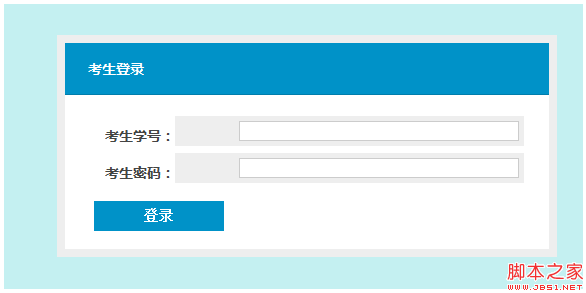
源码如下
<!DOCTYPE HTML PUBLIC "-//W3C//DTD HTML 4.0 Transitional//EN">
<HTML><HEAD><TITLE>纯CSS3制作的 登录模板 简洁蓝白(非IE效果更好)</TITLE>
<META content="text/html; charset=unicode" http-equiv=Content-Type>
<STYLE>
h1, h2, h3, h4, h5, h6{
font-weight:normal;
margin:0;
line-height:1.1em;
color:#000;
}
h1{font-size:2em;margin-bottom:.5em;}
h2{font-size:1.75em;margin-bottom:.5142em;padding-top:.2em;}
h3{font-size:1.5em;margin-bottom:.7em;padding-top:.3em;}
h4{font-size:1.25em;margin-bottom:.6em;}
h5,h6{font-size:1em;margin-bottom:.5em;font-weight:bold;}
p, blockquote, ul, ol, dl, form, table, pre{line-height:inherit;margin:0 0 1.5em 0;}
ul, ol, dl{padding:0;}
ul ul, ul ol, ol ol, ol ul, dd{margin:0;}
li{margin:0 0 0 2em;padding:0;display:list-item;list-style-position:outside;}
blockquote, dd{padding:0 0 0 2em;}
pre, code, samp, kbd, var{font:100% mono-space,monospace;}
pre{overflow:auto;}
abbr, acronym{
text-transform:uppercase;
border-bottom:1px dotted #000;
letter-spacing:1px;
}
abbr[title], acronym[title]{cursor:help;}
small{font-size:.9em;}
sup, sub{font-size:.8em;}
em, cite, q{font-style:italic;}
img{border:none;}
hr{display:none;}
table{width:100%;border-collapse:collapse;}
th,caption{text-align:left;}
form div{margin:.5em 0;clear:both;}
label{display:block;}
fieldset{margin:0;padding:0;border:none;}
legend{font-weight:bold;}
input[type="radio"],input[type="checkbox"], .radio, .checkbox{margin:0 .25em 0 0;}
/* base */
body, table, input, textarea, select, li, button{
font:1em "Lucida Sans Unicode", "Lucida Grande", sans-serif;
line-height:1.5em;
color:#444;
}
body{
font-size:12px;
background:#c4f0f1;
text-align:center;
}
/* login form */
#login{
margin:5em auto;
background:#fff;
border:8px solid #eee;
width:500px;
-moz-border-radius:5px;
-webkit-border-radius:5px;
border-radius:5px;
-moz-box-shadow:0 0 10px #4e707c;
-webkit-box-shadow:0 0 10px #4e707c;
box-shadow:0 0 10px #4e707c;
text-align:left;
position:relative;
}
#login a, #login a:visited{color:#0283b2;}
#login a:hover{color:#111;}
#login h1{
background:#0092c8;
color:#fff;
text-shadow:#007dab 0 1px 0;
font-size:14px;
padding:18px 23px;
margin:0 0 1.5em 0;
border-bottom:1px solid #007dab;
}
#login .register{
position:absolute;
float:left;
margin:0;
line-height:30px;
top:-40px;
right:0;
font-size:11px;
}
#login p{margin:.5em 25px;}
#login div{
margin:.5em 25px;
background:#eee;
padding:4px;
-moz-border-radius:3px;
-webkit-border-radius:3px;
border-radius:3px;
text-align:right;
position:relative;
}
#login label{
float:left;
line-height:30px;
padding-left:10px;
}
#login .field{
border:1px solid #ccc;
width:280px;
font-size:12px;
line-height:1em;
padding:4px;
-moz-box-shadow:inset 0 0 5px #ccc;
-webkit-box-shadow:inset 0 0 5px #ccc;
box-shadow:inset 0 0 5px #ccc;
}
#login div.submit{background:none;margin:1em 25px;text-align:left;}
#login div.submit label{float:none;display:inline;font-size:11px;}
#login button{
border:0;
padding:0 30px;
height:30px;
line-height:30px;
text-align:center;
font-size:14px;
Font-Weight:bold;
color:#fff;
text-shadow:#007dab 0 1px 0;
background:#0092c8;
-moz-border-radius:50px;
-webkit-border-radius:50px;
border-radius:50px;
cursor:pointer;
}
#login .forgot{text-align:right;font-size:11px;}
#login .back{padding:1em 0;border-top:1px solid #eee;text-align:right;font-size:20px;}
#login .error{
float:left;
position:absolute;
left:95%;
top:-5px;
background:#890000;
padding:5px 10px;
font-size:11px;
color:#fff;
text-shadow:#500 0 1px 0;
text-align:left;
white-space:nowrap;
border:1px solid #500;
-moz-border-radius:3px;
-webkit-border-radius:3px;
border-radius:3px;
-moz-box-shadow:0 0 5px #700;
-webkit-box-shadow:0 0 5px #700;
box-shadow:0 0 5px #700;
}
</STYLE>
<STYLE id=wiz_custom_css type=text/css>
body
{
font-family: 微软雅黑,Georgia,Helvetica,Arial,sans-serif,宋体,serif;
font-size: 10.5pt;
line-height: 1.5;
}
html, body, div, span, applet, object, iframe, p, blockquote, pre,
abbr, acronym, address, big, cite, code,
del, dfn, em, font, img, ins, kbd, q, s, samp,
small, strike, strong, sub, sup, tt, var,
b, u, i, center,
dl, dt, dd, ol, ul, li,
fieldset, form, label, legend,
table, caption, tbody, tfoot, thead, tr, th, td
{
color: inherit;
background-color: inherit;
}
h1 {
font-size:1.5em;
font-weight:bold;
}
h2 {
font-size:1.4em;
font-weight:bold;
}
h3 {
font-size:1.3em;
font-weight:bold;
}
h4 {
font-size:1.2em;
font-weight:bold;
}
h5 {
font-size:1.1em;
font-weight:bold;
}
h6 {
font-size:1.0em;
font-weight:bold;
}
img {
border:0;
}
</STYLE>
<META name=GENERATOR content="MSHTML 9.00.8112.16421"></HEAD>
<BODY>
<FORM id=login method=post action="">
<H1><STRONG>考生登录</STRONG></H1>
<DIV><LABEL for=login_username><STRONG>考生学号:</STRONG></LABEL> <INPUT
id=login_username class="field required" title=请输入您的用户名 name=username> </DIV>
<DIV><LABEL for=login_password><STRONG>考生密码:</STRONG></LABEL> <INPUT
id=login_password class="field required" title=密码不能为空 name=password
type=password> </DIV>
<DIV class=submit><BUTTON type=submit>登录</BUTTON> </DIV></FORM></BODY></HTML>


