效果图如下:
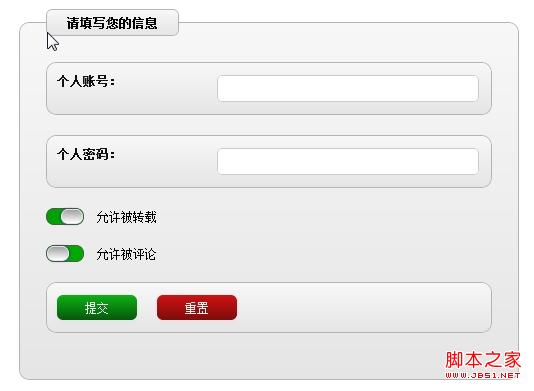
代码:
<!DOCTYPE html>
<html lang="">
<head>
<title>Animated Checkboxes using CSS3</title>
<meta charset="utf-8">
<meta name="description" content="UI checkboxes using CSS3" />
<meta name="keywords" content="CSS3, checkboxes" />
<meta name="robots" content="" />
<style type="text/css">
html, body, h1, form, fieldset, legend, ol, li {
margin: 0;
padding: 0;
}
body {
background: #ffffff;
color: #111111;
font-family: Helvetica;
padding: 20px;
font-size: 12px
}
input:not([type=checkbox]), textarea {
width: 250px;
padding: 5px;
border: 1px solid #ccc;
-moz-border-radius: 5px;
-webkit-border-radius: 5px;
}
form {
width: 500px;
margin: 0 auto 0 auto;
}
form fieldset {
padding: 26px;
border: 1px solid #b4b4b4;
-moz-border-radius: 10px;
-webkit-border-radius: 10px;
}
form legend {
padding: 5px 20px 5px 20px;
color: #030303;
-moz-border-radius: 6px;
-webkit-border-radius: 6px;
border: 1px solid #b4b4b4;
}
form ol {
list-style: none;
margin-bottom: 20px;
border: 1px solid #b4b4b4;
-moz-border-radius: 10px;
-webkit-border-radius: 10px;
padding: 10px;
}
form ol, form legend, form fieldset {
background-image: -moz-linear-gradient(top, #f7f7f7, #e5e5e5); /* FF3.6 */
background-image: -webkit-gradient(linear,left bottom,left top,color-stop(0, #e5e5e5),color-stop(1, #f7f7f7)); /* Saf4+, Chrome */
}
form ol.buttons {
overflow: auto;
}
form ol li label {
float: left;
width: 160px;
font-weight: bold;
}
/*
form ol.radio-buttons li {
float:left;
margin-bottom:0;
width:8px;
}
form ol.radio-buttons li label {
line-height:20px;
padding-right:20px;
width:80px;
}
form ol.radio-buttons li input {
padding:0;
width:20px;
}
*/
.settings {
/* width: 400px; */
list-style: none;
position: relative;
}
.settings p {
display: block;
margin-bottom: 20px;
background: -moz-linear-gradient(50% 50% 180deg,#C91A1A, #DB2E2E, #0C990C 0%);
background: -webkit-gradient(linear, 50% 50%, 0% 50%, from(#C90202), to(#009C05), color-stop(0,#00AB00));
border-radius: 8px;
-moz-border-radius: 6px;
border: 1px solid #555555;
width: 36px;
position: relative;
height: 15px;
}
/*
.settings p:before {
content: "ON";
padding-left: 9px;
line-height: 15px;
color: #fff;
font-size: 14px;
text-shadow: #093B5C 0px -1px 1px;
}
.settings p:after {
content: "OFF";
padding-left: 12px;
line-height: 15px;
color: #fff;
font-size: 14px;
text-shadow: #093B5C 0px -1px 1px;
}
*/
.check {
display: block;
width: 20px;
height: 13px;
border-radius: 8px;
-moz-border-radius: 6px;
background: -moz-linear-gradient(19% 75% 90deg,#FFFFFF, #A1A1A1);
background: #fff -webkit-gradient(linear, 0% 0%, 0% 100%, from(#A1A1A1), to(#FFFFFF));
border: 1px solid #e5e5e5;
position: absolute;
top: 0px;
left: 0px;
}
input[type=checkbox] {
display: none;
}
@-webkit-keyframes labelON {
0% {
top: 0px;
left: 0px;
}
100% {
top: 0px;
left: 14px;
}
}
input[type=checkbox]:checked + label.check {
top: 0px;
left: 14px;
-webkit-animation-name: labelON;
-webkit-animation-duration: .2s;
-webkit-animation-iteration-count: 1;
-webkit-animation-timing-function: ease-in;
-webkit-box-shadow: #244766 -1px 0px 3px;
-moz-box-shadow: #244766 -1px 0px 3px;
}
@-webkit-keyframes labelOFF {
0% {
top: 0px;
left: 16px;
}
100% {
top: 0px;
left: 0px;
}
}
input[type=checkbox] + label.check {
top: 0px;
left: 0px;
-webkit-animation-name: labelOFF;
-webkit-animation-duration: .2s;
-webkit-animation-iteration-count: 1;
-webkit-animation-timing-function: ease-in;
-webkit-box-shadow: #244766 1px 0px 3px;
-moz-box-shadow: #244766 1px 0px 3px;
}
label.info {
position: absolute;
color: #000;
top:0px;
left: 50px;
line-height: 15px;
width: 200px;
}
form ol.buttons li {
float: left;
width: 100px;
}
input[type=submit] {
width: 80px;
color: #f3f3f3;
-moz-border-radius: 6px;
-webkit-border-radius: 6px;
background-image: -moz-linear-gradient(top, #0cb114, #07580b); /* FF3.6 */
background-image: -webkit-gradient(linear,left bottom,left top,color-stop(0, #07580b),color-stop(1, #0cb114)); /* Saf4+, Chrome */
-webkit-box-shadow: #4b4b4b 0px 2px 5px;
-moz-box-shadow: #4e4e4e 0px 2px 5px;
box-shadow: #e3e3e3 0px 2px 5px;
border: none;
}
input[type=reset] {
width: 80px;
color: #f3f3f3;
-moz-border-radius: 6px;
-webkit-border-radius: 6px;
background-image: -moz-linear-gradient(top, #d01111, #7e0c0c); /* FF3.6 */
background-image: -webkit-gradient(linear,left bottom,left top,color-stop(0, #7e0c0c),color-stop(1, #d01111)); /* Saf4+, Chrome */
-webkit-box-shadow: #4b4b4b 0px 2px 5px;
-moz-box-shadow: #4e4e4e 0px 2px 5px;
box-shadow: #e3e3e3 0px 2px 5px;
border: none;
}
input[type=file] {
width: 80px;
}
</style>
</head>
<body>
<form id="form-1" action="" method="post">
<fieldset>
<legend><b>请填写您的信息</b></legend>
<ol>
<li><label for="field1">个人账号:</label></li>
<li><input type="text" id="field1" name="field1" required/></li>
</ol>
<ol>
<li><label for="field2">个人密码:</label></li>
<li><input type="password" id="field2" name="field2" /></li>
</ol>
<div class="settings">
<p>
<input type="checkbox" value="1" id="1" name="1" checked="checked"/>
<label class="check" for="1"></label>
<label class="info">允许被转载</label>
</p>
<p>
<input type="checkbox" value="2" id="2" name="2" />
<label class="check" for="2"></label>
<label class="info">允许被评论</label>
</p>
</div>
<ol class="buttons">
<li><input type="submit" class="button" value="提交" /></li>
<li><input type="reset" class="button" value="重置" /></li>
</ol>
</fieldset>
</form>
</body>
</html>


