

我们先来看下运行效果图
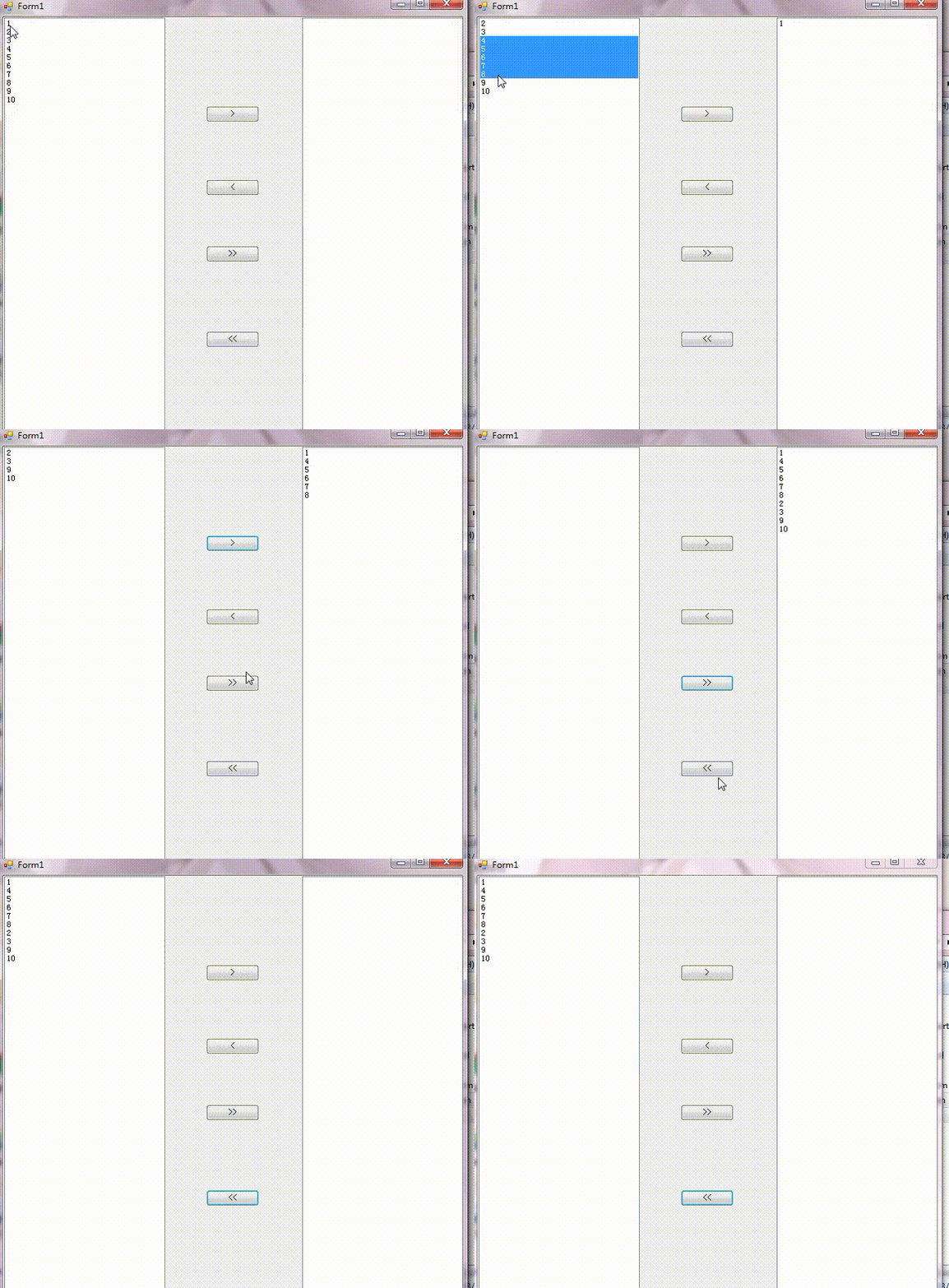
Form1.cs代码:
using System;
using System.Collections.Generic;
using System.ComponentModel;
using System.Data;
using System.Drawing;
using System.Linq;
using System.Text;
using System.Threading.Tasks;
using System.Windows.Forms;
using System.Collections;

namespace MoveItem
{
  public partial class Form1 : Form
  {
    public Form1()
    {
      InitializeComponent();
    }
    ArrayList list = new ArrayList();
    private void listBox1_SelectedIndexChanged(object sender, EventArgs e)
    {

    }

    private void Form1_Load(object sender, EventArgs e)
    {
      for (int i = 1; i <= 10; i++)
      {
        list.Add(i);
        string s = i.ToString();
        listBox1.Items.Add(s);
      }

    }

    private void listBox2_SelectedIndexChanged(object sender, EventArgs e)
    {

    }

    private void button1_Click(object sender, EventArgs e)
    {
      //单选,无法实现多选
      //string str = this.listBox1.Text.Trim().ToString();
      //if (listBox1.Items.Contains(str))
      //{
      //  listBox1.Items.Remove(str);
      //  listBox2.Items.Add(str);
      //}
      for (int i=0;i<listBox1.SelectedIndices.Count;i++)
      {
        listBox2.Items.Add(listBox1.Items[listBox1.SelectedIndices[i]]);
        listBox1.Items.RemoveAt(listBox1.SelectedIndices[i]);
        i--;
      }
    }

    private void button2_Click(object sender, EventArgs e)
    {
      for (int i = 0; i < listBox2.SelectedIndices.Count; i++)
      {
        listBox1.Items.Add(listBox2.Items[listBox2.SelectedIndices[i]]);
        listBox2.Items.RemoveAt(listBox2.SelectedIndices[i]);
        i--;
      }
    }

    private void button3_Click(object sender, EventArgs e)
    {
      listBox2.Items.AddRange(listBox1.Items);
      listBox1.Items.Clear();
    }

    private void button4_Click(object sender, EventArgs e)
    {
      listBox1.Items.AddRange(listBox2.Items);
      listBox2.Items.Clear();
    }
  }
}
大家可以测试运行下,有其他问题可以在下方的留言区讨论,感谢大家对脚本之家的支持。


