

这篇博客将梳理一下.NET中4个Timer类,及其用法。
1. System.Threading.Timer
public Timer(TimerCallback callback, object state, int dueTime, int period);
callback委托将会在period时间间隔内重复执行,state参数可以传入想在callback委托中处理的对象,dueTime标识多久后callback开始执行,period标识多久执行一次callback。
using System.Threading;
// System.Threading.Timer
Timer timer = new Timer(delegate
{
 Console.WriteLine($"Timer Thread: {Thread.CurrentThread.ManagedThreadId}");
 Console.WriteLine($"Is Thread Pool: {Thread.CurrentThread.IsThreadPoolThread}");
 Console.WriteLine("Timer Action.");
},
null,
2000,
);
Console.WriteLine("Main Action.");
Console.WriteLine($"Main Thread: {Thread.CurrentThread.ManagedThreadId}");
Console.ReadLine();
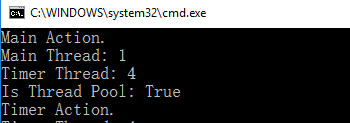
Timer回掉方法执行是在另外ThreadPool中一条新线程中执行的。
2. System.Timers.Timer
System.Timers.Timer和System.Threading.Timer相比,提供了更多的属性,
Interval 指定执行Elapsed事件的时间间隔;
Elapsed 指定定期执行的事件;
Enabled 用于Start/Stop Timer;
Start 开启Timer
Stop 停止Timer
System.Timers.Timer timer = new System.Timers.Timer();
timer.Interval = 500;
timer.Elapsed += delegate
{
 Console.WriteLine($"Timer Thread: {Thread.CurrentThread.ManagedThreadId}");
 Console.WriteLine($"Is Thread Pool: {Thread.CurrentThread.IsThreadPoolThread}");
 Console.WriteLine("Timer Action");
 timer.Stop();
};
timer.Start();
Console.WriteLine("Main Action.");
Console.WriteLine($"Main Thread: {Thread.CurrentThread.ManagedThreadId}");
Console.ReadLine();
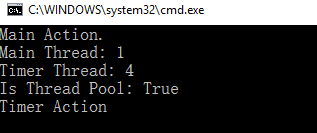
Timer Elapsed定期任务是在ThreadPool的线程中执行的。
3. System.Windows.Forms.Timer
Interval 指定执行Elapsed事件的时间间隔;
Tick 指定定期执行的事件;
Enabled 用于Start/Stop Timer;
Start 开启Timer
Stop 停止Timer
使用System.Windows.Forms.Timer来更新窗体中Label内时间,
using System.Windows.Forms;
public Form1()
{
 InitializeComponent();
 this.Load += delegate
 {
 Timer timer = new Timer();
 timer.Interval = 500;
 timer.Tick += delegate
 {
 System.Diagnostics.Debug.WriteLine($"Timer Thread: {System.Threading.Thread.CurrentThread.ManagedThreadId}");
 System.Diagnostics.Debug.WriteLine($"Is Thread Pool: {System.Threading.Thread.CurrentThread.IsThreadPoolThread}");
 this.lblTimer.Text = DateTime.Now.ToLongTimeString();
 };
 timer.Start();
 System.Diagnostics.Debug.WriteLine($"Main Thread: {System.Threading.Thread.CurrentThread.ManagedThreadId}");
 };
}
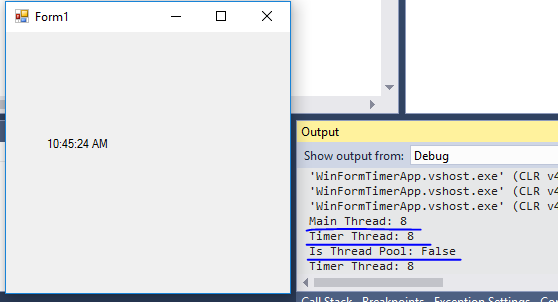
Timer Tick事件中执行的事件线程与主窗体的线程是同一个,并没有创建新线程(或者使用ThreadPool中线程)来更新UI。下面将代码做一个改动,使用System.Timers.Timer来更新UI上的时间,代码如下,
public Form1()
{
 InitializeComponent();
 this.Load += delegate
 {
 System.Timers.Timer timer = new System.Timers.Timer();
 timer.Interval = 500;
 timer.Elapsed += delegate
 {
 System.Diagnostics.Debug.WriteLine($"Timer Thread: {System.Threading.Thread.CurrentThread.ManagedThreadId}");
 System.Diagnostics.Debug.WriteLine($"Is Thread Pool: {System.Threading.Thread.CurrentThread.IsThreadPoolThread}");
 this.lblTimer.Text = DateTime.Now.ToLongTimeString();
 };
 timer.Start();
 System.Diagnostics.Debug.WriteLine($"Main Thread: {System.Threading.Thread.CurrentThread.ManagedThreadId}");
 };
}
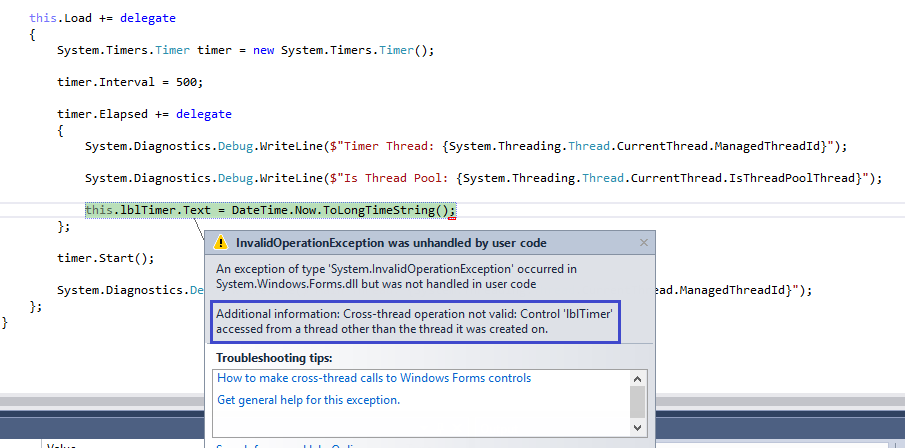
很熟悉的一个错误。因为Label是由UI线程创建的,所以对其进行修改需要在UI线程中进行。System.Timers.Timer中Elasped执行是在ThreadPool中新创建的线程中执行的。所以会有上面的错误。
4. System.Windows.Threading.DispatcherTimer
属性和方法与System.Windows.Forms.Timer类似。
using System.Windows.Threading;
public MainWindow()
{
 InitializeComponent();
 this.Loaded += delegate
 {
 //DispatcherTimer
 DispatcherTimer timer = new DispatcherTimer();
 timer.Interval = TimeSpan.FromSeconds(1);
 timer.Start();
 Debug.WriteLine($"Main Thread Id: {Thread.CurrentThread.ManagedThreadId}");
 timer.Tick += delegate
 {
 tbTime.Text = DateTime.Now.ToLongTimeString();
 Debug.WriteLine($"Timer Thread Id: {Thread.CurrentThread.ManagedThreadId}");
 timer.Stop();
 };
 };
}
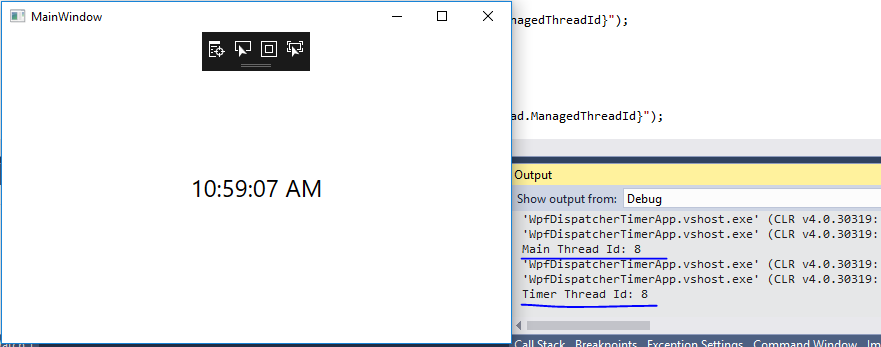
DispatcherTimer中Tick事件执行是在主线程中进行的。
使用DispatcherTimer时有一点需要注意,因为DispatcherTimer的Tick事件是排在Dispatcher队列中的,当系统在高负荷时,不能保证在Interval时间段执行,可能会有轻微的延迟,但是绝对可以保证Tick的执行不会早于Interval设置的时间。如果对Tick执行时间准确性高可以设置DispatcherTimer的priority。例如:
DispatcherTimer timer = new DispatcherTimer(DispatcherPriority.Send);
以上就是本文的全部内容,希望本文的内容对大家的学习或者工作能带来一定的帮助,同时也希望多多支持脚本之家!


