

我们可以自定义DataGridView的DataGridViewColumn来实现自定义的列,下面介绍一下如何通过扩展DataGridViewColumn来实现一个TreeViewColumn
1.TreeViewColumn类
TreeViewColumn继承自DataGridViewColumn,为了动态给TreeViewColumn传入一个TreeView,这里暴露出一个公共属性_root,可以绑定一个初始化的TreeView. 另外需要重写DataGridCell类型的CellTemplate,这里返还一个TreeViewCell(需要自定义)
 /// <summary>
  /// Host TreeView In DataGridView Cell
  /// </summary>
  public class TreeViewColumn : DataGridViewColumn
  {
   public TreeViewColumn()
    : base(new TreeViewCell())
   {
   }
   [Description("Set TreeView Root in DataGridView Cell"), Category("TreeView")]
   public TreeView _root
   {
    get{return Roots.tree;}
    set{Roots.tree=value;}
   }
   public override DataGridViewCell CellTemplate
   {
    get
    {
     return base.CellTemplate;
    }
    set
    {
     // Ensure that the cell used for the template is a TreeViewCell.
     if (value != null &&
      !value.GetType().IsAssignableFrom(typeof(TreeViewCell)))
     {
      throw new InvalidCastException("Must be a TreeViewCell");
     }
     base.CellTemplate = value;
    }
   }
  }
2.TreeViewCell类
上面TreeViewColumn重写了CellTemplate,返回的就是自定义的TreeViewCell,这里就是具体实现其逻辑。一般来说选择树控件的节点后,返回的是一个文本信息,是文本类型,可以继承DataGridViewTextBoxCell,并重写InitializeEditingControl来进行自定义的DataGridView.EditingControl (编辑控件)。
 public class TreeViewCell : DataGridViewTextBoxCell
  {
   public TreeViewCell()
    : base()
   {
    //初始设置
   }
   public override void InitializeEditingControl(int rowIndex, object
    initialFormattedValue, DataGridViewCellStyle dataGridViewCellStyle)
   {
    // Set the value of the editing control to the current cell value.
    base.InitializeEditingControl(rowIndex, initialFormattedValue,
     dataGridViewCellStyle);
    TreeViewEditingControl ctl =
     DataGridView.EditingControl as TreeViewEditingControl;
    // Use the default row value when Value property is null.
    if (this.Value == null)
    {
     ctl.SelectedNode =new TreeNode( this.DefaultNewRowValue.ToString());
    }
    else
    {
     ctl.SelectedNode = new TreeNode(this.Value.ToString());
    }
   }
   public override Type EditType
   {
    get
    {
     // Return the type of the editing control that CalendarCell uses.
     return typeof(TreeViewEditingControl);
    }
   }
   public override Type ValueType
   {
    get
    {
     // Return the type of the value that CalendarCell contains.
     return typeof(String);
    }
   }
   public override object DefaultNewRowValue
   {
    get
    {
     // Use the current date and time as the default value.
     return "";
    }
   }
  }
3.TreeViewEditingControl类
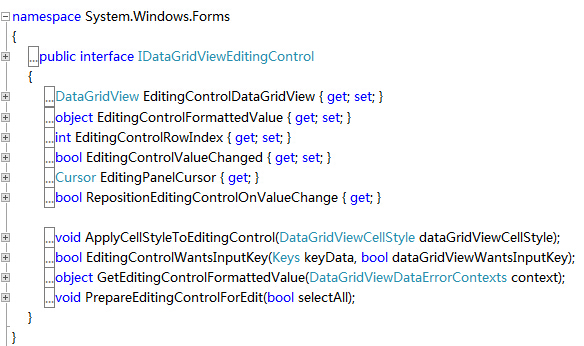
TreeViewEditingControl为编辑控件,当用户编辑TreeViewCell时,显示的为树编辑控件,需要继承TreeView,同时实现IDataGridViewEditingControl接口,实现以下方法:
 public class TreeViewEditingControl : TreeView, IDataGridViewEditingControl
  {
   DataGridView dataGridView;
   private bool valueChanged = false;
   int rowIndex;
   public TreeViewEditingControl()
   {
    try
    {
     //必须加Roots.tree.Nodes[].Clone() 否则报错 不能在多处增添或插入项,必须首先将其从当前位置移除或将其克隆
     this.Nodes.Add(Roots.tree.Nodes[].Clone() as TreeNode);
     this.SelectedNode = this.Nodes[];
    }
    catch (Exception ex)
    {
     MessageBox.Show(ex.Message);
    }
   }
   // Implements the IDataGridViewEditingControl.EditingControlFormattedValue
   // property.
   public object EditingControlFormattedValue
   {
    get
    {
     return this.SelectedNode.Text;
    }
    set
    {
     if (value is String)
     {
      try
      {
       // This will throw an exception of the string is
       // null, empty, or not in the format of a date.
       this.SelectedNode = new TreeNode((String)value);
      }
      catch
      {
       // In the case of an exception, just use the
       // default value so we're not left with a null
       // value.
       this.SelectedNode = new TreeNode("");
      }
     }
    }
   }
   // Implements the
   // IDataGridViewEditingControl.GetEditingControlFormattedValue method.
   public object GetEditingControlFormattedValue(
    DataGridViewDataErrorContexts context)
   {
    return EditingControlFormattedValue;
   }
   // Implements the
   // IDataGridViewEditingControl.ApplyCellStyleToEditingControl method.
   public void ApplyCellStyleToEditingControl(
    DataGridViewCellStyle dataGridViewCellStyle)
   {
    this.Font = dataGridViewCellStyle.Font;
    this.ForeColor = dataGridViewCellStyle.ForeColor;
    this.BackColor = dataGridViewCellStyle.BackColor;
   }
   // Implements the IDataGridViewEditingControl.EditingControlRowIndex
   // property.
   public int EditingControlRowIndex
   {
    get
    {
     return rowIndex;
    }
    set
    {
     rowIndex = value;
    }
   }
   // Implements the IDataGridViewEditingControl.EditingControlWantsInputKey
   // method.
   public bool EditingControlWantsInputKey(
    Keys key, bool dataGridViewWantsInputKey)
   {
    // Let the TreeViewPicker handle the keys listed.
    switch (key & Keys.KeyCode)
    {
     case Keys.Left:
     case Keys.Up:
     case Keys.Down:
     case Keys.Right:
     case Keys.Home:
     case Keys.End:
     case Keys.PageDown:
     case Keys.PageUp:
      return true;
     default:
      return !dataGridViewWantsInputKey;
    }
   }
   // Implements the IDataGridViewEditingControl.PrepareEditingControlForEdit
   // method.
   public void PrepareEditingControlForEdit(bool selectAll)
   {
    // No preparation needs to be done.
   }
   // Implements the IDataGridViewEditingControl
   // .RepositionEditingControlOnValueChange property.
   public bool RepositionEditingControlOnValueChange
   {
    get
    {
     return false;
    }
   }
   // Implements the IDataGridViewEditingControl
   // .EditingControlDataGridView property.
   public DataGridView EditingControlDataGridView
   {
    get
    {
     return dataGridView;
    }
    set
    {
     dataGridView = value;
    }
   }
   // Implements the IDataGridViewEditingControl
   // .EditingControlValueChanged property.
   public bool EditingControlValueChanged
   {
    get
    {
     return valueChanged;
    }
    set
    {
     valueChanged = value;
    }
   }
   // Implements the IDataGridViewEditingControl
   // .EditingPanelCursor property.
   public Cursor EditingPanelCursor
   {
    get
    {
     return base.Cursor;
    }
   }
   protected override void OnAfterExpand(TreeViewEventArgs e)
   {
    base.OnAfterExpand(e);
    this.dataGridView.Columns[this.dataGridView.CurrentCell.ColumnIndex].Width = this.Width+;
    this.dataGridView.Rows[this.dataGridView.CurrentCell.RowIndex].Height = this.Height+;
   }
   protected override void OnAfterSelect(TreeViewEventArgs e)
   {
    // Notify the DataGridView that the contents of the cell
    // have changed.
    valueChanged = true;
    this.EditingControlDataGridView.NotifyCurrentCellDirty(true);
    base.OnAfterSelect(e);
   }
  }
为了在不同类之间传递参数,定义一个全局静态类:
 /// <summary>
  /// 静态类的静态属性,用于在不同class间传递参数
  /// </summary>
  public static class Roots
  {
   //从前台绑定树
  public static TreeView tree = null;
  }
完整代码为:
 using System;
 using System.Collections.Generic;
 using System.Linq;
 using System.Text;
 using System.Windows.Forms;
 using System.ComponentModel;
 namespace Host_Controls_in_Windows_Forms_DataGridView_Cells
 {
  /// <summary>
  /// 静态类的静态属性,用于在不同class间传递参数
  /// </summary>
  public static class Roots
  {
   //从前台绑定树
   public static TreeView tree = null;
  }
  /// <summary>
  /// Host TreeView In DataGridView Cell
  /// </summary>
  public class TreeViewColumn : DataGridViewColumn
  {
   public TreeViewColumn()
    : base(new TreeViewCell())
   {
   }
   [Description("Set TreeView Root in DataGridView Cell"), Category("TreeView")]
   public TreeView _root
   {
    get{return Roots.tree;}
    set{Roots.tree=value;}
   }
   public override DataGridViewCell CellTemplate
   {
    get
    {
     return base.CellTemplate;
    }
    set
    {
     // Ensure that the cell used for the template is a TreeViewCell.
     if (value != null &&
      !value.GetType().IsAssignableFrom(typeof(TreeViewCell)))
     {
      throw new InvalidCastException("Must be a TreeViewCell");
     }
     base.CellTemplate = value;
    }
   }
  }
  //----------------------------------------------------------------------
  public class TreeViewCell : DataGridViewTextBoxCell
  {
   public TreeViewCell()
    : base()
   {
    //初始设置
   }
   public override void InitializeEditingControl(int rowIndex, object
    initialFormattedValue, DataGridViewCellStyle dataGridViewCellStyle)
   {
    // Set the value of the editing control to the current cell value.
    base.InitializeEditingControl(rowIndex, initialFormattedValue,
     dataGridViewCellStyle);
    TreeViewEditingControl ctl =
     DataGridView.EditingControl as TreeViewEditingControl;
    // Use the default row value when Value property is null.
    if (this.Value == null)
    {
     ctl.SelectedNode =new TreeNode( this.DefaultNewRowValue.ToString());
    }
    else
    {
     ctl.SelectedNode = new TreeNode(this.Value.ToString());
    }
   }
   public override Type EditType
   {
    get
    {
     // Return the type of the editing control that CalendarCell uses.
     return typeof(TreeViewEditingControl);
    }
   }
   public override Type ValueType
   {
    get
    {
     // Return the type of the value that CalendarCell contains.
     return typeof(String);
    }
   }
   public override object DefaultNewRowValue
   {
    get
    {
     // Use the current date and time as the default value.
     return "";
    }
   }
  }
  //-----------------------------------------------------------------
 public class TreeViewEditingControl : TreeView, IDataGridViewEditingControl
  {
   DataGridView dataGridView;
   private bool valueChanged = false;
   int rowIndex;
   public TreeViewEditingControl()
   {
    try
    {
     //必须加Roots.tree.Nodes[].Clone() 否则报错 不能在多处增添或插入项,必须首先将其从当前位置移除或将其克隆
     this.Nodes.Add(Roots.tree.Nodes[].Clone() as TreeNode);
     this.SelectedNode = this.Nodes[];
    }
    catch (Exception ex)
    {
     MessageBox.Show(ex.Message);
    }
   }
   // Implements the IDataGridViewEditingControl.EditingControlFormattedValue
   // property.
   public object EditingControlFormattedValue
   {
    get
    {
     return this.SelectedNode.Text;
    }
    set
    {
     if (value is String)
     {
      try
      {
       // This will throw an exception of the string is
       // null, empty, or not in the format of a date.
       this.SelectedNode = new TreeNode((String)value);
      }
      catch
      {
       // In the case of an exception, just use the
       // default value so we're not left with a null
       // value.
       this.SelectedNode = new TreeNode("");
      }
     }
    }
   }
   // Implements the
   // IDataGridViewEditingControl.GetEditingControlFormattedValue method.
   public object GetEditingControlFormattedValue(
    DataGridViewDataErrorContexts context)
   {
    return EditingControlFormattedValue;
   }
   // Implements the
   // IDataGridViewEditingControl.ApplyCellStyleToEditingControl method.
   public void ApplyCellStyleToEditingControl(
    DataGridViewCellStyle dataGridViewCellStyle)
   {
    this.Font = dataGridViewCellStyle.Font;
    this.ForeColor = dataGridViewCellStyle.ForeColor;
    this.BackColor = dataGridViewCellStyle.BackColor;
   }
   // Implements the IDataGridViewEditingControl.EditingControlRowIndex
   // property.
   public int EditingControlRowIndex
   {
    get
    {
     return rowIndex;
    }
    set
    {
     rowIndex = value;
    }
   }
   // Implements the IDataGridViewEditingControl.EditingControlWantsInputKey
   // method.
   public bool EditingControlWantsInputKey(
    Keys key, bool dataGridViewWantsInputKey)
   {
    // Let the TreeViewPicker handle the keys listed.
    switch (key & Keys.KeyCode)
    {
     case Keys.Left:
     case Keys.Up:
     case Keys.Down:
     case Keys.Right:
     case Keys.Home:
     case Keys.End:
     case Keys.PageDown:
     case Keys.PageUp:
      return true;
     default:
      return !dataGridViewWantsInputKey;
    }
   }
   // Implements the IDataGridViewEditingControl.PrepareEditingControlForEdit
   // method.
   public void PrepareEditingControlForEdit(bool selectAll)
   {
    // No preparation needs to be done.
   }
   // Implements the IDataGridViewEditingControl
   // .RepositionEditingControlOnValueChange property.
   public bool RepositionEditingControlOnValueChange
   {
    get
    {
     return false;
    }
   }
   // Implements the IDataGridViewEditingControl
   // .EditingControlDataGridView property.
   public DataGridView EditingControlDataGridView
   {
    get
    {
     return dataGridView;
    }
    set
    {
     dataGridView = value;
    }
   }
   // Implements the IDataGridViewEditingControl
   // .EditingControlValueChanged property.
   public bool EditingControlValueChanged
   {
    get
    {
     return valueChanged;
    }
    set
    {
     valueChanged = value;
    }
   }
   // Implements the IDataGridViewEditingControl
   // .EditingPanelCursor property.
   public Cursor EditingPanelCursor
   {
    get
    {
     return base.Cursor;
    }
   }
   protected override void OnAfterExpand(TreeViewEventArgs e)
   {
    base.OnAfterExpand(e);
    this.dataGridView.Columns[this.dataGridView.CurrentCell.ColumnIndex].Width = this.Width+;
    this.dataGridView.Rows[this.dataGridView.CurrentCell.RowIndex].Height = this.Height+;
   }
   protected override void OnAfterSelect(TreeViewEventArgs e)
   {
    // Notify the DataGridView that the contents of the cell
    // have changed.
    valueChanged = true;
    this.EditingControlDataGridView.NotifyCurrentCellDirty(true);
    base.OnAfterSelect(e);
   }
  }
 }
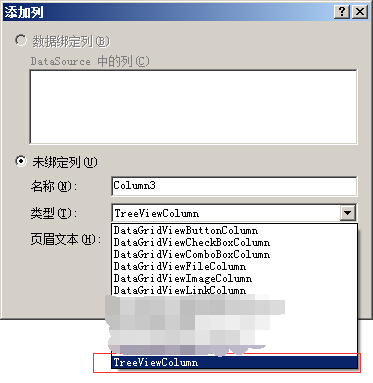
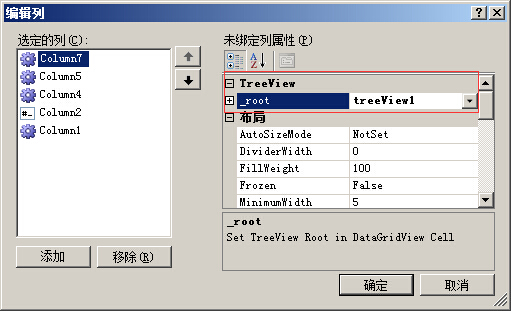
当编辑无误后,可以在添加列的时候看到TreeViewColumn类型。此类型暴露出一个_root属性,可以绑定外部的一个带数据的TreeView。
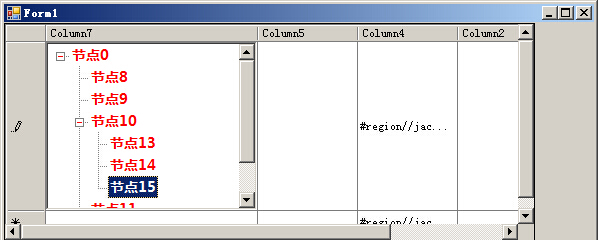
运行代码,单击单元格,进入编辑状态,可以看到如下界面:
以上内容是小编给大家介绍的C#自定义DataGridViewColumn显示TreeView 的全部叙述,希望大家喜欢。


