

Path.Combine:
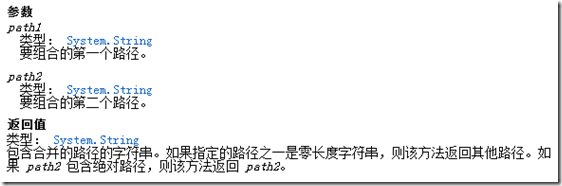
什么时候会用到Path.Combine呢?,当然是连接路径字符串的时候!
所以下面的代码可以完美的工作:
public static void Main()
{
string[] arr_pa = { @"c:\abc\", @"c:\abc" };
string[] arr_pb = { @"test.txt" };
foreach (string pa in arr_pa)
{
foreach (string pb in arr_pb)
{
Console.WriteLine("'{0}' + '{1}'= '{2}'", pa, pb, Path.Combine(pa, pb));
}
}
}
结果如下:

当然你也可以:
Console.WriteLine("'{0}' + '{1}'= '{2}'", pa, pb, Path.Combine(pa, "def", pb));
结果是:

从这个例子可以知道,我们不需要考虑arr_pa里面的字符串是不是以”\” 结尾,这的确提供了方便,而且这也是很多人喜欢使用Path.Combine的一个原因,但是仅此而已。
Path.Combine 虽然解决了路径连接问题,但是由于很多人片面的去理解它,所有它非常容易造成错误的应用,要想用好Path.Combine 并非易事,下面我会列举几个实例来说明这点。
第一个:当path2 是相对路径的时候,返回的是path2,path1会被丢弃。
看一下下面的代码:
public static void Main()
{
string[] arr_pa = { @"c:\abc\", @"c:\abc" };
string[] arr_pb = { @"\test.txt", @"/test.txt", @"test.txt" };
foreach (string pa in arr_pa)
{
foreach (string pb in arr_pb)
{
Console.WriteLine("'{0}' + '{1}'= '{2}'", pa, pb, Path.Combine(pa, pb));
}
}
}
你知道这段代码输出什么吗?
这段代码的输出如下:
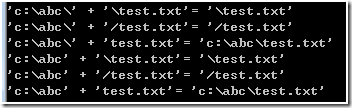
可以看到对于”/test.txt” 和”\test.txt” ,Path.Combine 认为path2是相对路径,所以直接返回path2.。
第二点:路径是驱动器,返回的结果不正确
public static void Main()
{
string[] arr_pa = { @"c:", @"c:\" };
string[] arr_pb = { @"\test.txt", @"/test.txt", @"test.txt" };
foreach (string pa in arr_pa)
{
foreach (string pb in arr_pb)
{
Console.WriteLine("'{0}' + '{1}'= '{2}'", pa, pb, Path.Combine(pa, pb));
}
}
}
输出结果是:
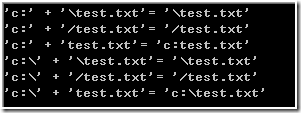
可以看到,如果path1 是” C:”的话,那么Path.Combine结果就是不正确的。
第三点:无法连接http路径
除了连接本地路路径之外,有的时候,也需要拼接http链接地址,可惜的是System.IO.Path.Combine却无法拼接http地址。
将arr_pa 修改为
string[] arr_pa = { @"http://www.Test.com/", @"http://www.Test.com" };
结果如下:

在这里就没有什么技巧了,纯粹的死记硬背,
记住,只有

才会产生正确的解。
如果你将代码修改为:
public static void Main()
{
string[] arr_pa = { @"http://www.Test.com/", @"http://www.Test.com" };
string[] arr_pb = { @"\test.txt", @"/test.txt", @"test.txt" };
foreach (string pa in arr_pa)
{
foreach (string pb in arr_pb)
{
Console.WriteLine("'{0}' + '{1}'= '{2}'", pa, pb, Path.Combine(pa, "def", pb));
}
}
}
那么无论怎样,你都无法得到正确的结果:
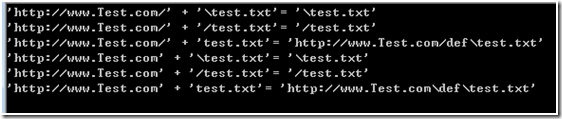
正是因为上述的几点不足,导致Path.Combine 很难用,这也是有一部分人选择使用String.Format 的原因了。
当然,我写了一个MyPath.Combine的方法,可以解决上面的问题。 string firstPath = paths[0]; if (firstPath.StartsWith("HTTP", StringComparison.OrdinalIgnoreCase)) if (!firstPath.EndsWith(spliter)) for (int i = 1; i < paths.Length; i++) if (i != paths.Length - 1)//not the last one builder.Append(nextPath); return builder.ToString();复制代码 代码如下:
class MyPath
{
public static string Combine(params string[] paths)
{
if (paths.Length == 0)
{
throw new ArgumentException("please input path");
}
else
{
StringBuilder builder = new StringBuilder();
string spliter = "\\";
{
spliter = "/";
}
{
firstPath = firstPath + spliter;
}
builder.Append(firstPath);
{
string nextPath = paths[i];
if (nextPath.StartsWith("/") || nextPath.StartsWith("\\"))
{
nextPath = nextPath.Substring(1);
}
{
if (nextPath.EndsWith("/") || nextPath.EndsWith("\\"))
{
nextPath = nextPath.Substring(0, nextPath.Length - 1) + spliter;
}
else
{
nextPath = nextPath + spliter;
}
}
}
}
}
}
使用也比较简单
例如:
public static void Main()
{
string[] arr_pa = { @"c:\abc\", @"c:\abc", @"http://www.Test.com/", @"http://www.Test.com" };
string[] arr_pb = { @"\test.txt", @"/test.txt", @"test.txt" };
foreach (string pa in arr_pa)
{
foreach (string pb in arr_pb)
{
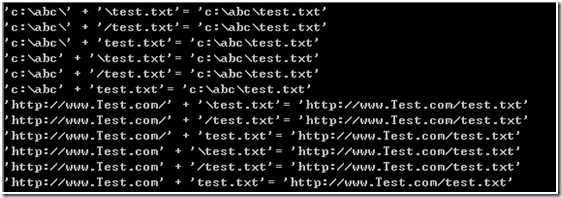
Console.WriteLine("'{0}' + '{1}'= '{2}'", pa, pb, MyPath.Combine(pa, pb));
}
}
}
结果如下:
当然,你也可以这样:
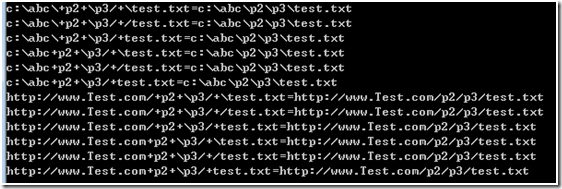
Console.WriteLine("{0}+{1}+{2}+{3}={4}",
pa, "p2", "\\p3/", pb, MyPath.Combine(pa, "p2", "\\p3/", pb));
输出如下:
最后如果你不用Path.Combine,那么还可以选择string.Format


