myeclipse试用一段时间后提示注册码失败怎么激活?

所属分类: 软件教程 / 编程开发 阅读数: 1467
收藏 0 赞 0 分享

下载后的myeclipse用了一段时间后,弹出注册码失效了怎么办?今天给大家分享如何破解myeclipse

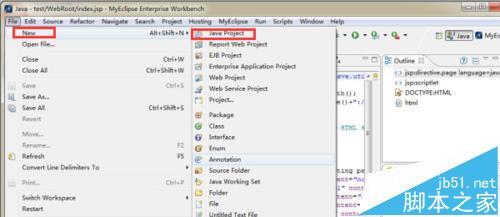
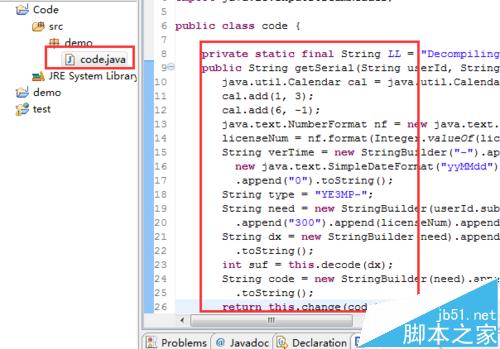
1、打开你的myeclipse,新建一个java项目。
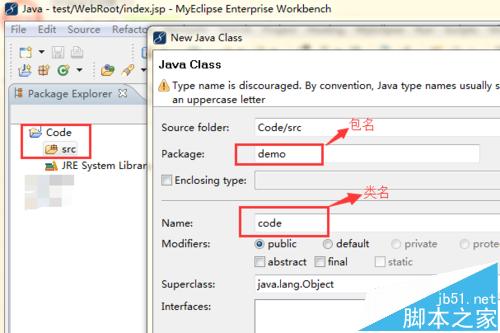
2、在新建的项目下创建一个类,具体如下步骤。
3、在该类下,加入下列打码(将下列代码复制到code类中)
 

复制内容到剪贴板
  1. package demo;   
  2.   
  3. import java.io.BufferedReader;     
  4.   
  5. import java.io.IOException;     
  6.   
  7. import java.io.InputStreamReader;    
  8.   
  9. public class code {   
  10.   
  11. private static final String LL = "Decompiling this copyrighted software is a violation of both your license agreement and the Digital Millenium Copyright Act of 1998 (http://www.loc.gov/copyright/legislation/dmca.pdf). Under section 1204 of the DMCA, penalties range up to a $500,000 fine or up to five years imprisonment for a first offense. Think about it; pay for a license, avoid prosecution, and feel better about yourself.";     
  12.   
  13. public String getSerial(String userId, String licenseNum) {     
  14.   
  15.   java.util.Calendar cal = java.util.Calendar.getInstance();     
  16.   
  17.   cal.add(1, 3);     
  18.   
  19.   cal.add(6, -1);     
  20.   
  21.   java.text.NumberFormat nf = new java.text.DecimalFormat("000");     
  22.   
  23.   licenseNum = nf.format(Integer.valueOf(licenseNum));     
  24.   
  25.   String verTime = new StringBuilder("-").append(     
  26.   
  27.     new java.text.SimpleDateFormat("yyMMdd").format(cal.getTime()))     
  28.   
  29.     .append("0").toString();     
  30.   
  31.   String type = "YE3MP-";     
  32.   
  33.   String need = new StringBuilder(userId.substring(0, 1)).append(type)  .append("300").append(licenseNum).append(verTime).toString();     
  34.   
  35.   String dx = new StringBuilder(need).append(LL).append(userId)   .toString();     
  36.   
  37.   int suf = this.decode(dx);     
  38.   
  39.   String code = new StringBuilder(need).append(String.valueOf(suf))   .toString();     
  40.   
  41.   return this.change(code);  }     
  42.   
  43. private int decode(String s) {     
  44.   
  45.   int i;     
  46.   
  47.   char[] ac;     
  48.   
  49.   int j;     
  50.   
  51.   int k;     
  52.   
  53.   i = 0;     
  54.   
  55.   ac = s.toCharArray();     
  56.   
  57.   j = 0;     
  58.   
  59.   k = ac.length;     
  60.   
  61.   while (j < k) {     
  62.   
  63.    i = (31 * i) + ac[j];     
  64.   
  65.    j++;     
  66.   
  67.   }     
  68.   
  69.   return Math.abs(i);     
  70.   
  71. }     
  72.   
  73. private String change(String s) {     
  74.   
  75.   byte[] abyte0;  char[] ac; int i;  int k;  int j;     
  76.   
  77.   abyte0 = s.getBytes();     
  78.   
  79.   ac = new char[s.length()];     
  80.   
  81.   i = 0;     
  82.   
  83.   k = abyte0.length;     
  84.   
  85.   while (i < k) {     
  86.   
  87.    j = abyte0[i];     
  88.   
  89.    if ((j >= 48) && (j <= 57)) {     
  90.   
  91.     j = (((j - 48) + 5) % 10) + 48;     
  92.   
  93.    } else if ((j >= 65) && (j <= 90)) {     
  94.   
  95.     j = (((j - 65) + 13) % 26) + 65;     
  96.   
  97.    } else if ((j >= 97) && (j <= 122)) {     
  98.   
  99.     j = (((j - 97) + 13) % 26) + 97;     
  100.   
  101.    }     
  102.   
  103.    ac[i] = (char) j;     
  104.   
  105.    i++;     
  106.   
  107.   }     
  108.   
  109.   return String.valueOf(ac);     
  110.   
  111. }     
  112.   
  113. public code() {     
  114.   
  115.   super();     
  116.   
  117. }     
  118.   
  119. public static void main(String[] args) {     
  120.   
  121.   try {     
  122.   
  123.    System.out.println("please input register name:");     
  124.   
  125.    BufferedReader reader = new BufferedReader(new InputStreamReader(     
  126.   
  127.      System.in));     
  128.   
  129.    String userId = null;     
  130.   
  131.    userId = reader.readLine();     
  132.   
  133.   code myeclipsegen = new code();     
  134.   
  135.    String res = myeclipsegen.getSerial(userId, "5");     
  136.   
  137.    System.out.println("Serial:" + res);     
  138.   
  139.    reader.readLine();     
  140.   
  141.   } catch (IOException ex) {     
  142.   
  143.   }     
  144.   
  145. }     
  146.   
  147. }  

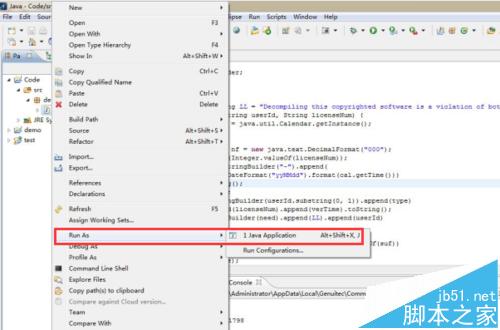
4、然后运行该类。具体如下

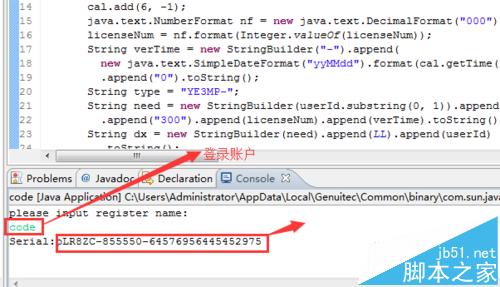
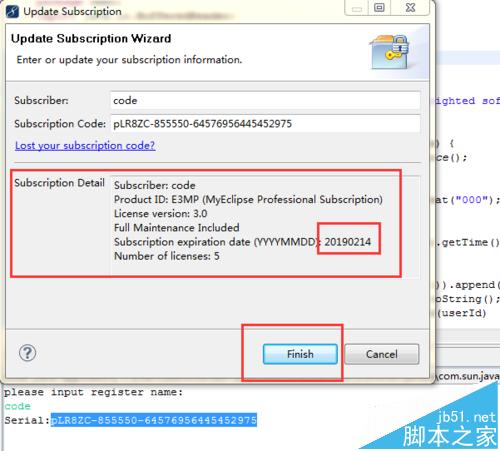
5、运行后控制,输入登录账户然后回城就能生产注册码

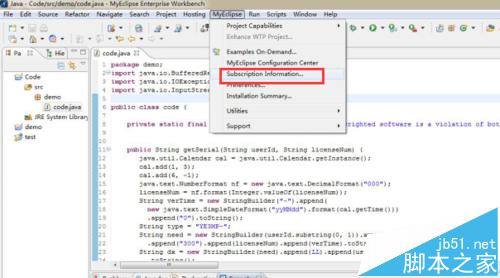
6、在myeclipse栏目下找到subscription information选项
7、将生成的注册码复制到对应位置,完成激活(一定时间内)。
相关推荐:

myeclipse误删的项目文件怎么找回?

myeclipse怎么导出war包?Web项目导出war包的方法

myeclipse创建spring配置文件正确却显示红叉该怎么办?

更多精彩内容其他人还在看

parse_url函数解析

  描述  array parse_url ( string url )      此函数返回一个关联数组,包含现有 URL 的各种组成部分。如果缺少了其中的某一个,则不会为这个组成部分创建数组项。组成部分为:      scheme - ...
收藏 0 赞 0 分享

visualstudio2019怎么连接并使用VSTS?

visualstudio2019怎么连接并使用VSTS?visual studio 2019使用的时候,想要连接visual studio team service,该怎么操作呢?下面我们就来看看详细的教程,需要的朋友可以参考下
收藏 0 赞 0 分享

vscode怎么规范代码? vscode代码格式化的教程

vscode怎么规范代码?vscode编程开发的时候,发现代码很轮,想要自动格式化代码,该怎么操作呢?下面我们就来看看vscode代码格式化的教程,需要的朋友可以参考下
收藏 0 赞 0 分享

Sublime Text英文字母大小写怎么切换?

Sublime Text英文字母大小写怎么切换?Sublime Text中编程开发的时候,想要切换英文大小写,该怎么切换呢?下面我们就来看看详细的教程,需要的朋友可以参考下
收藏 0 赞 0 分享

CodeBlocks(vc开发工具)的入门使用教程

今天起我们将加大对其他编译器学习的支持,对于训练场中的题目,我们极力建议大家以CodeBlocks作为编程工具,因为VC6的种种问题及与训练场判题系统标准的不符,导致不少新同学被坑不少
收藏 0 赞 0 分享

Sublime代码编辑器怎么重新打开编码?

Sublime代码编辑器怎么重新打开编码?Sublime代码编辑器之前变价的编码想要打开,该怎么打开呢?下面我们就来看看详细的教程,需要的朋友可以参考下
收藏 0 赞 0 分享

vb怎么将年表分成四份季度表?

vb怎么将年表分成四份季度表?visual basic中的一个表想要分成多分表,该怎么实现呢?我们可以使用代码实现,下面我们就来看看详细的教程,需要的朋友可以参考下
收藏 0 赞 0 分享

VB怎么编写给表格快速添加批注的代码?

VB怎么编写给表格快速添加批注的代码?想要给表格中的数据添加批注,我们可以使用vb代码来实现,下面我们就来看看详细的教程,需要的朋友可以参考下
收藏 0 赞 0 分享

UltraEdit怎么修改选中文本的颜色?

UltraEdit怎么修改选中文本的颜色?UltraEdit编程开发的时候,想要修改文本的颜色,该怎么修改选中文本的颜色呢?下面我们就来看看详细的教程,需要的朋友可以参考下
收藏 0 赞 0 分享

ueditor编辑器怎么修改复制粘贴文档源代码的字体?

ueditor编辑器怎么修改复制粘贴文档源代码的字体?ueditor复制来的代码想要编辑一下,该怎么设置代码字体大小呢?下面我们就来看看详细的教程,需要的朋友可以参考下
收藏 0 赞 0 分享
查看更多